Every creator or business’s social media strategy looks different. Some lean into video, while others prefer to use words or pictures to tell the story. Some create new or repurposed content for each post, while others have a mix of new posts and those they recycle on a schedule.
And then there are agencies that have to manage multiple accounts across it all.
Me? I’m a text-based, new content LinkedIn gal who dreams of starting her own YouTube channel (maybe someday).
Whichever kind of creator or business you are or manage, there’s a social media management tool out there for you. In this post, I’m comparing two of them, complete with hands-on testing across publishing, analytics, inbox management, and team workflows.
Buffer is built around getting content published quickly and flexibly for anyone, from a solo creator to a growing team, with no learning curve and a free plan that has no strings attached. RecurPost is built around the idea that a lot of social media content should keep running behind-the-scenes, with libraries that auto-loop and Instagram DM automations.
Here’s what I found.
Key takeaways
- Buffer has a free-forever plan that includes three channels, 10 social posts per channel (refillable anytime), basic analytics, API access, and 24/7 email support. RecurPost has no free plan, only a 14-day free trial. On RecurPost's entry-level paid plan ($9 per month), support is knowledge base only, and there are no shareable calendars.
- Buffer’s Team plan ($12/channel per month) has unlimited users. RecurPost’s Agency plan includes 3 seats, and each additional seat costs $20.
- RecurPost’s evergreen content libraries are a mature content recycling system with looping and optional end dates. Buffer has a recurring posts feature in beta, but it’s simpler: set a single post to repeat on a schedule rather than a rotating library of multiple posts.
- Buffer's Community inbox covers comments and mentions across a wider set of platforms, but no DMs. RecurPost's inbox covers comments and DMs on fewer channels.
- RecurPost has strong Instagram DM features. It gives you lots of customization options to set which posts to automatically DM people on, and what to say. Buffer doesn’t offer DM support.
- Buffer's API and MCP come with a developer ecosystem. You’ll find beginner-friendly docs, active builder channels in the Discord community, a Developer Advocate on staff, and stories from builders for inspiration. RecurPost also has both an API and an MCP, but neither is mentioned on the marketing website, and there are no real resources to help builders. Most people would never even know they exist.
- RecurPost’s analytics reporting goes deep. Agency plan teams can create detailed, deeply customizable reports and delivery for clients. Buffer analytics include AI-powered takeaways to easily understand the data, plus Markdown export for deeper analysis in Claude or ChatGPT.
- Buffer's AI Assistant is unlimited on all plans for content creation and idea generation. RecurPost includes 100 AI credits per month, after which you buy more as a paid add-on.
Jump to a section:
RecurPost vs. Buffer at a glance
| Buffer | RecurPost | |
|---|---|---|
| Free plan | 3 channels, 10 scheduled posts/channel | 14-day free trial only |
| Starting paid price | $6/channel per month (Essentials) | $9 per month (Starter) |
| Social channels | 3 on Free, Essentials, and Team plans start at 1 and scale with channels added | 2 on Starter, 5 on Personal, 20 on Agency; Additional profiles are available at $4/profile |
| Pricing model | Per channel | Flat plans + add-ons for additional channels, users, and features |
| AI features | AI Assistant available on every plan for content creation and idea generation, reply suggestions, and insights; connect to Claude and ChatGPT via MCP | 100 credits per month included for content creation and 10 credits per month for image generation, additional credits available for purchase |
| Content recycling | Recurring single posts | Evergreen libraries with looping and optional end dates |
| Unified inbox | Comments and mentions across 10 platforms, no DMs | Comments and DMs available on 4 platforms |
| Instagram DM automation | Not available | Keyword-triggered or blanket rule automations |
| Reports | PDF, CSV, and Markdown exports on paid plans | White-labelled PDFs for reporting |
| API and MCP | Available on all plans, including Free, with strong supporting resources | Available but not marketed, no supporting resources |
| Boost post | Not supported | Supported through Meta Ads Manager as a paid add-on |
| Team approval workflows | Enforced per user, all content types | Library posts only, not mandatory; one-offs excluded |
| Customer support | 24/7 via email, also active on social media and Discord, for all plans | Email and chat on paid plans from Monday to Friday, closed Indian public holidays |
Let’s look at these a little closer.
Plans and pricing
RecurPost and Buffer use different pricing models — one scales per channel, the other is flat-rate with add-ons for channels, users, and additional features.
Buffer pricing (billed monthly, annual saves ~20%)
- Free: 3 channels, 10 scheduled posts per channel (refillable at any time), 1 user, AI Assistant, API and MCP access, analytics, community inbox
- Essentials: starts at $6/channel per month for unlimited posts, 1 user, analytics including exports, first comment scheduling
- Team: starts at $12/channel per month for unlimited posts, unlimited users, approval workflows, custom permissions
Buffer has a tiered pricing model within each plan and includes volume discounts for more than 10 channels. The more channels you use Buffer on, the more affordable each one gets. The Team plan includes unlimited users, so you can have two or 22 people, and it won’t impact your monthly budget.
See Buffer’s full pricing guide here →
RecurPost pricing (billed monthly, annual gets you two months free)
- Starter: $9 per month for 1 user, 2 social accounts, 10 posts per account per day, knowledge base support only
- Personal: $25 per month for 1 user, 5 social accounts, 20 posts per account per day, email and chat support
- Agency: $79/month for 3 users, 20 social accounts, 80 posts per account per day, everything in Personal plus client workspaces, password-free account onboarding, custom reports, internal and external approval workflows
- Enterprise: Custom pricing
If you post to X/Twitter, the platform isn't available during the free trial. Once on a paid plan, basic tweets are included, but posting tweets that contain a URL and X analytics require a paid credit top-up. There’s no inbox support for X.
One good thing to know about RecurPost’s pricing is that, if you need more accounts than a plan provides, you can add them à la carte instead of jumping up to the next plan. Extra accounts come at $4 per month each. For extra users on the Agency plan, it’ll cost $20 per month per additional seat.
There are also add-ons available for more daily posting slots, boosting posts with Meta Ads Manager, and additional AI credits.
See RecurPost’s full pricing guide →
What this means in practice
Let’s look at how costs compare across a few scenarios for solo creators and teams.
| Buffer | RecurPost | |
|---|---|---|
| 1 user, 3 channels | $0/mo (Free) | $13/mo (Starter) |
| 1 user, 4 channels | $24/month (Essentials) | $25/month (Personal) |
| 3 users, 8 channels | $96/mo (Team) | $79/mo (Agency) |
| 5 users, 20 channels | $160/mo (Team) | $119/mo (Agency, with additional paid users) |
| 10 users, 35 channels | $210/mo (Team) | $279/mo (Agency, with additional paid users and channels) |
If budget is the sole criteria, the tools look different depending on your team size and the number of channels you manage.
RecurPost does not have an equivalent to Buffer’s Free plan, so if you’re a solo creator with three channels or fewer, then Buffer comes out on top. Add another channel and it’s almost the same.
For teams, RecurPost works out more cost-effective for fewer channels and team members. As the number of channels and team members needed goes up, Buffer ends up being the more affordable of the two.
Bear in mind this doesn’t take into account any RecurPost add-ons beyond accounts and user seats that aren’t included in the plans. If you run out of AI credits, want to boost Instagram or Facebook posts, or need more calendars to share with clients, among other things (more on all this later), you’ll need to spend more.
Scheduling and publishing
RecurPost's entire scheduling is built around the assumption that you’ll be posting evergreen content continuously. Buffer assumes you're mostly creating something new.
Buffer's composer gets you from idea to scheduled post quickly. Write your post, customize per platform, and schedule. The queue handles timing: set your posting slots once, and new posts drop in automatically. On the Team plan, anyone who needs a post approved hits “Save and Request Approval”, and a team member with full access either edits, rejects, or approves and sends it to the queue.
Just like the posts themselves, the posting slots are also customizable per channel. You can choose your own or let Buffer suggest the best times to post for each channel based on our data. These are flexible and can be changed at any time.
One of my favorite (and most used) spaces in Buffer’s publishing tools is the Create space. It’s a board for saving your ideas before you’re ready to turn them into a ready-to-publish post. My Create space is full of ideas that include:
- A transcribed voice note to capture an idea before I lose it, saved here from the Buffer iOS app
- A URL I wanted to write about, saved here using Buffer’s browser extension
- Topics to explore more deeply based on things I’ve already posted about, saved here using a custom app I built with the Buffer API
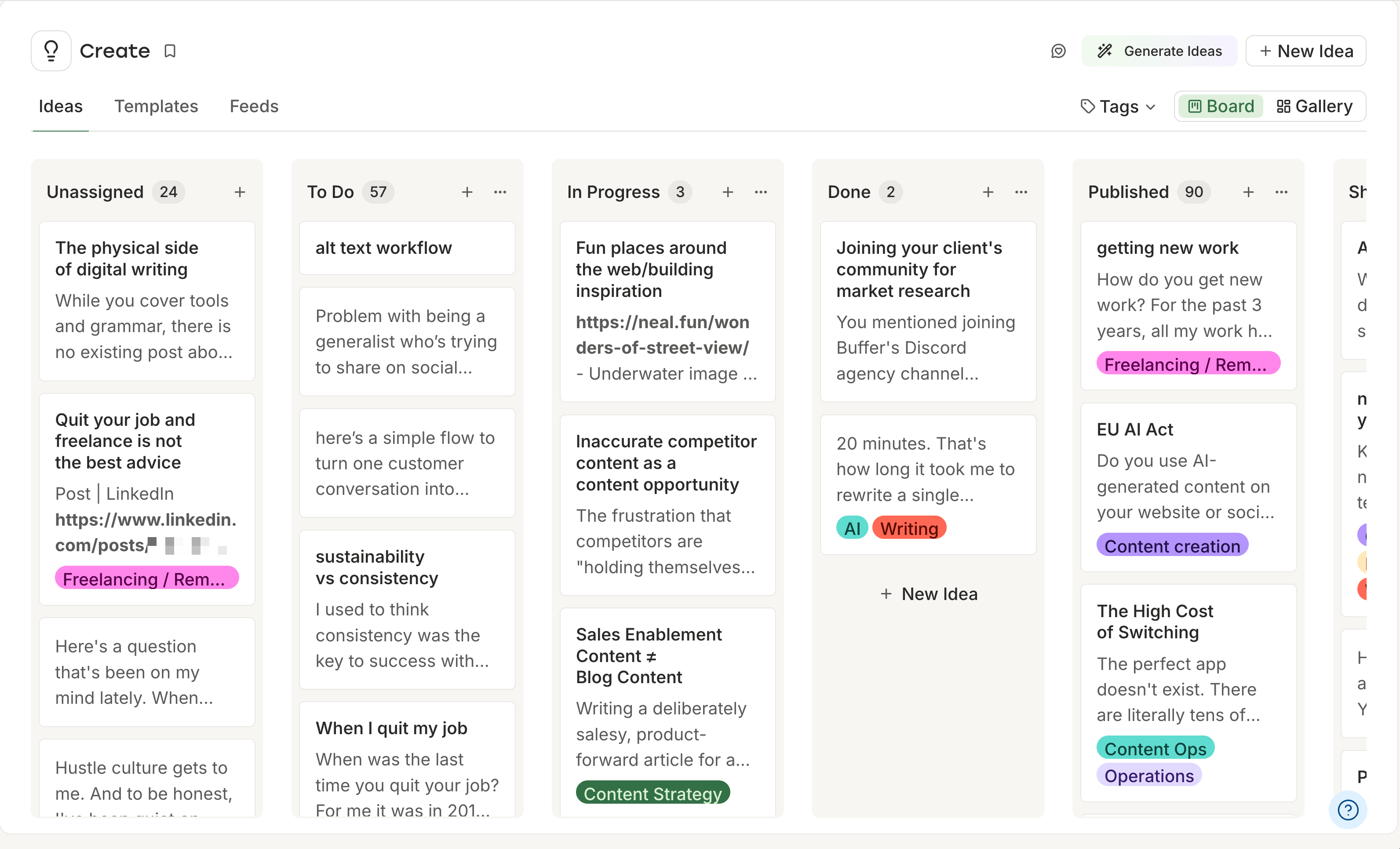
Each one is an idea for a new post to keep my content fresh and make sure I’m never wondering, “What should I post about next?” From here, I can develop an idea further before it’s ready to become a draft, then move it over to the composer and schedule it without leaving Buffer.
On Team plans, the whole team shares the Create space, so you can collaborate on ideas within Buffer itself. RecurPost has no equivalent — there's nowhere to hold work-in-progress or store ideas before you lose them.
RecurPost's scheduling system works differently in other ways too. You can schedule a post once and move on to the next, but that’s not what it’s designed around. Instead, you create a library, add recurring time slots by day of week or month, and posts cycle through and loop back automatically.
Two posts in a library alternate. Six posts rotate in order and then restart at the beginning. If you add an end date to a specific post, it drops out of the rotation from that date, and the rest continue.
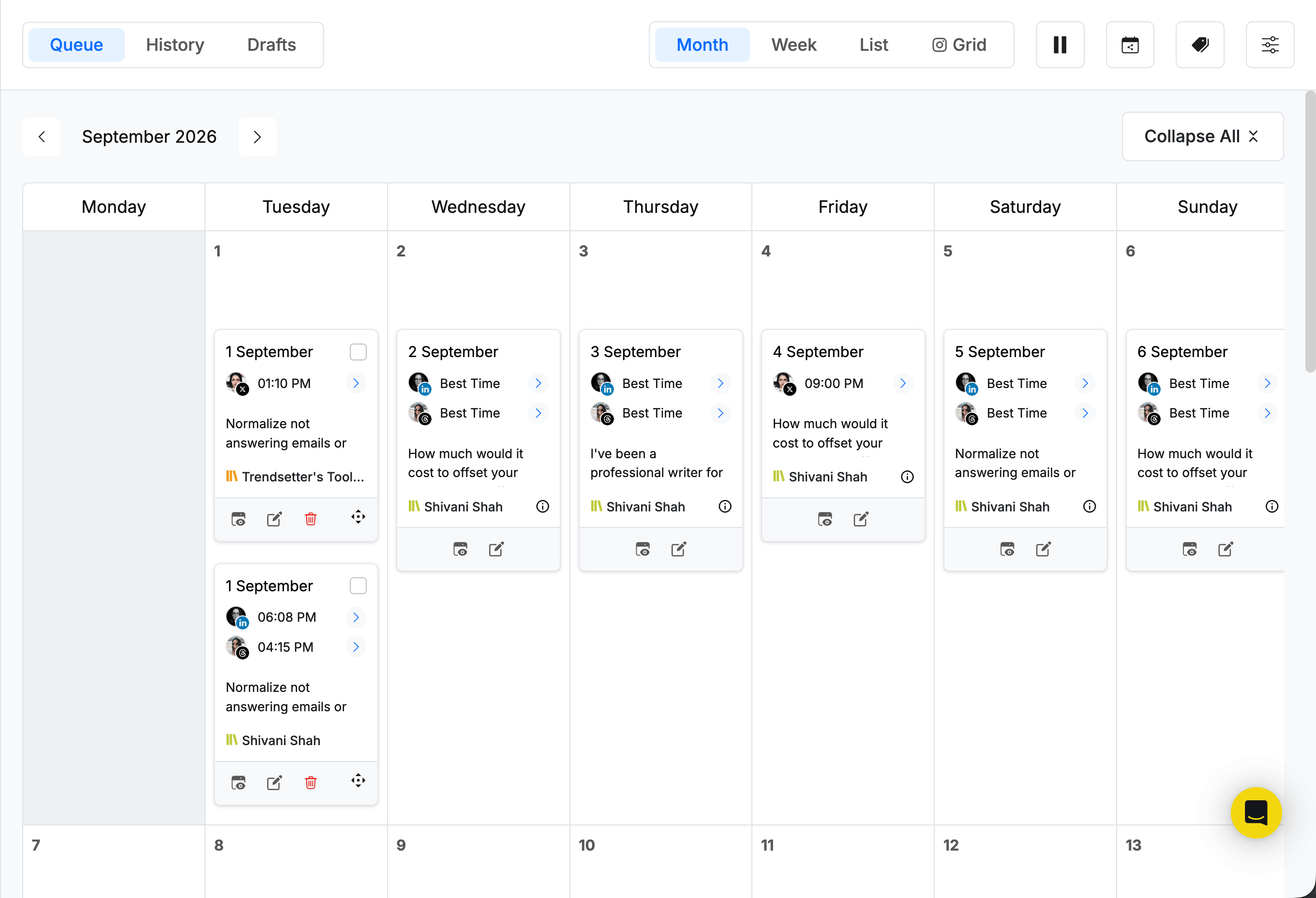
It was pretty fiddly to figure out at first, and I’ll admit I spent a few hours trying to wrap my head around setting it up. If your content is unique each time, this system is more complex than you need. But for content that's meant to repeat, RecurPost's library approach is strong.
Buffer also has recurring posts (currently in beta), but it works differently — you can set one post at a time to repeat on a schedule rather than a rotating library of multiple posts cycling through automatically.
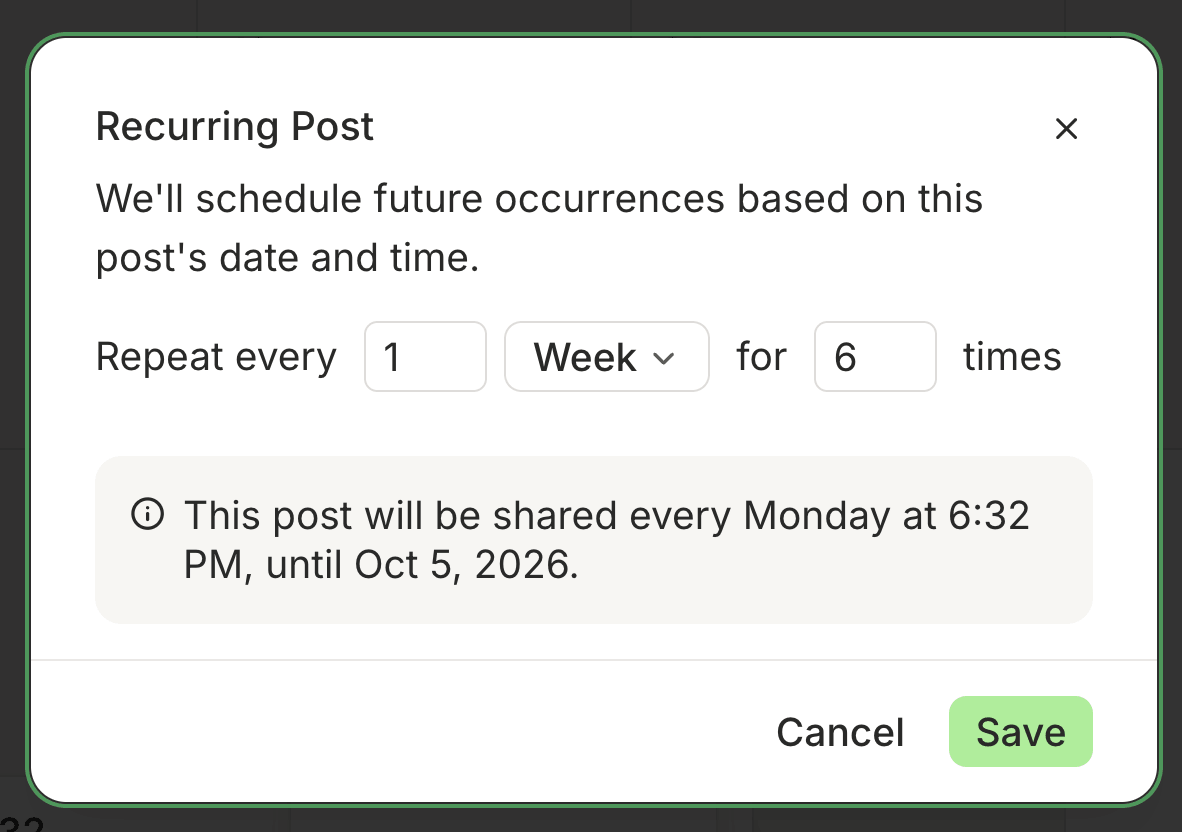
Where RecurPost goes the extra mile is in its Instagram-specific features. From within the composer itself, you can schedule a reel as a trial reel if your account supports it, add licensed audio via your Facebook connection, set up an automatic DM for a specific post, and tag people, products, and collaborators.
An additional $5 per month allows you to boost Instagram (and Facebook) posts from within RecurPost. You’ll need to connect your Meta Ads Manager account for this, and once set up, you can manage ads while scheduling posts. For Instagram-heavy workflows, this is a much richer toolkit than many schedulers offer.
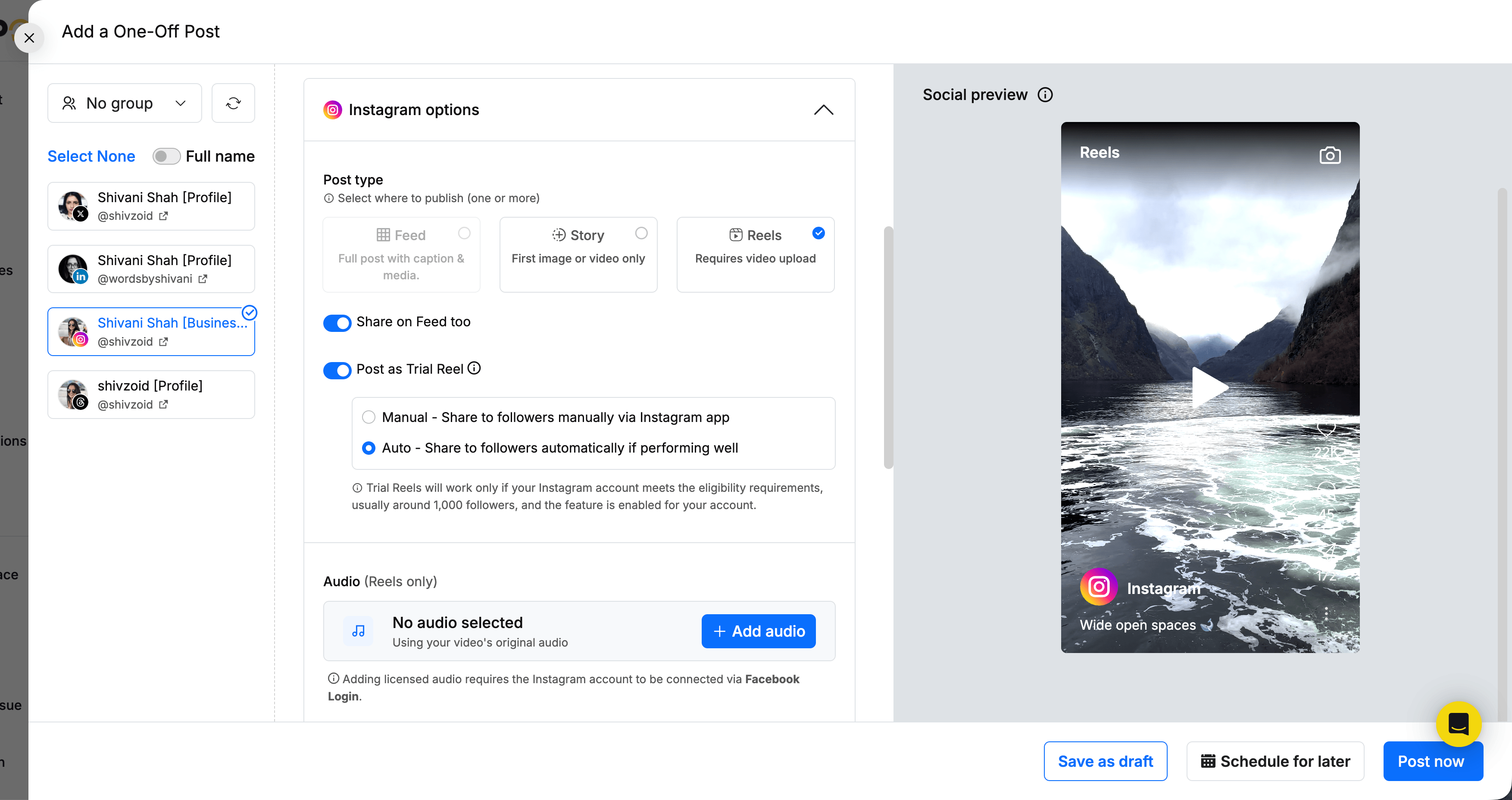
If you share the same content across different platforms, keep in mind that you can customize the post for each platform only on the Personal plan and above. On the Starter plan, you’d have to schedule the post on each platform separately.
Inbox and engagement
Buffer's Community inbox covers a wide platform footprint. You can reply to comments and mentions on Facebook Pages, LinkedIn profiles and pages, Instagram professional accounts, Threads, Bluesky, X/Twitter, Google Business Profiles, TikTok, YouTube, and Mastodon.
If you’re spread out across different channels, you can engage with your audience and build relationships from within Buffer itself instead of hopping back and forth between them. AI reply suggestions are available on all platforms and give you a starting point for each comment if you need a nudge.
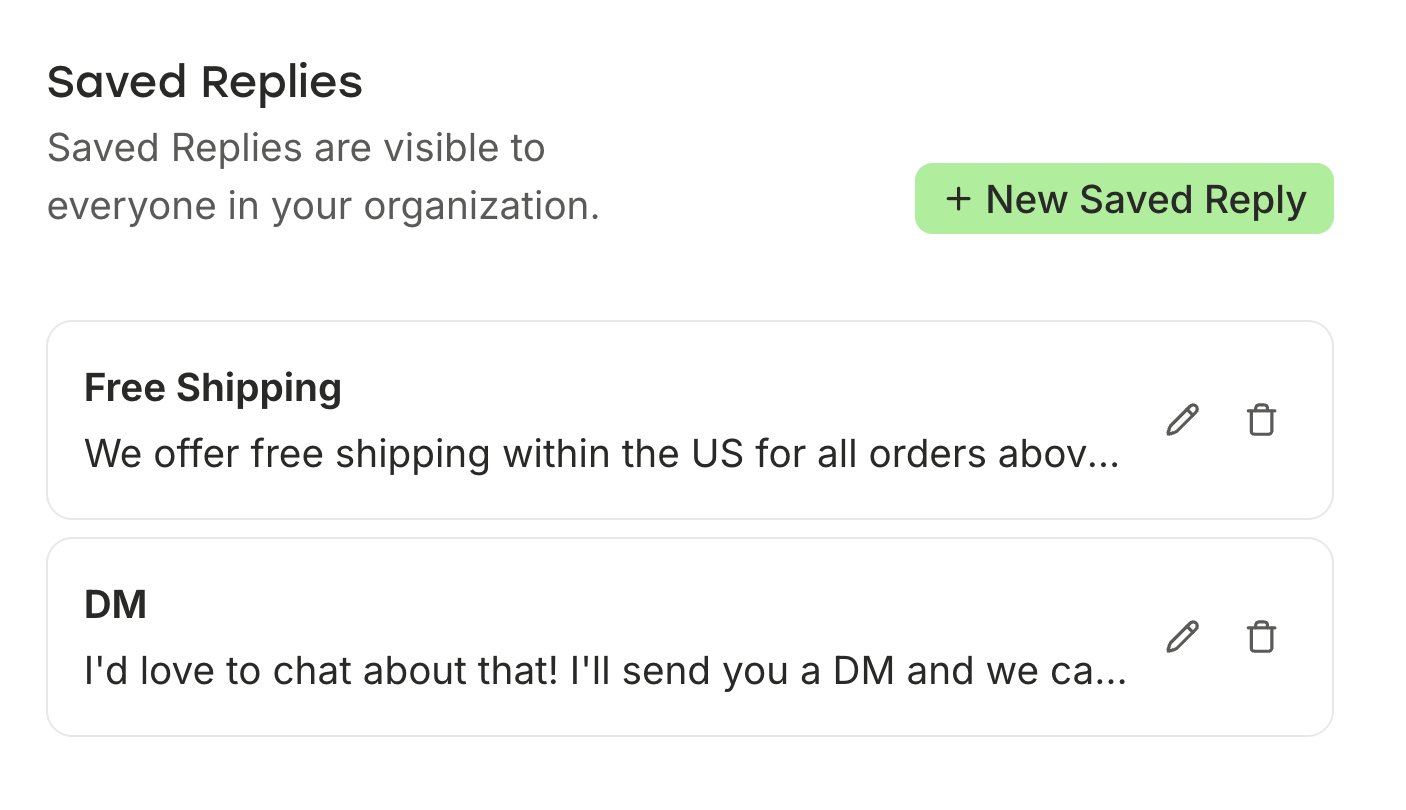
Every channel has its own Comment Score to track how quickly your team responds, and you can save responses to the most frequently asked questions. These are shared with your whole team, so everyone can drop the same answer to these questions so that commenters aren’t left waiting for too long.
RecurPost's inbox covers Instagram business profiles, Facebook Pages, LinkedIn Company Pages, and Google Business Profiles. It’s a narrower set of platforms, but it goes deeper by including Facebook and Instagram DMs.
The Instagram DM automation is one of RecurPost’s strongest features across the entire platform. You can set up lots of configurations: have it run on individual posts or reels (or across all of them), choose a specific keyword trigger or go on every comment, and decide whether to send a DM instantly or only after the person follows you first.
I tested it, and it worked beautifully. It’s exactly the kind of thing that's useful for those campaigns where you want to automatically send a link or a download to anyone who comments on your posts.
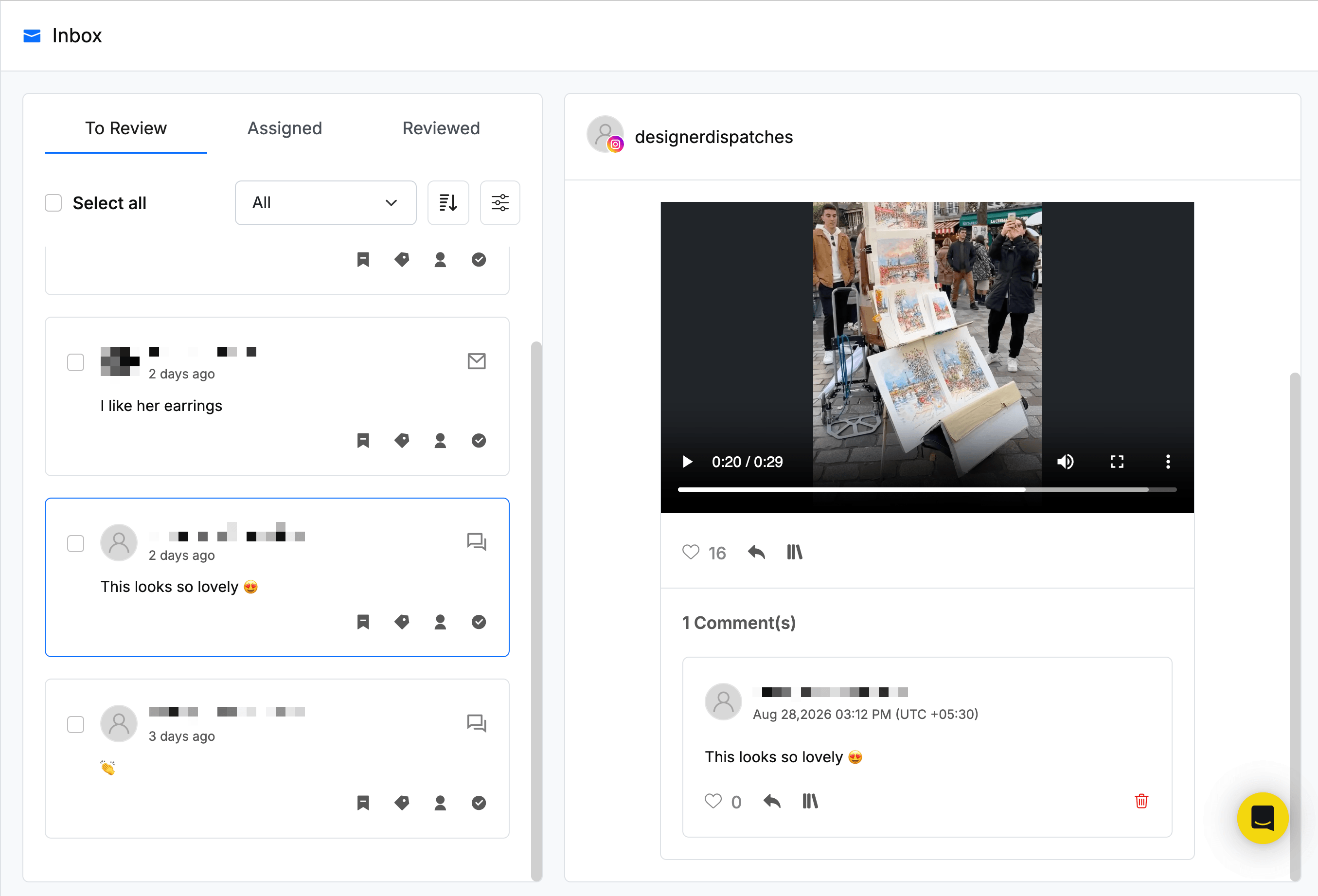
One thing to watch out for: comments that were auto-replied to by an automation still showed up in the inbox as pending (like the one in the screenshot below). This creates a real risk of a double response if a team member doesn't notice it was already handled.
Another gap is that RecurPost doesn’t have saved replies. On platforms that aren’t Instagram, your team has to manually write responses to repeated questions each time. This makes it slower to go through all the pending comments, and it risks miscommunication if there’s been a change in one of your policies and a teammate didn’t clock it before replying.
If your engagement work is primarily comment management across many platforms, Buffer is the right fit. If managing DMs for a smaller set of platforms matters, or you want to run automated Instagram DM campaigns, RecurPost is the stronger choice.
Analytics and reporting
Analytics on Buffer live in Insights and cover 10 platforms: Instagram, Facebook, X/Twitter, LinkedIn, TikTok, Pinterest, Threads, Bluesky, YouTube, and Mastodon. You get data for each individual channel and your entire social media presence rolled up in one. Use filters or channel groups to create a custom dashboard for two or more channels of your choosing.
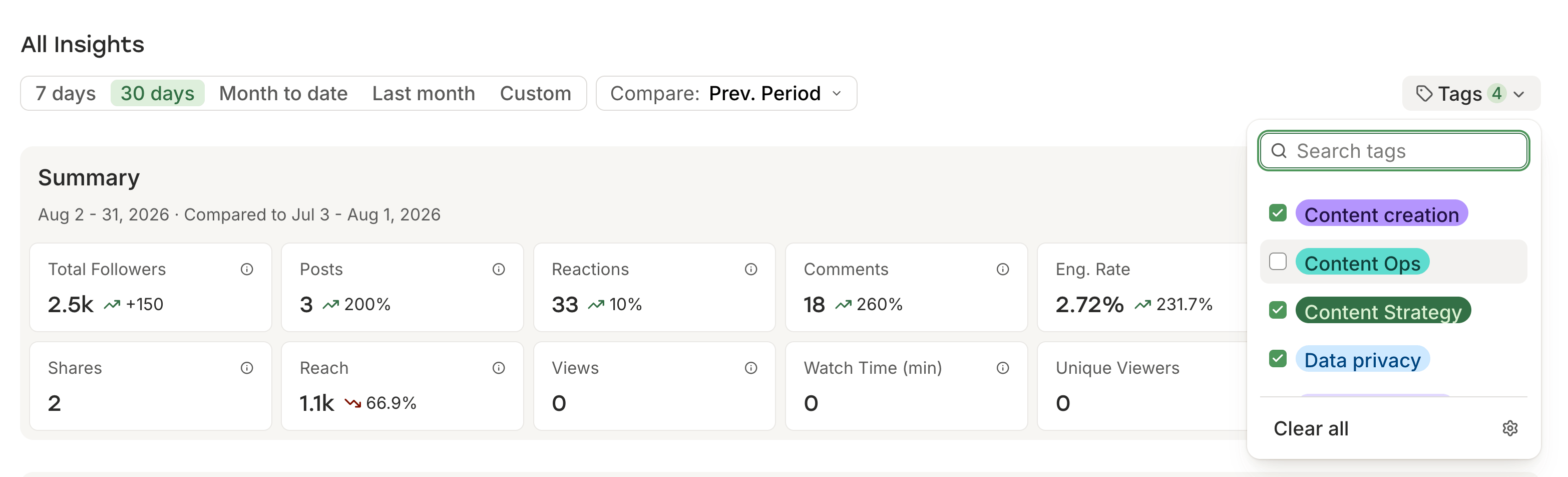
You can even create dashboards for tags assigned to posts. I use tags to categorize posts by topic, so I can see how, for example, all posts on content creation or all posts on data privacy have performed.
At the channel level, AI-powered weekly takeaways share tailored suggestions on what to do next. For creators and teams that want both the numbers and data-backed, built-in recommendations for how to grow their engagement and following, Buffer’s Insights offers it all in one place.
On paid plans, you can export your data in PDF format for reporting to clients or stakeholders, plus CSV or Markdown formats if you want to run a deeper analysis on a tool like ChatGPT or Claude.
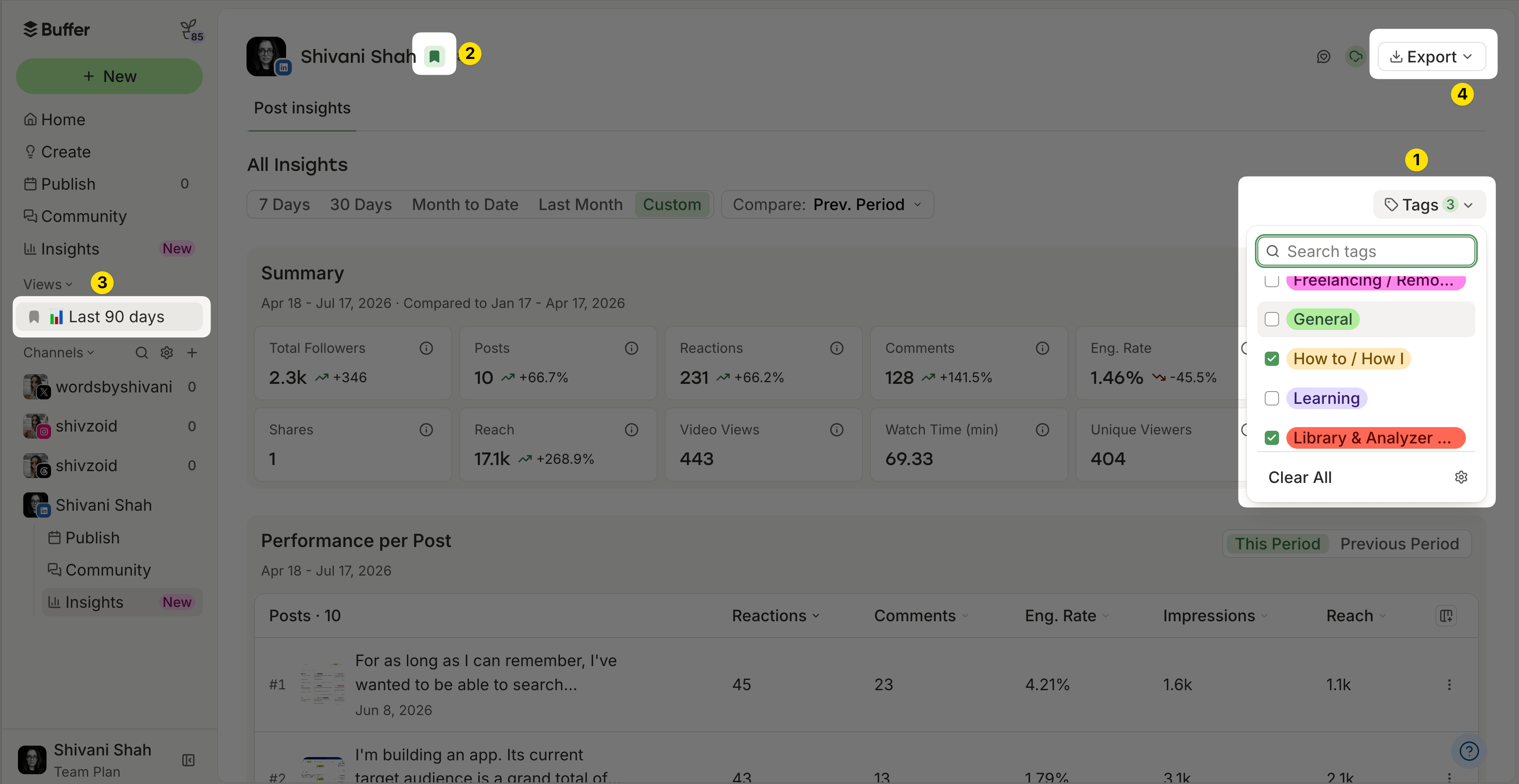
You can build custom reports using filters: by client, by channel or channel group, by tags, or a combination of these. Set a date range — the past 7 days, the past 30 days, the past quarter, something else entirely — and compare it against the same period before it or even the same date range in the previous year.
It’s a flexible way to create reports that show exactly what each client or campaign needs. Bookmark the custom view to return to it with one click for next month’s report.
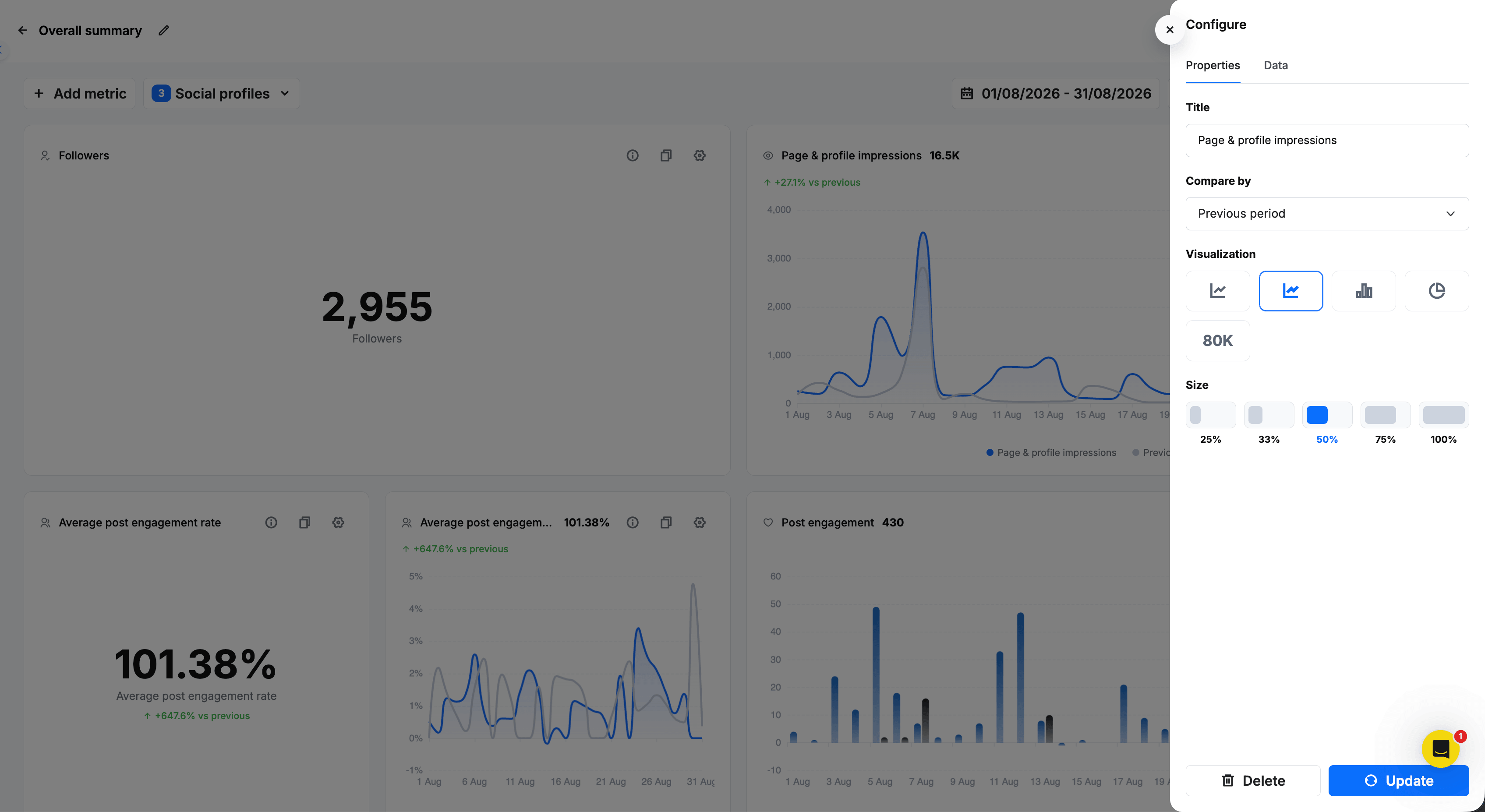
Where Buffer's Insights are designed to help you act on your data quickly, RecurPost's analytics are designed to give you everything you may ever need for a report. The dashboards are incredibly detailed: channel and post performance snapshots; audience demographics by age, gender, country and city; link click performance; and publishing cadence; to name just a few.
The custom report builder, available on Agency and above, lets you tailor reports down to how the data is presented — line chart, raw numbers, or others — remove metrics you don't need, and add ones the templates don't include by default. White-label PDF reports with agency branding and scheduled delivery to clients are available on Agency and above. For agency billing and client reporting, this is a strong foundation.
RecurPost’s AI feature for analytics has a chat interface where you can ask plain-language questions about your performance data. Where the data exists, it analyzes and responds. Where it doesn't, it generates a response that appears to be based on general best practices, which is worth knowing before you lean on it for client meetings.
X/Twitter analytics are available only as a paid-add on that’s priced per post. It’s an incredibly low amount — $0.006 per post — but worth flagging for agencies that need to report on hundreds of posts across multiple clients.
Team collaboration
Buffer’s Team plan includes unlimited team members at no additional cost. When you invite a new team member, you can give them the exact permissions they need for posting and inbox management for each social channel.
For posting, team members can have full access to publish without approval, require approval before publishing, or no access to the channel’s publishing. For the Community inbox, they can have full access to reply to any comments or mentions, view only so they can read but not reply, or no access to the channel’s inbox.
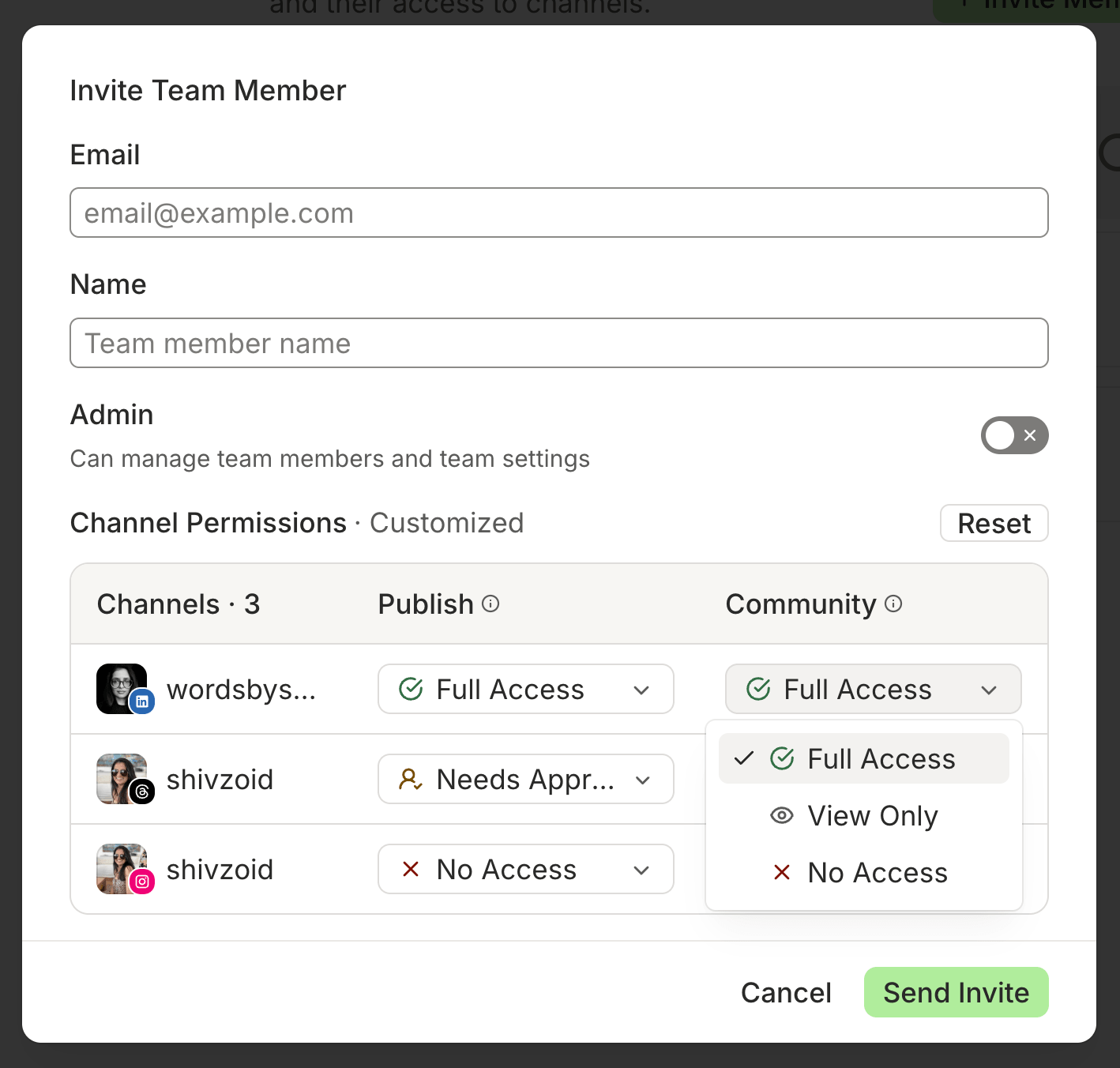
Permissions don’t have to be the same for one channel. A team member can have full access to post on Instagram and view only access to comments, while having no access to TikTok at all.
Since the plan includes unlimited team members, you can invite clients and give them access to only their channels without compromising on your own or other clients’ privacy. Brainstorming, drafting, and approvals can all happen with your team or clients directly inside Buffer.
In RecurPost, team collaboration takes place in workspaces. Your plan's channel limit is shared across all workspaces — on Agency, you're distributing the 20 included accounts across clients, not multiplying them per workspace.
Each workspace has its own connected social profiles, media library, team members, and reports. You can invite team members to specific workspaces only, so a contractor or teammate working on one client account can’t see what’s in any of the others. If they’re working on more than one account, invite them to all the relevant workspaces to give them access.
There’s one big limitation with team workflows: there’s no way to require approval from a team member. They can choose to send a post for approval when adding it to the library, but there's no access levels within a workspace like Buffer has. Anyone on the team can schedule a post or reply to messages without any oversight.
RecurPost’s Agency plan comes with three user seats in total, so if you need four or more, that’s a paid add-on at $20 per seat. You don’t need to add clients to your plan. The Agency plan comes with five shareable calendars — a maximum of one allowed per workspace — and you can get more via paid add-ons again. Clients can view a shareable calendar without logging in and comment on individual posts directly to share feedback.
For agencies where clean client separation matters most, RecurPost's workspace model is the right structure. For teams that need enforced approval workflows across all content, Buffer's permissions model is more reliable.
AI features
Buffer's AI Assistant is available on every plan including Free, with no cap on its use for publishing posts. You can use it in the Create space to spin up post ideas, and in the composer to draft the text, repurpose content across platforms, or just refine what you already have.
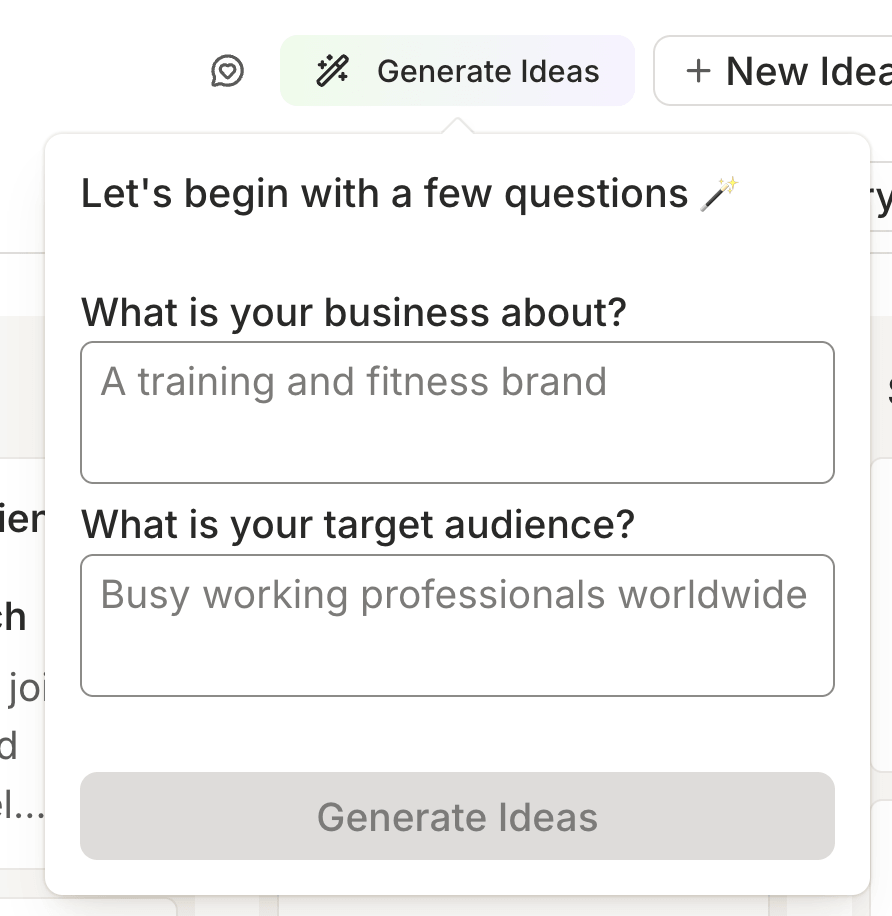
You can also generate alt text for any images you post to make them more accessible. If you rely on AI to get the words flowing, you can use it as often as you like without running into limits on any plan.
AI-powered takeaways in Insights work the same way: always on, no credits required. In the Community inbox, AI reply suggestions are unlimited on paid plans, and Free plans get five suggestions per week.
These are just the AI features inside Buffer. You can also connect your Buffer account to AI tools like Claude and ChatGPT and work on your social media content from inside the tools you’re already using (more on this below).
RecurPost also has AI reply suggestions for the inbox and an AI chat feature to analyze reports, but it’s the AI posting features that offer plenty of options. You can use it to generate a single post, plan a full week’s worth of content, create posts based on a template, and draft for holidays and observances like Halloween or Valentine's Day. I tested these out with a mixed bag of results.
Where it fared better was with AI-generated images to accompany the posts, which Buffer doesn’t offer. I generated with both a vague prompt and detailed instructions — including brand colors, angle, and illustration style — and was pleasantly surprised that I got two equally good graphics at first shot.
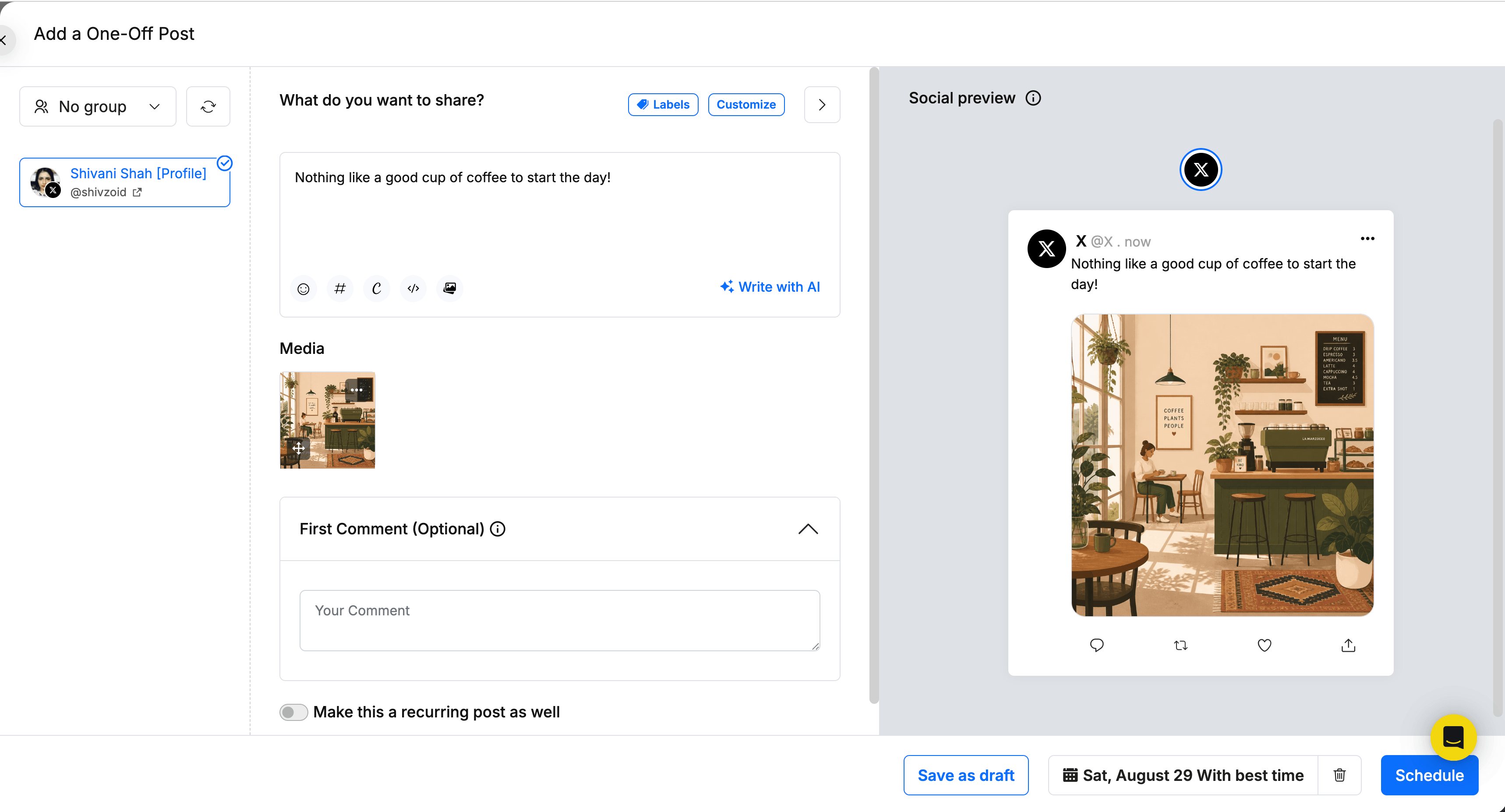
These AI features come with caps: 100 credits per month across all plans for post generation, and 10 for images, with add-ons available to buy if you need more.
One thing I couldn't find during testing: a visible, persistent credit counter anywhere. The in-session counter resets every time you close the chat, so after using the AI tools across a few different sessions, I had no way of knowing how many credits I had left overall.
For teams that want image generation, custom AI personas, weekly planning tools, and don't mind managing a monthly allowance, RecurPost's AI has more range. For daily use without credit management, Buffer's unlimited approach is simpler.
API and MCP
Both Buffer and RecurPost have public APIs and MCPs, but the experience surrounding them is poles apart.
Buffer's API is available on all plans including Free, and the number of calls and API keys depends on your plan.
It’s incredibly easy to use — I know, because I’ve built a bunch of tools and workflows despite being a non-technical user. Buffer users have spun up everything from a trend-based ideas engine to a workflow that turns questions in Slack into social media posts written in the author’s voice.
What makes all of this easier is the ecosystem around the API. You’ll find stories on the Buffer blog about what people have actually built so you can get inspiration, beginner-friendly guides and best practices in the developer docs, clear support documentation, active builder channels in the Discord community, and a full-time Developer Advocate on the Buffer team. If you're building something with Buffer, there's real support available for builders of all technical levels.
There’s also an MCP so you can use Buffer directly from inside ChatGPT, Perplexity, Cursor, Raycast, and others. Ask what's scheduled for the week, brainstorm and save ideas, draft and schedule posts directly from inside the tools you’re already using. Buffer also has an official Claude connector so you can get it up and running quickly.
RecurPost’s API works — I tested it with a lightweight Lovable app just to confirm. But while the technical foundation exists, there’s none of the surrounding support.
There isn’t even a mention of the API on the website or knowledge base, or indication of usage limits. I found the MCP listed, so I put on my finest detective hat and did a little digging to see if there was also a public API (it’s not a given that it would be available). I found it, but I couldn’t find anything close to Buffer's developer documentation depth or builder community. You can build with RecurPost’s API, but you’re on your own.
This may work for technical users, but it’s a real stumbling block for non-technical users. For anyone who doesn’t want to build custom workflows or tools, this distinction probably doesn't matter. For technical users or anyone who wants a custom integration, Buffer's developer ecosystem is a meaningful advantage.
Customer support
Buffer offers email support on all plans including Free, plus active coverage across social channels and a dedicated support channel in our Discord community. Our global team means someone is available 24/7, no matter what timezone you’re in. There's no live chat, but 24/7 email coverage means you're not waiting until Monday if something goes wrong on a Friday evening.
RecurPost's support model varies by plan. On the Starter plan, you get a knowledge base and self-serve guides only. If you have a problem or question, there’s no human on the other side to help you out. Email and live chat become available on Personal and above, 24/5 with no weekend coverage. Agency and Enterprise plans get faster responses and personalized onboarding help.
There’s also no coverage on Indian public holidays, which I learned when I opened the live chat widget on one such day — that also happened to be a Friday. The message confirmed that support is closed on weekends and any messages that came through would be answered on Monday in the order they arrived.
That gap in support coverage can be frustrating for different reasons. It could mean a missed opportunity to run a time-bound promotion for a small business, scrambling to fix problems with influencer marketing campaigns for a creator, and problems with client accounts for agencies. Buffer's 24/7 availability on every plan is a meaningful difference here.
Supported platforms
Both Buffer and RecurPost cover similar channels, with a few differences among them.
| Platform | Buffer | RecurPost |
|---|---|---|
| Instagram (Business, Creator, and Personal) | ✅ | ✅ |
| Facebook (Pages and Groups) | ✅ | ✅ |
| LinkedIn (Pages and Profiles) | ✅ | ✅ |
| X/Twitter | ✅ | ✅ Analytics and tweets with links require paid credits |
| TikTok | ✅ | ✅ |
| YouTube | ✅ Shorts only | ✅ Full videos and Shorts |
| ✅ | ✅ | |
| Google Business Profile | ✅ | ✅ |
| Threads | ✅ | ✅ |
| Bluesky | ✅ | ✅ |
| Substack | ✅ Notes only | ❌ |
| Mastodon | ✅ | ❌ |
| Total platforms supported | 12 | 10 |
There are two gaps that matter most for publishing: Buffer supports Substack and Mastodon, and RecurPost doesn't. RecurPost supports full YouTube video upload — title, category, thumbnail, the whole thing — while Buffer covers Shorts only. If either of these channels are part of your social media presence, you need the tool that supports it.
The other is the inbox. Buffer supports comments and mentions on a much wider range of channels, and RecurPost supports DMs for a select few.
Who should pick which tool
Creators and solopreneurs
Pick Buffer. If video is central to what you do, go with RecurPost. For everything else, Buffer is the stronger fit. Our Free plan is a real free plan — three channels, 10 scheduled posts per channel (refillable at any time), an AI Assistant, API access, analytics, and community inbox, with no credit card required. RecurPost has no free plan, and its $9 per month Starter plan limits you to knowledge base support. If you occasionally need content to repeat, Buffer’s recurring posts feature handles the basics. If evergreen libraries are central to your strategy, RecurPost Personal plan at $25 per month is the minimum to get the feature set that makes it worthwhile.
Small businesses and growing teams
It depends. If you publish fresh content consistently and need strict approval workflows that cover everything your team publishes, Buffer is the cleaner setup. Our permissions go to the channel level, with posting and inbox access configured independently for each user. And because Team includes unlimited team members, you're not paying per seat as your team grows. If you publish evergreen content on repeat, have fewer users, and don't need enforced posting approval workflows inside the tool, RecurPost's Agency plan is worth a serious look — just know that the fourth user and above are $20 per month each.
Video creators
Pick RecurPost. If you post primarily video content, RecurPost is hard to beat. Its Instagram toolkit goes further than most schedulers, it supports full YouTube video uploads as well as Shorts, and has TikTok-specific features like setting privacy levels per post, turning off comments, and enabling duets and stitches directly from the composer.
Agencies
Pick Buffer. Buffer’s Team plan starts at $12/channel per month and includes unlimited users. You can require approval on every post before it goes live, build flexible custom reports per client, support engagement on 10 channels, and get round-the-clock support. RecurPost goes deeper on analytics — but its Agency plan starts at $79/month, the cost grows with every user you add beyond three, there’s no way to enforce approvals, and the inbox supports only four channels.
Technical (and non-technical) users and builders
Pick Buffer. The API is available on every plan including Free, and the MCP connects directly to Claude, ChatGPT, Cursor, Raycast, and others. What makes it practical for non-technical users as much as developers is the ecosystem: builder stories, beginner-friendly guides, active builder channels in the Discord community, and a full-time Developer Advocate on staff. RecurPost has both an API and an MCP, but you'd be building without meaningful documentation, usage guidance, or community support.
To sum it up
RecurPost is the right call in specific situations: video-first creators who need all the bells and whistles for Instagram, YouTube, and TikTok, and teams running evergreen content libraries for clients with white-label delivery.
For everyone else — and for most teams that don't map neatly to one of those categories — I think Buffer is the stronger fit. The free plan is real, the data is designed to help you act, the scheduling is fast, and approval workflows cover everything your team publishes.
Buffer has a real free plan, and RecurPost has a 14-day free trial — the best way to know which is right for you is to try both and see which suits how you and your team work.
Sign up here to try Buffer’s Free plan — it’s free forever, no catch.
Frequently asked questions
Does RecurPost have a free plan?
No, RecurPost offers a 14-day free trial, but there's no ongoing free plan after that. The entry-level paid plan is Starter at $9 per month for two social accounts and one user, with support limited to a knowledge base. Buffer has a free-forever plan that includes three social channels, 10 scheduled posts per channel (refillable at any time), an AI Assistant, API access, and basic analytics, with no trial period or expiry date.
Is Buffer or RecurPost better for agencies?
Buffer is better for agencies. Buffer’s Team plan starts at $12/channel per month and includes unlimited users, enforced approval workflows, flexible custom reports, inbox features for up to 10 channels, and 24/7 customer support.
RecurPost’s analytics go deeper on the Agency plan and include white-label reports and password-free client approvals. But the plan starts at $79 per month, the cost grows $20 with every user you add beyond three, the inbox only supports four channels, and there’s no way to require approvals before publishing.
Which is cheaper, Buffer or RecurPost?
It depends on two things: how many channels you connect and how many users you have.
Buffer pricing is per channel — Essentials starts at $6 per channel per month, Team at $12 — with volume discounts as you scale. Team includes unlimited team members at no extra cost. There are no surprises: you know exactly what you'll pay each month regardless of how many people are on your team.
RecurPost uses fixed plans with room to grow without upgrading. You can add channels or users without moving up a plan, but each addition is an extra cost ($4 per channel and $20 per user). Layer on top of that the add-ons like Twitter analytics and tweet links, and additional AI credits beyond what's included in your plan. The base price may look lower at a small scale, but the total can climb depending on how you use it.
Does Buffer have content recycling like RecurPost?
Yes, but it's simpler. Buffer's recurring posts feature (in beta) lets you schedule a post and set it to repeat daily, weekly, monthly, or yearly. RecurPost's library system is more elaborate: you create a library, set recurring time slots by day, add multiple posts that cycle through and loop back automatically, and can set end dates on individual posts to pull them from rotation. For basic recurring content, Buffer works. For a full evergreen library strategy with multiple rotating posts and seasonal content, RecurPost's system is more capable.
Does RecurPost have an API?
Yes, RecurPost has both an API and an MCP, although neither is mentioned on RecurPost's pricing page, and there's no information about which plans include access or what the usage limits are. Buffer's API is available on all plans including Free, clearly documented with per-plan limits and supported by a developer community, beginner-friendly guides, and a full-time Developer Advocate.
Can I switch from RecurPost to Buffer?
Yes. Setup takes a few minutes: connect your channels, set a posting schedule, and start scheduling content. Buffer will pull in older posts and historical data for each channel based on what the platforms allow. There's no automated way to import scheduled posts from RecurPost, but you can start publishing through Buffer immediately. Buffer's free plan lets you test it with no time limit or credit card required.
Try Buffer for free
200,000+ creators, small businesses, and marketers use Buffer to grow their audiences every month.