I’m becoming a pretty prolific tool tester (seriously), and I’ve developed what I think is a fairly scientific approach when exploring a new one. I scour the website, dive headfirst into actually using it, and read the docs to get the details that may not be immediately obvious as I explore.
I did all these things when testing Loomly — so buckle up for a very thorough comparison!
If you’ve landed on this page, you’re either looking for Loomly alternatives or simply comparing social media management tools. Both Buffer and Loomly are great options. So which one should you choose?
There’s no “right” answer to this one; it depends on your team size, how many channels you manage, and which features you need.
Buffer is designed to be a flexible, affordable way for creators, small- to mid-sized businesses, and agencies to maintain their social media presence and build relationships with their networks.
Loomly is designed for teams — its pricing plans and approval workflows make this clear right from the start.
In this guide, I’ll compare the two platforms so you can see which one is right for you.
Key takeaways
- Buffer has a permanent free plan that includes three channels, 10 scheduled posts per channel (refillable once they’re published), an AI assistant, API and MCP access, and basic analytics. Loomly’s free plan includes three channels and a maximum of five posts per month across all channels.
- Buffer’s paid plans scale per channel; Loomly’s paid plans have fixed channel and user limits. Buffer’s Essentials plan is $6/channel per month for one user. Loomly’s lowest paid plan is the Starter plan at $65 per month for three users and 12 channels, regardless of how many channels you actually use. There’s no paid option below that for one person.
- Buffer’s Team plan ($12/channel per month) includes unlimited users. Loomly’s Starter plan caps at three users. If you’re a team or agency that wants to add a fourth user (or more than 12 channels), you need the Beyond plan that goes straight to $332 per month.
- Buffer’s API is available on all plans including Free. Loomly has no public API for managing your social media presence. There is a status API for monitoring planned maintenance, but nothing for creating posts, pulling analytics, or connecting to external tools.
- Buffer’s AI Assistant is unlimited on all plans. Loomly caps AI usage on Starter with “limited monthly usage” but doesn't publish the actual number. On Loomly’s Free plan, you get "minimal monthly usage.”
- Buffer supports 13 platform types, including Substack and X/Twitter on all plans. Loomly supports 11, including Snapchat and a custom connection type.
Jump to a section:
Buffer vs. Loomly at a glance
| Feature | Buffer | Loomly |
|---|---|---|
| Free plan | Yes — 3 channels, 10 posts/channel (refillable at any time), API and MCP access, AI Assistant | Yes — 3 accounts, 5 posts per month total, limited AI usage |
| Starting paid price | $6/channel per month (Essentials) | $65 per month (Starter) |
| User seats | Unlimited on Team plan | 3 users on Starter; unlimited on Beyond ($332 per month) |
| AI features | Unlimited on all plans including Free (AI Community replies capped at 5/week on Free) | Minimal monthly usage on Free, limited on Starter; extended on Beyond |
| Analytics | Buffer Insights on all plans, with deeper reporting on paid tiers | Advanced on all paid plans; auto-scheduled reports on Beyond only |
| Unified inbox | Community inbox for comments and mentions on all plans | Interactions for comments, mentions, and DMs; assign conversations to team members |
| API | Schedule, save ideas, analyze performance, and build tools all plans including Free | Monitor Loomly status and get notified when it's down or back up only; no MCP |
| Supported platforms | 13 (including X/Twitter, Substack, and Mastodon) | 11 (including Snapchat and a custom channel connection) |
| Best for | Creators, solo users, small businesses, agencies, and those want to build custom workflows | Small teams needing structured approval workflows |
Let’s dig into these a little more.
Plans and pricing
Before I go into what each tool costs, it’s worth flagging: Loomly increased its pricing in 2025, with some users reporting an increase of 400% for their plan. This comparison doesn’t go into whether that’s fair, and there are plenty of social media tools out there that cost just as much or more. But if that increase is what sent you looking for alternatives — or you just want a sense of what Buffer and Loomly may look like for your setup — I’ll cover that below.
Buffer pricing (billed monthly, annual saves 20%)
- Free: 3 channels, 1 user, 10 posts per channel (refillable at any time), AI Assistant (unlimited), analytics, API and MCP access, community inbox.
- Essentials: $6/channel per month. Unlimited posts, 1 user, advanced analytics, first comment scheduling, analytics exports.
- Team: $12/channel per month. Unlimited users, unlimited posts, approval workflows, custom permissions.
It’s worth a note that Buffer’s paid plans use tiered per-channel pricing that drops as you connect more channels — the more you manage, the lower your average cost per channel gets. I’ll show you what that looks like soon.
See Buffer’s full pricing guide here →
Loomly pricing (billed monthly, annual saves 25%)
- Free: 1 user, 3 social accounts, 1 calendar, 5 posts per month total, AI Assistant (minimal usage). A slot from the 5-post allowance becomes available again exactly one month from the date on which you created it.
- Starter: $65/month for three users, 12 social accounts, unlimited calendars, AI assistant (limited usage), scheduling, approval workflows, advanced analytics, basic social listening (2 queries/month), bulk posting, recurring posts.
- Beyond: $332/month for 60 social accounts, unlimited users, custom branding, scheduled analytics reports, extended AI usage, 5 social listening queries/month.
- Enterprise: custom pricing for more than 61 social accounts, unlimited users, and priority support.
A calendar on Loomly includes one account on each supported social channel. They’re a great way for agencies to keep clients’ social channels separate for planning, permissions, and analytics.
On the flip side, if you’re a solo creator or founder managing a LinkedIn company page and a profile, you’ll need the Starter plan so you can add each to a separate calendar.
See Loomly’s full pricing guide here →
What this means in practice
Let’s look at how this plays out in a few different scenarios for a creator, small team, and an agency.
| Buffer | Loomly | |
|---|---|---|
| Solo creator (1 person, 4 channels) | $24/month (Essentials) | $65/month (Starter) |
| Small team (3 users, 8 channels) | $96/month (Team) | $65/month (Starter) |
| Small team (4 users, 8 channels) | $96/month (Team) | $332/month (Beyond, since Starter caps at 3 users) |
| Small team (3 users, 13 channels) | $132/month (Team) | $332/month (Beyond, since Starter caps at 12 channels) |
| Agency (10 users, 60 channels) | $275/month (Team) | $332/month (Beyond) |
This volume is where Buffer’s tiered pricing comes into play. For 13 channels, you’re paying just over $10/channel per month. For 60, that number drops down to less than $5/channel per month.
If it comes down to price alone, Buffer is the stronger of the two in nearly every scenario (including the Free plans, because of the features available) except a small team with three users managing eight channels. If that’s you, Loomly is more attractive on cost.
This math is also simplified — it doesn’t take Loomly’s calendar setup into account. If you’re an agency managing four or more accounts on one platform for different clients, you’ll need to be on the Beyond plan even if you manage less than 12 channels in total.
Both Buffer and Loomly have free trials of their paid plans so you can test out the features for yourself. Buffer’s free trial is 14 days, with no credit card required.
Loomly has a 7-day free trial. Once I was on the trial, some of the features available on the Starter plan — best time to post, bulk posting — prompted me to upgrade to Beyond (not Starter) and add credit card details before I could test them out. Loomly didn’t charge my card, but I won’t lie — I felt a little hoodwinked that I wasn’t able to get the full experience without adding card details, when the website says “No credit card required.” 😔
Scheduling and publishing
Buffer’s scheduling is low-friction: write a post, pick your channels, customize per platform in the same composer window, and schedule it or send it for approval. You can publish right away, pick a date and time, or slot it in the queue.
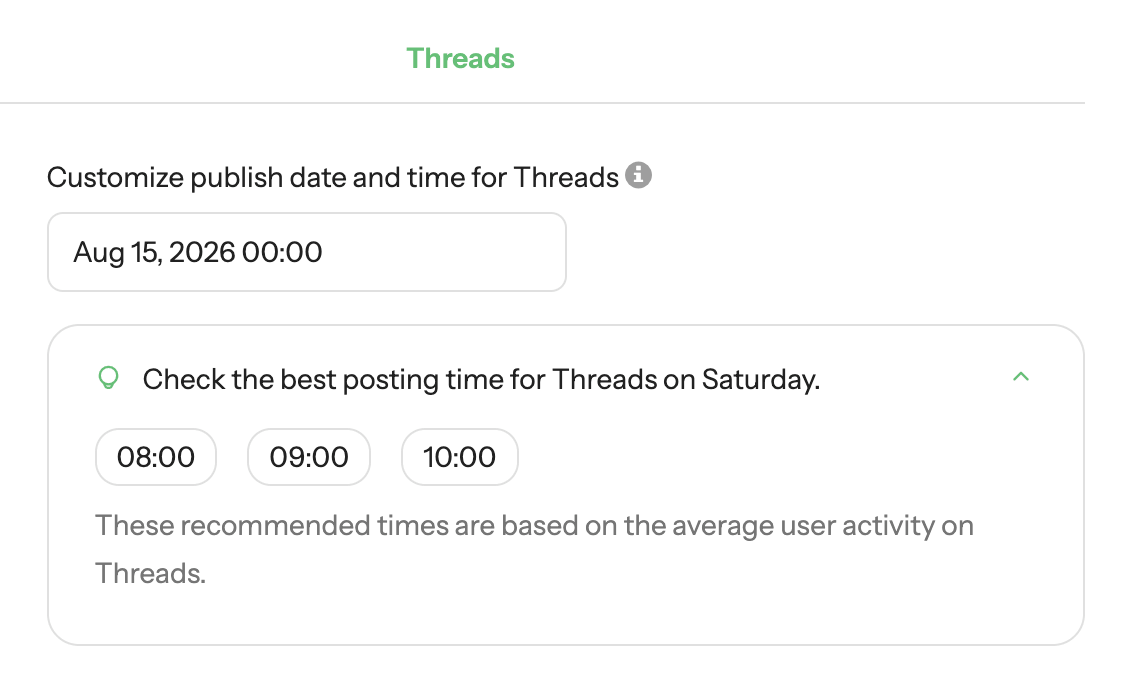
You can set different posting times for each channel, either picking the day and time yourself or using Buffer’s data-backed recommendations on the best times to post.
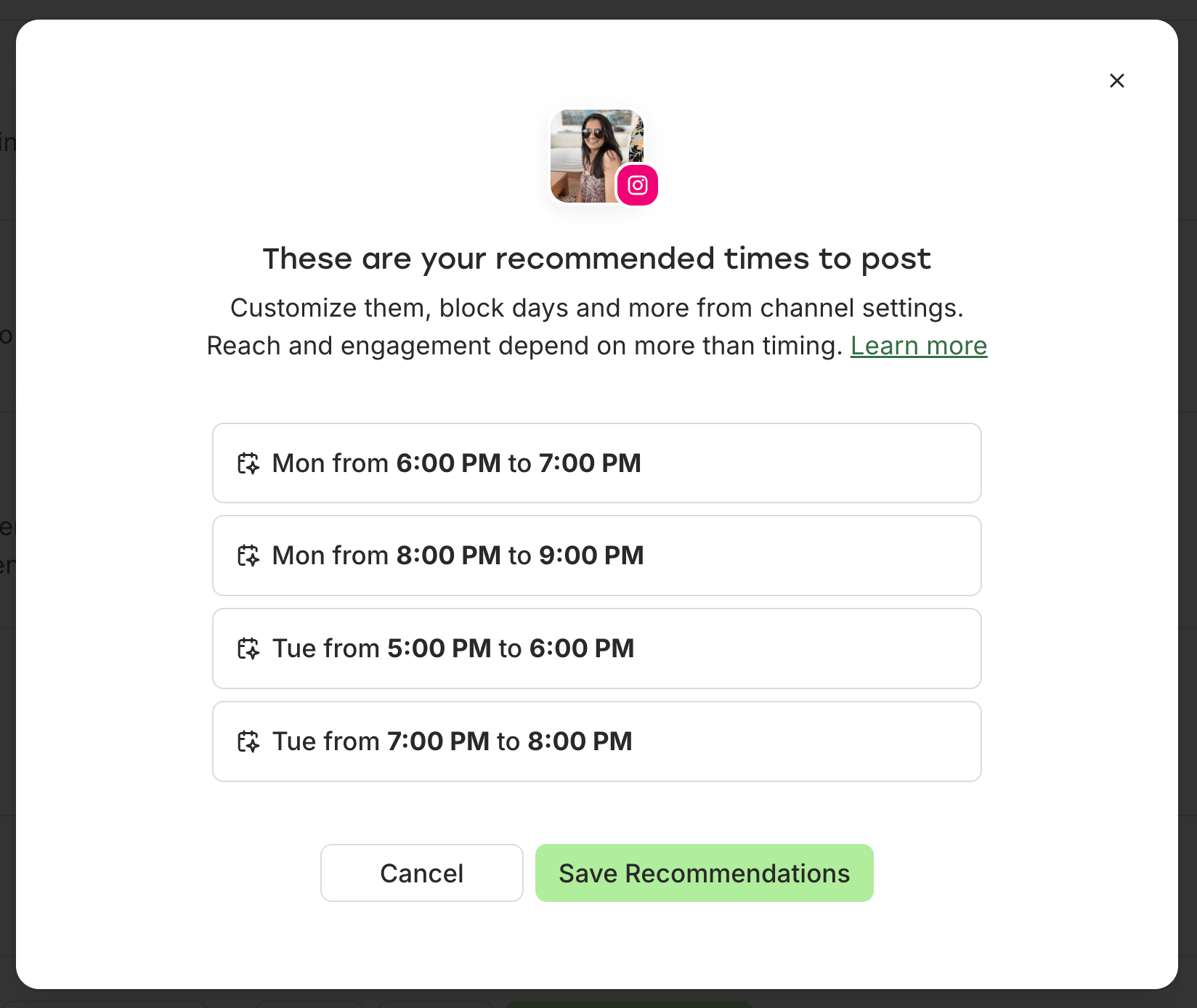
If you’re picking a custom time from the composer, Buffer’s recommended posting times show up there for you, too.
If you’re noodling on an idea that’s not yet ready to publish, you can store it in Buffer’s Create space. Think of it like your scratchpad, where you can jot down quick notes before you lose them and then flesh them out into full drafts. When you’re ready, move them to the scheduling workflow with one click.
Buffer also supports bulk scheduling up to 100 posts on paid plans (or 10, if you’re on the Free plan) by uploading a CSV file. Bulk scheduling works at the channel level, so if you need to bulk upload to multiple connected social channels, you’ll have to upload a different CSV file for each one.
Loomly organizes things a bit differently. Each calendar functions as its own workspace, and the posting slots are set at the calendar level for all connected channels. That means you can't set different times for LinkedIn and Instagram accounts on the same calendar. It’s not ideal, since the best times to post are pretty different for each platform. If you’re on a paid plan, you can select the best time to post from Loomly’s platform-specific suggestions while scheduling instead.
Loomly also supports bulk scheduling via a CSV file, but it’s limited to 60 rows per file and is only available on paid plans. Unlike Buffer, you can upload to multiple channels in one file. The CSV template also includes a column for what stage the post is in — draft, requires edits, pending approval, etc. — which is a nice touch for teams.
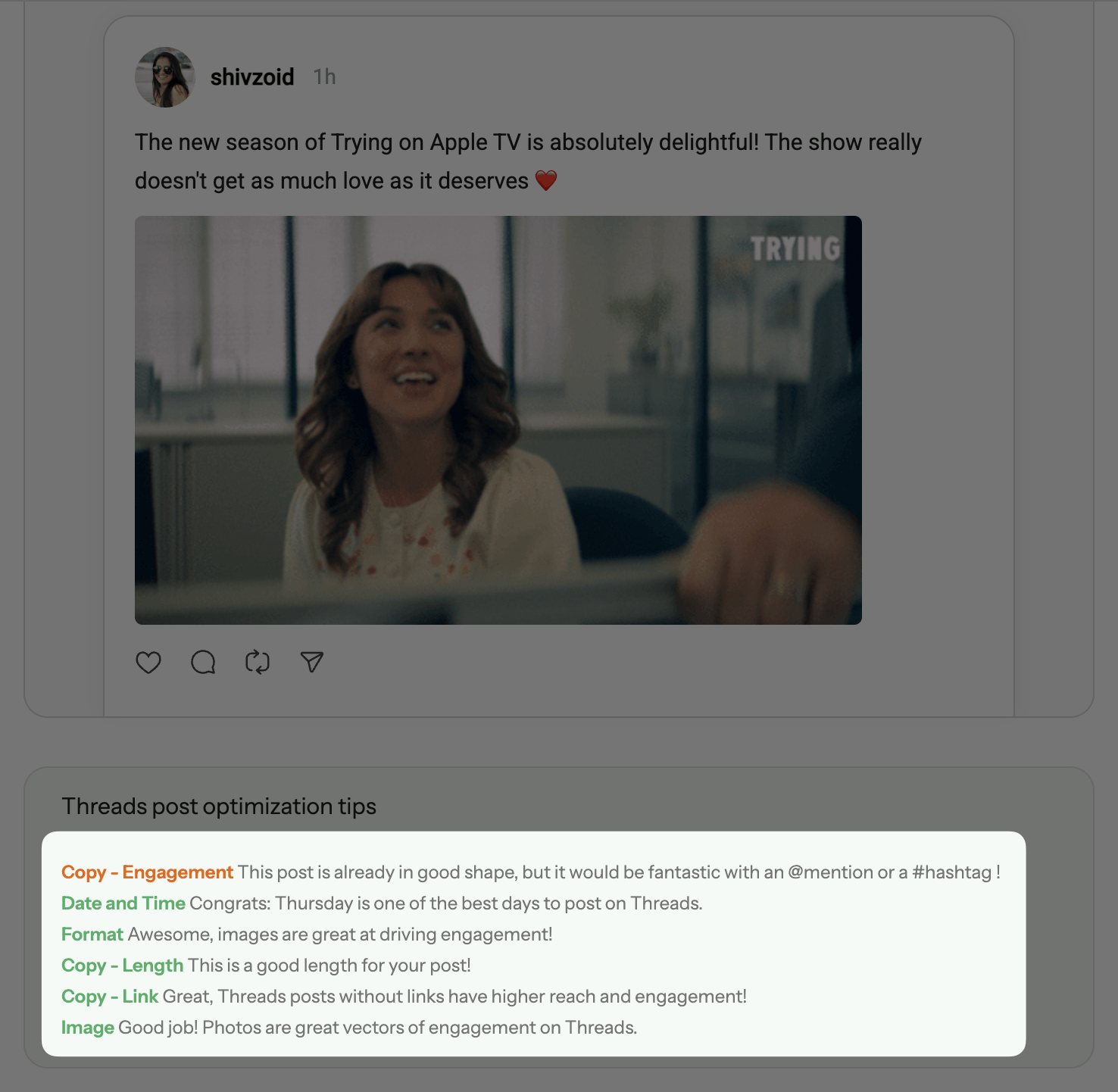
Loomly has a feature I really like when you’re customizing a post for a specific platform — you get live optimization tips that react to what you’re doing. On Threads, when I drafted a post without an image link, it flagged that posts with images perform better. The moment I added one, it flipped, responding to what was actually in the composer.
It’s worth keeping in mind that Loomly doesn’t pull in posts you publish directly on a platform or backfill posts when you connect a new channel. They show up in analytics and the inbox, but they’re missing from your calendar. Buffer syncs posts published natively and backfills posts when you connect a new channel. If you post across tools and want a complete content calendar in one place, that’s something you’ll get only on Buffer.
Loomly’s per-platform optimization tips are a really nice addition, but the posts that don’t sync in the calendar and generic posting slots make it feel like you’re working with a puzzle that’s missing some pieces. For day-to-day scheduling, Buffer is faster and gives you a complete picture of your social media presence.
Analytics and reporting
Buffer Insights are available on every plan and designed to help you make sense of your data. You get post-level, channel-level, and follower growth data in one dashboard for all your social channels.
The insights go deeper for each individual channel with detailed metrics like reach, impressions, engagement rate, and comments. AI-powered takeaways analyze this data and share specific suggestions, like repurposing content that did well, or posting more often if you’ve been behind.
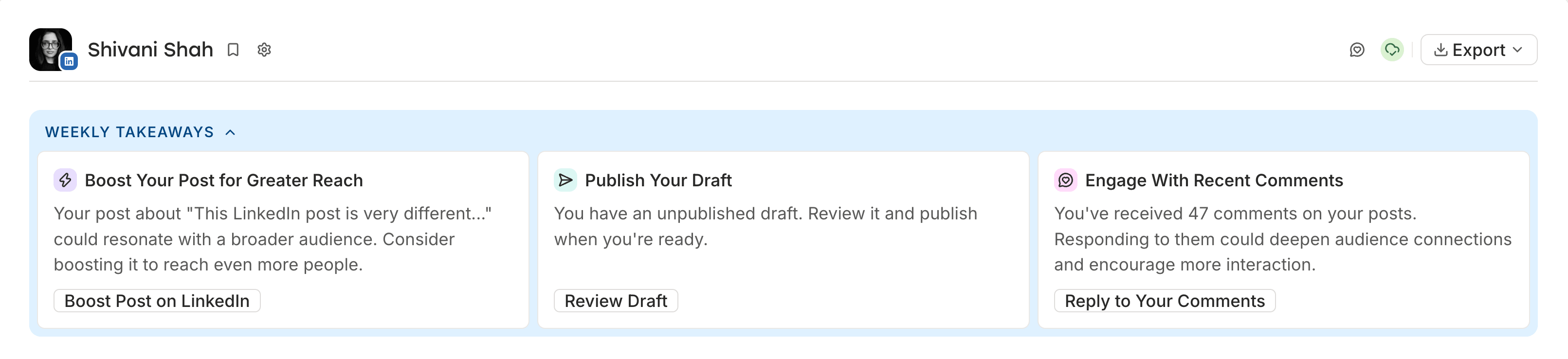
Because this is based on your actual data, you’ll see new takeaways every week that you can act on right away. If you’re on a paid plan, you can export your data in PDF formats to present to clients or stakeholders, or in CSV or Markdown formats for deeper analysis in a custom tool.
📍See Buffer’s full analytics breakdown →
Loomly’s analytics are available on all plans, although LinkedIn analytics are only available for company pages, not personal profiles. Basic analytics give you total and average numbers for post performance.
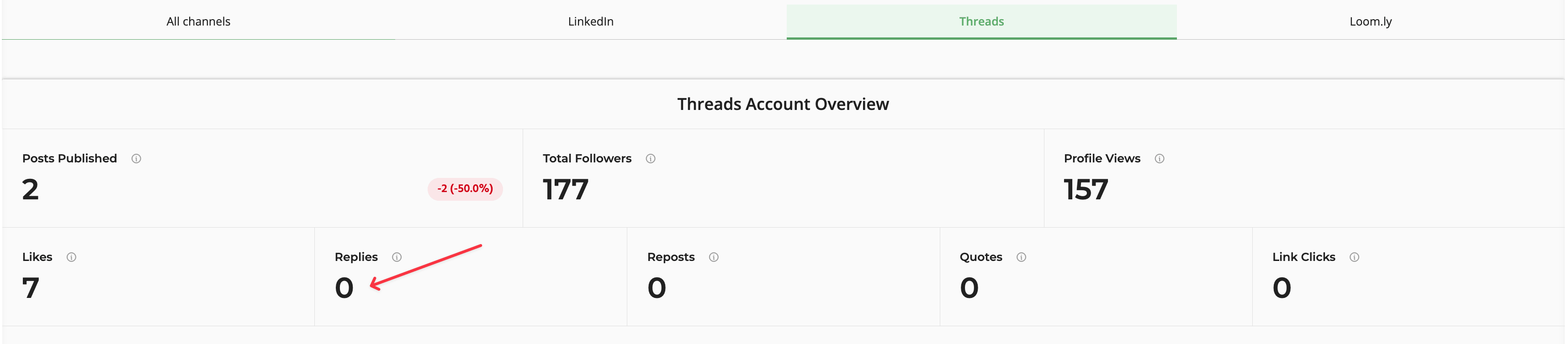
Advanced analytics give you more detailed data, including follower growth, reposts, and link clicks. I'll be frank: getting to see them took a lot of waiting around. When I activated advanced analytics for Threads, it spent two hours trying to fetch data before I refreshed the page. It returned an error and asked me to reconnect the account, but nothing happened.
Eventually, three business days later, I finally had them — and they’re not accurate. The post-level data for Threads says I have three replies to a post, but the overview dashboard right above it says I have none.
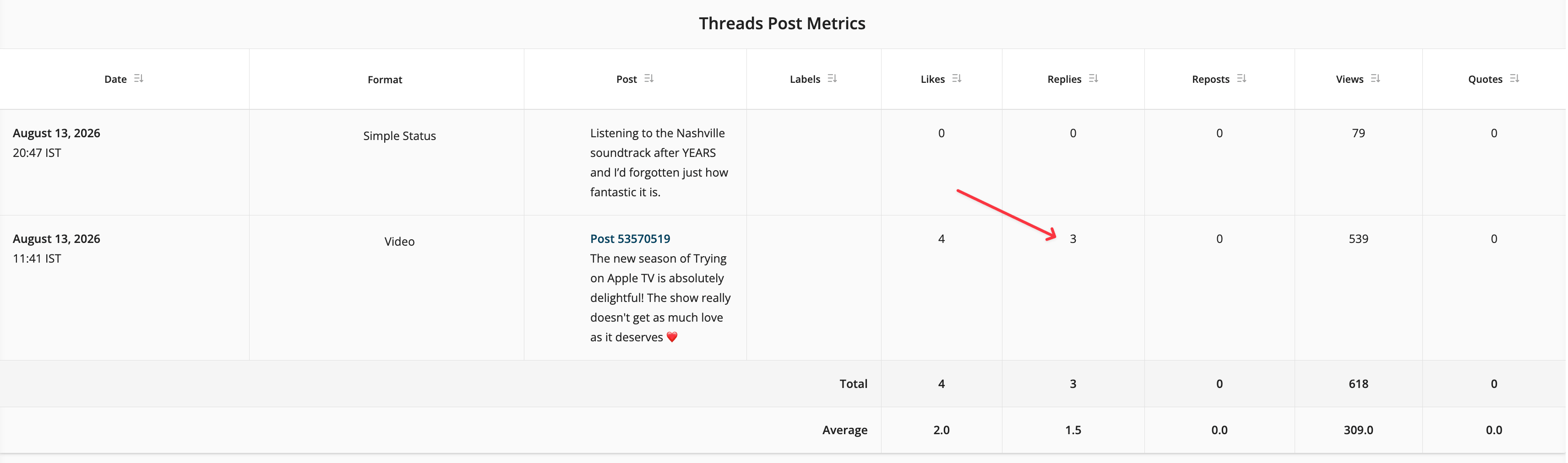
Like Buffer, you can export your data from Loomly, too. Loomly offers exports in PDF or Excel formats. On the Beyond plan, you can auto-schedule up to three PDF reports per calendar. Either weekly or monthly, depending on what you choose, Loomly will automatically e-mail that report to up to 25 people.
Inbox and engagement
Buffer’s Community inbox is available on all plans, and it’s been a huge help for me to stay on top of conversations with my network. It tracks comments and mentions across all connected channels, so I can easily move from LinkedIn to Threads to Instagram conversations in one inbox instead of switching back and forth between platforms.
These are just the platforms I’m active on — it covers Facebook Pages, Instagram professional accounts, Threads, Bluesky, X/Twitter, LinkedIn profiles and pages, Google Business Profiles, TikTok, YouTube, and Mastodon.
You get AI reply suggestions for each comment to use as a starting point if you like, and you can save replies to questions you get most often. These saved replies are shared across your team, which helps everyone quickly answer questions like “What’s your refund policy?” without looking it up or typing the whole thing out again and again.
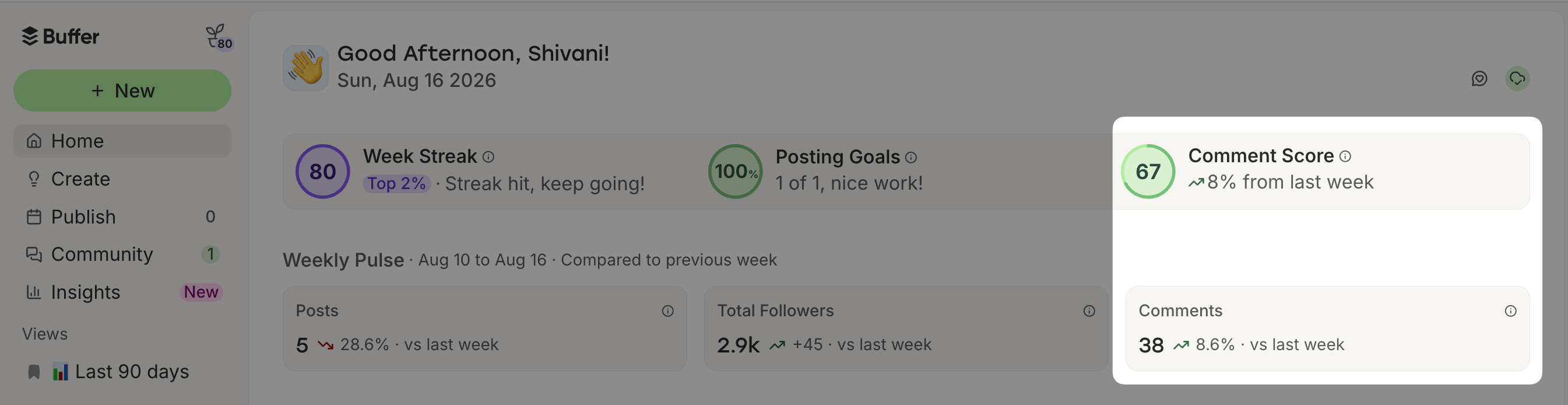
There’s also a Comment Score for the whole inbox plus each individual channel. It tracks how quickly and consistently the team responds — and shows you how you’re doing compared to the previous week — so you can stay on top of responses.
Loomly’s inbox is called Interactions, and it pulls in comments, mentions, and DMs from connected channels. It does the same thing Buffer does — help you stay on top of your conversations — but it’s set up very differently.
AI in these conversations takes the shape of auto-replies, and you can choose which channels to use them for. Select when to use them, whether they cover just the first reply or the full conversation, and which days of the week they’re active.
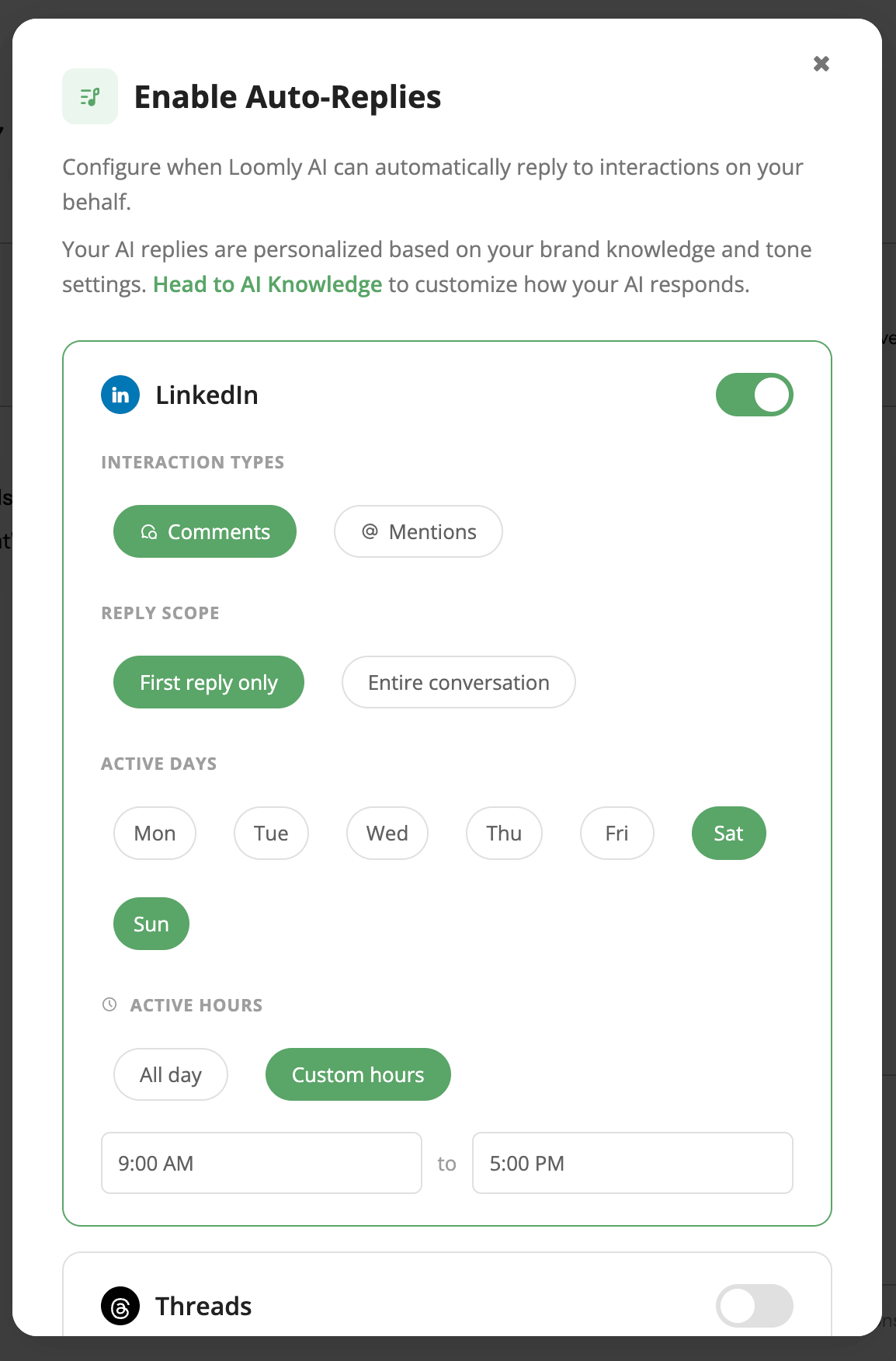
Setup happens in an AI Knowledge section where you add your support or help center URL for the AI to reference when it generates responses. You can even set a tone of voice and default translation language, and use the AI Replies Playground to test sample conversations before anything goes live.
This is a useful automation for anyone with a customer support-heavy inbox, especially if the questions you often get are specific enough that the AI can handle them accurately from your docs.
The inbox also lets you assign conversations so you can route a comment to a specific teammate. If you need to get input from someone with specific knowledge, or your support workflow is set up so one person manages conversations from start to finish, this is a handy feature to have.
For teams doing active community management and customer support, Loomly’s inbox has a meaningful edge. For solo users and teams where the goal is to stay on top of every comment and clear the inbox quickly, Buffer's inbox covers what's needed without the setup overhead.
Team collaboration
Buffer’s collaboration features live on the Team plan. Pricing is per channel, so you can have as many team members as you need at no additional cost.
You have full control over what permissions team members have: full access, needs approval, view only, or no access. A team member can have no access to LinkedIn and full access on Facebook, while needing approval on Instagram posts and view-only access to Instagram comments.
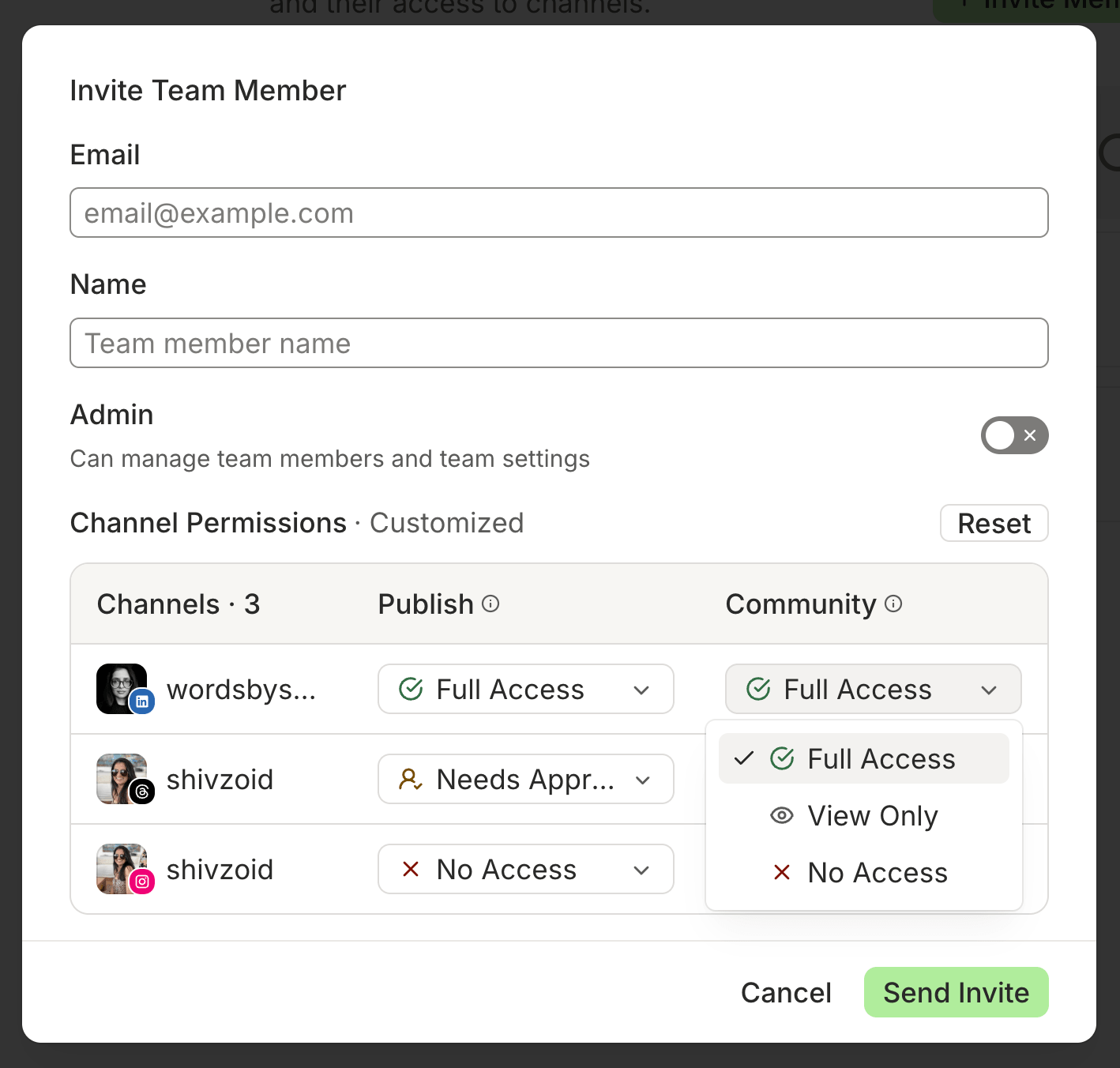
This granular permission setup makes it easy to invite clients and give them access to their channels. And because the Team plan comes with unlimited members, you can work easily with clients without increasing your cost right within Buffer.
The approval workflow is straightforward: when someone without posting access finishes a draft, they click “Submit for Approval,” and anyone with admin or full access to that channel can approve or reject.
Team members — including clients — with access to the channel can leave comments on the draft, so all work happens within Buffer itself. It’s designed to make it easy to get posts out into the queue.
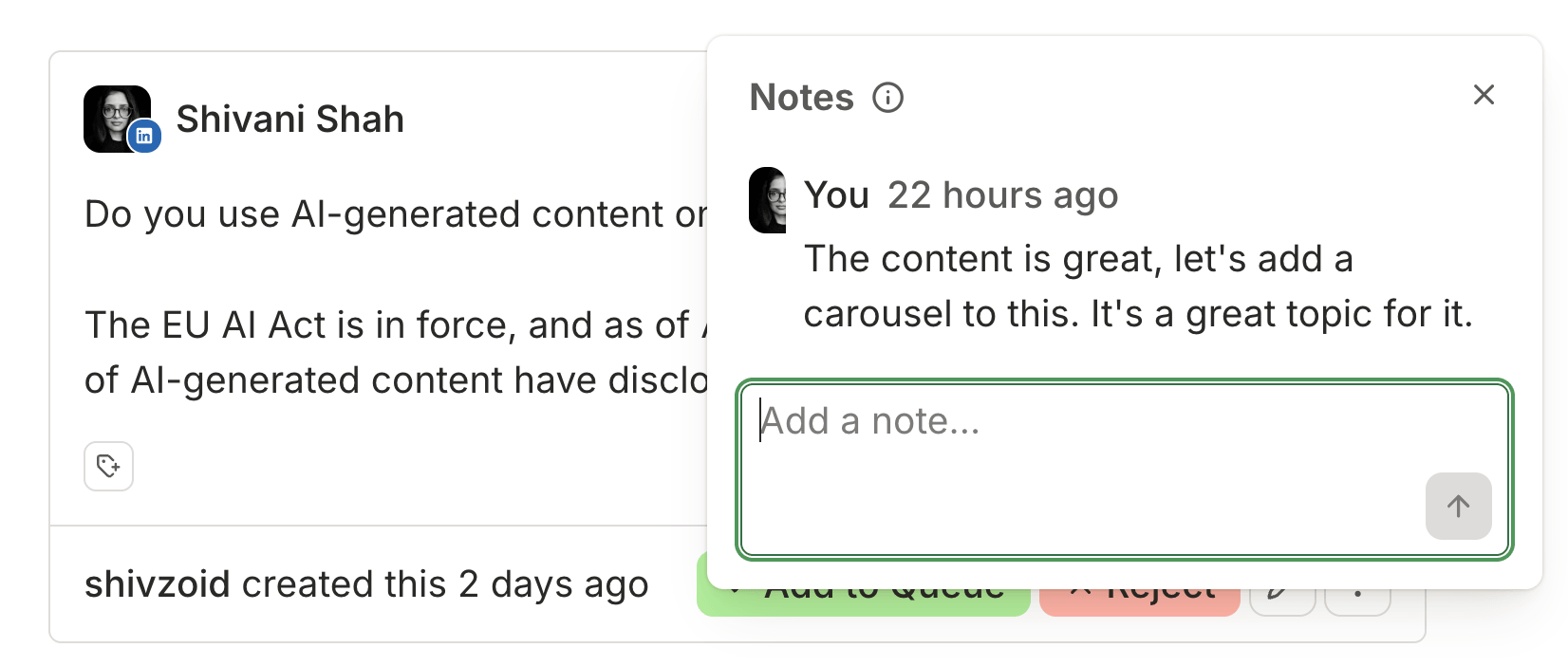
Loomly’s approval system goes considerably further. You can set up automated workflows where a post hitting a particular state — pending approval, requires edits — automatically gets assigned to one or more specific team members.
There’s also a feature called state guards, where you can require that multiple assigned people all take action before a post can move to the next state. If something is marked as pending approval and has state guard rules, it literally cannot be scheduled until everyone assigned to that workflow has signed off.
For high-stakes content in regulated industries or anything with legal review in the loop, that’s a level of control Buffer doesn’t offer. And it comes with a price tag that jumps a lot the moment you need more than three team members, clients included.
For a team that has strict rules around approvals, Loomly’s collaboration setup is stronger. For teams where approval is simpler, Buffer is easier to manage without the additional configuration.
AI features
Buffer and Loomly also offer AI features to help with publishing, engagement, and analytics. Where they differ is how you interact with them, and how much you can use them based on your plan.
Buffer’s AI Assistant for publishing posts is on every plan, including Free, with no cap. You can generate post ideas, write drafts, repurpose content — just tell it what your business is about and who the target audience for the post is, and it’ll spin up what you need. Customize it, and save it directly to your ideas board or as a draft in one click.
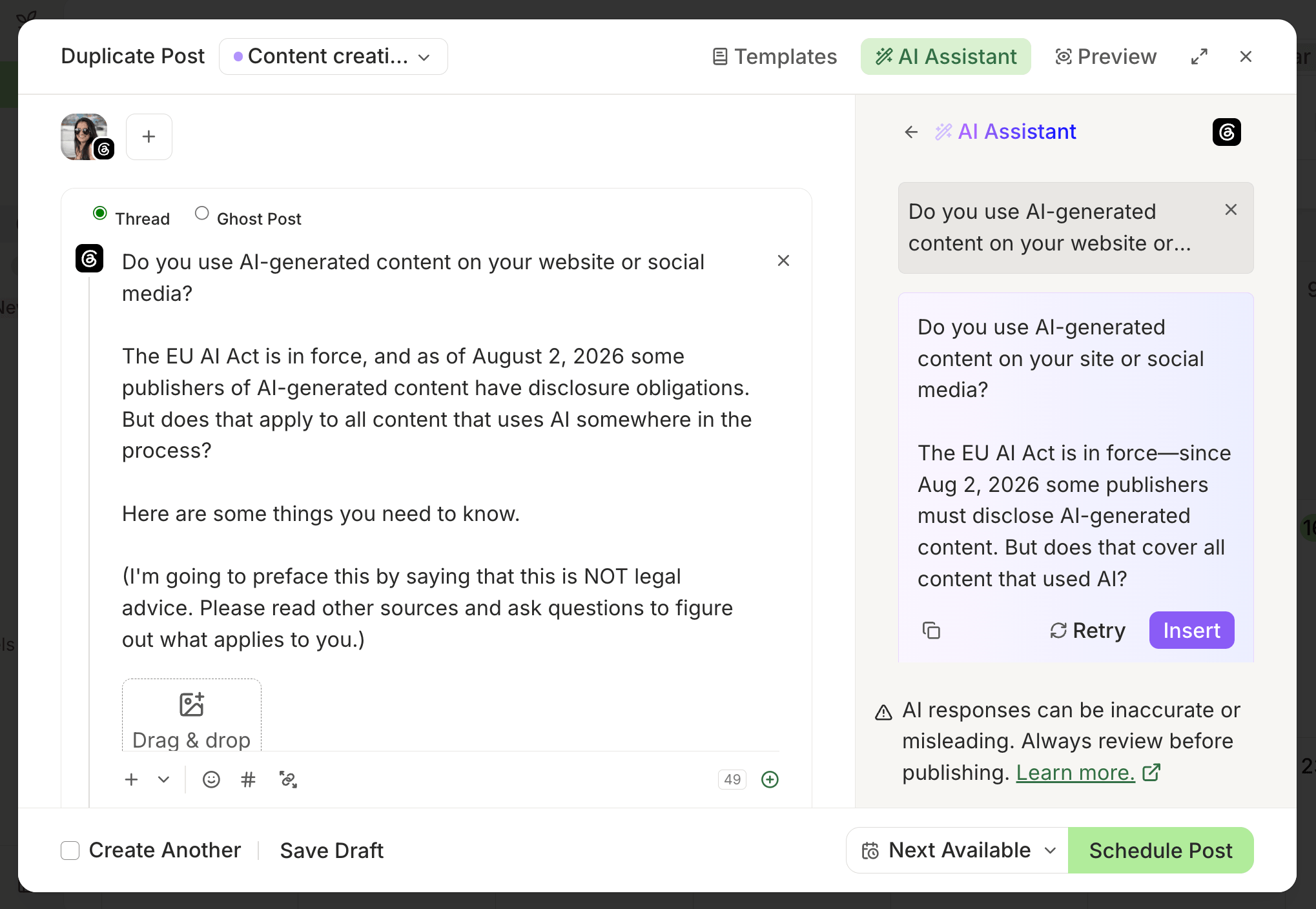
You’ll find AI-powered replies for every comment in the Community inbox on all paid plans, with the Free plan giving you five per week. We’ve heard it from our community members and experienced it ourselves — if you’re dealing with a large volume of comments to clear, they keep conversations moving without you needing to jump from one tool to another. And on Insights, you get weekly AI-powered takeaways that go through your performance data and come back with specific suggestions on what you can do next.
Loomly’s AI has more surface area, but it’s capped. You get “minimal” monthly usage on the Free plan and “limited” on Starter, which is shared across your calendars. I used it across a handful of idea and drafting sessions and went through 10% of my monthly credits in just one day. If you rely heavily on AI for content, you might find yourself running out of credits faster than you think.
What sets Loomly’s AI apart is the onboarding. During setup, Loomly analyzed my brand website and accurately pulled what I do, plus messaging and positioning guidelines based on the website to help the AI understand my voice. There’s an AI knowledge section in settings where, in addition to the information for auto-replies I shared above, you can add custom instructions to give Loomly more context about your brand.
Loomly’s AI works as a chat interface. You describe what you need and attach any files that may help, and it generates ideas or drafts for you, even searching the web when generating ideas. I like that you can pick up old conversations if there’s a topic you’d like to revisit.
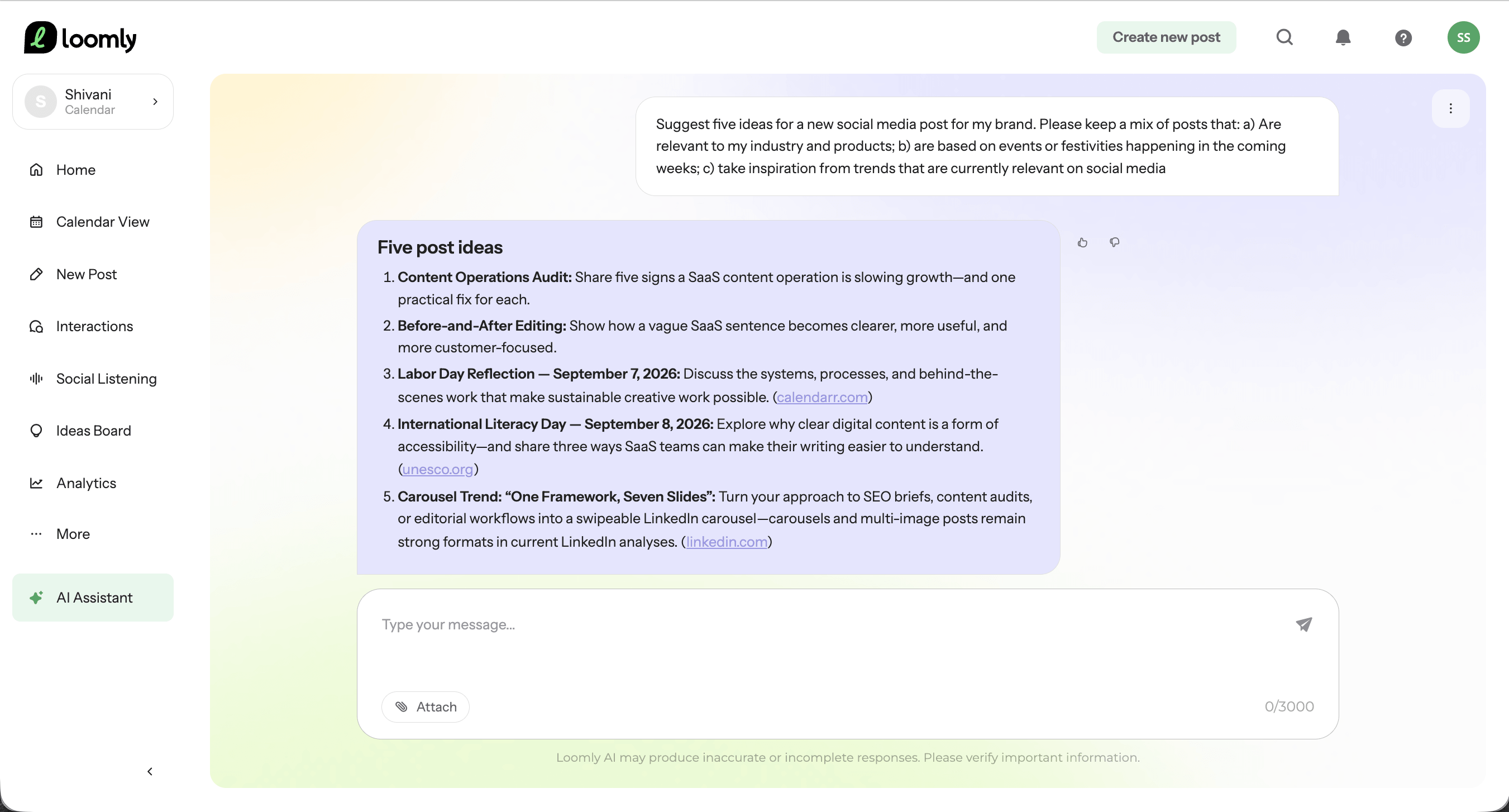
If you use AI heavily and don’t want to worry about hitting any limits, Buffer’s AI has you covered. Loomly’s approach to defining and storing brand context can be incredibly useful when you’re managing multiple clients or brands — just keep an eye on the Starter cap.
API and MCP
The API is one area where Buffer and Loomly have completely different approaches.
Buffer’s API is available on all plans including Free, and the number of API keys and requests available depend on your plan. It’s incredibly easy to use, even if you’re non-technical. Many Buffer users (including me) have built automated publishing workflows and custom apps that handle everything from generating ideas to analyzing performance.
Buffer also has an MCP server. You can connect it to AI tools like ChatGPT and Raycast for building automated content workflows where you can ask what's scheduled, draft and schedule posts, or pull performance data without leaving the tool you’re already working in.
Loomly does have an API, but it’s a status API only. It exposes planned maintenance states and incident data, so you could build a Slack alert for when Loomly goes down (or will be down). That’s the full extent of it. You can’t create posts, pull analytics, manage content, or interact with your account in any way, and there’s no MCP either.
Social listening
Loomly includes social listening on all paid plans, and how many queries you get depends on the plan you’re on. You select which connected profiles to run it on, hit “Run Social Listening,” and Loomly gives you a detailed breakdown of topics and themes plus sentiment analysis that goes beyond just positive, neutral, and negative.
This sounds really good in theory. In practice, I didn’t get a result I could use. I ran it on both my connected accounts — Threads and LinkedIn — and the themes it surfaced had nothing to do with what I actually post about. Apparently I have poor makeup skills (rude!) and post children’s photos publicly. On the plus side, it seems I have great dancing skills and my video production quality is high.
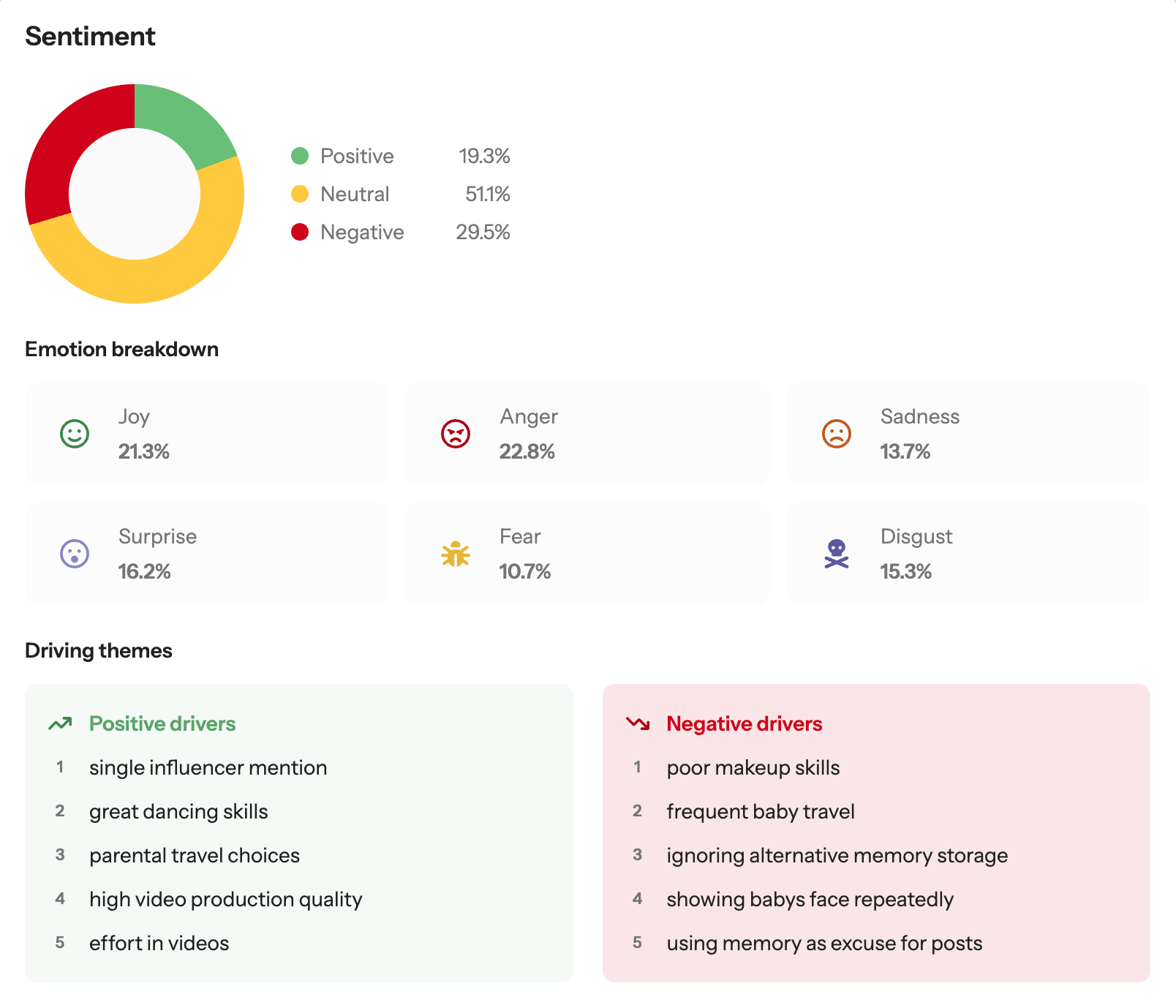
In reality, my LinkedIn posts are mostly about content marketing, operations, freelancing, or macOS tips. On Threads, I post a lot about music, TV shows, and swimming. No children appear anywhere in the mix, and I post maybe one video a year.
I’ll give Loomly the benefit of the doubt — my first and last name combination is common enough that it may be pulling in content from other people who share it. But my accounts are linked, and it claims to be analyzing interactions with those accounts specifically. Either way, my results weren’t something I could act on.
Buffer doesn’t offer social listening as a feature. But based on my testing, Loomly’s social listening isn’t a feature you can currently rely on in its current state.
Supported platforms and integrations
Both Buffer and Loomly cover the core platforms most teams need, with a handful of gaps on both sides.
| Platform | Buffer | Loomly |
|---|---|---|
| ✅ | ✅ | |
| ✅ | ✅ | |
| ✅ | ✅ | |
| X/Twitter | ✅ | ❌ |
| TikTok | ✅ | ✅ |
| YouTube | ✅ Shorts only | ✅ |
| ✅ | ✅ | |
| Threads | ✅ | ✅ |
| Substack | ✅ Notes only | ❌ |
| Bluesky | ✅ | ✅ |
| Mastodon | ✅ | ❌ |
| Google Business Profile | ✅ | ✅ |
| Snapchat | ❌ | ✅ |
| Custom Channel | ❌ | ✅ 1 per calendar |
| Shop Grid (link-in-bio) | ✅ | ❌ |
| Total platforms supported | 13 | 11 |
Loomly’s custom channel feature lets you connect to a platform it doesn’t support, like Reddit or even a newsletter. Unlike with supported channels, you can’t auto-publish posts to a custom channel. Instead, Loomly will send you an email at the scheduled time. You can either manually publish or use a Zapier automation if the custom channel has a Zapier integration.
Loomly also connects with Zapier, Slack, Teams, Canva, Giphy, Google Drive, and Unsplash. Buffer covers all of those except Giphy, and goes further — tools like n8n, Raycast, and Notion via MCP, plus Dropbox and OneDrive for media storage, Google Photos, and IFTTT and Make for automation, among others.
Who should pick which tool
Creators and solopreneurs
Pick Buffer. The pricing alone settles it. Loomly’s paid plans start at $65 per month, whether you want 12 channels and two more users or not. If you’re managing fewer than 10 channels, Buffer’s Essentials plan at $6/channel per month works out much lighter on the wallet. Buffer's Free plan is more generous too: 10 posts per channel (refillable) versus Loomly's five posts per month total across all connected channels. Loomly simply isn’t priced for solo users.
Small businesses and growing teams
It depends. Buffer’s per channel pricing is flexible, meaning you pay for only the channels you need, whether you have two users or 10. Loomly’s pricing is fixed and depends on your channels and users. The fourth user or 13th channel takes you straight from the $65 per month Starter plan to the $332 per month Beyond plan. If you’re fewer than three people and managing 12 channels and less — and you won’t grow beyond this — then Loomly’s Starter plan is cheaper. If you’re growing or plan to grow, Buffer is the stronger long-term bet.
Marketing agencies
Pick Buffer. At 13+ channels, Buffer’s per-channel pricing scales better than Loomly’s flat rate (60 channels on Buffer Team works out to $275 per month vs. Loomly Beyond at $332 per month). Buffer’s API and MCP support let you build content workflows and connect to AI tools. Loomly’s features are definitely agency-friendly — calendars per client, role-based access, structured workflows, custom branding on Beyond. But the pricing jump from three users to four and 12 channels to 13, plus needing an Enterprise plan if you manage more than 60 channels, undercuts it for anything above a small agency.
Enterprise teams
Neither tool fits the bill for enterprise needs. Buffer isn’t designed for enterprise teams, and that’s a deliberate decision on our part. Loomly has an Enterprise tier and features like structured approval workflows, inbox assignment, social listening, and advanced analytics — but the latter two were completely unusable in testing. If you’re looking for a platform for enterprise social operations, it’s worth comparing evaluating Loomly against tools like Sprout Social or Hootsuite that compete in this category.
The bottom line
For most people reading this — solo creators, growing teams, agencies, anyone who builds workflows or posts to X — Buffer is the stronger fit. The per-channel pricing scales with how you actually use it, the free plan is usable, and the API and MCP open up automation options that Loomly just doesn’t offer.
Loomly earns its price tag for a specific situation: a team of fewer than three people who need structured, multi-step content approvals, aren’t posting to X, and manage up to 12 channels. Within that window, the collaboration features are strong and the flat-rate pricing is competitive. Outside of it, the math stops working quickly.
Both tools have free plans and paid plan trials, so if you’re still on the fence, the best way to decide is to try them out and see which one works better for you. We’d love for you to try Buffer. Sign up to use our free plan or to test paid plans for free, no credit card required.
Frequently asked questions
Does Loomly have a free plan?
Yes, but it’s not advertised. Loomly’s free plan is only visible inside the billing section of your account after you sign up. It's limited to 1 user, 3 social accounts, 1 calendar, and 5 posts per month total across all channels. Bulk posting and best time to post data is not available on Loomly’s free plan, and there’s minimal monthly usage of the AI features. Buffer’s free plan gives you 1 user, 3 channels, and 10 posts per channel (refillable at any time), plus bulk posting, best time to post data, and unlimited use of the AI assistant (AI reply suggestions are capped at 5 per week). It’s meaningfully more generous for anyone just getting started.
How much does Loomly cost per month?
Loomly has three paid plans: Starter is priced $65/month on monthly billing or $49/month on annual billing, covering 12 social channels and up to 3 users. Beyond includes unlimited users and up to 60 social channels at $332/month monthly or $249/month annually. Enterprise pricing is custom for 61 or more accounts.
Which is cheaper, Buffer or Loomly?
It depends on your team size and channel count. Both tools have Free plans. For creators and solo users who want more advanced features, it depends on how many channels you’re managing. Buffer’s Essentials plan starts at $6/channel per month. Loomly has no paid plan for solo users, and its Starter plan for teams is priced at a flat rate of $65 per month for up to 12 channels and 3 team members.
For teams of up to 3 people managing up to 12 channels, Loomly’s Starter plan costs $65 per month. Buffer’s Team plan pricing starts at $12/channel per month, with tiered per-channel pricing for teams managing a large number of social channels. Add a fourth user and Loomly jumps to $332 per month. Buffer Team has unlimited users, so adding a fourth — or 40th — user won’t increase your bill.
Does Loomly support X/Twitter?
No, Loomly doesn’t support X/Twitter on any plan. If posting to X is part of your workflow, Loomly isn't the right tool. Buffer supports X/Twitter on all plans including Free.
Does Loomly have an API?
Loomly has a status API for monitoring planned maintenance and incidents, but there’s no public API for creating posts, managing content, pulling analytics, or building integrations. Buffer’s API and MCP are available on all plans including Free.
Is Loomly good for agencies?
It depends on scale. The custom roles and approval workflows can be useful for agencies. But pricing jumps sharply once you need more than 3 users or 12 channels, from $65 per month straight to $332. Custom Enterprise rates kick in if you need more than 60 channels. For small agencies with a tight client set, Loomly can work. For anything larger, Buffer’s tiered per channel pricing, unlimited users, and API access make it the stronger long-term option.
Try Buffer for free
200,000+ creators, small businesses, and marketers use Buffer to grow their audiences every month.