
I volunteer as a community lead for a tech non-profit that helps people get their start in tech through free training programs and mentorship. The role has two halves: answering members' questions in our Slack and running the non-profit's social channels, where I share content that helps the wider community.
Our Slack runs across more channels than I can keep an eye on, but four of them carry most of the traffic. Between them, that's roughly 80 questions a week. For a long time, the content side of my job meant I had to scroll through it all by hand, hunt for patterns, and build a calendar around whatever kept coming up.
On a good week, I got two or three posts out, and each one took three to five hours, including the research, writing, scheduling, and replying to comments afterward. All in, that was 15 to 20 hours a week on top of my day job, which is exactly how I ended up burned out.
I needed a better way to keep up. So I built a pipeline that listens to conversations across a community workspace, surfaces overlooked questions, and turns shared concerns into content that helps more people. It scans those four channels, drafts a reply to every real question for me to approve and send. Then it takes the ones worth answering in public, writes them up in my voice, and drops them into Buffer ready to schedule.
The posts have to be public because only a slice of our community lives in Slack. Plenty of members check social media every day but open the workspace once a week, and the people we exist to serve who haven't found us yet are out there searching for answers that sit behind a login no search engine can reach. A question will still be answered in the channel first. But the same answer, published where people already scroll, keeps helping long after the thread goes quiet.
Here's how I built it and how it transformed my workload and the community's experience.
Why keeping up manually stopped working
The volume on its own was manageable. The harder part was that the questions I most needed to catch were the ones most likely to slip past me.
A few things were working against me at once:
- Questions got buried. Across the four channels, with people also chatting, brainstorming, and thinking out loud, the important questions sank under everything else moving faster.
- Time zones stacked up. I'm in Nigeria, while members are spread across Europe, America, and several time zones in between. I'd close my laptop at night and wake up to a stretch of conversations I'd slept through, with questions sitting unanswered the whole time.
- Deadline days turned into pile-ups. We run free training programs with hard application deadlines, and people tend to apply on the last day. The moment they hit a blocker, I'd get hundreds of messages at once. If I missed one reply, registration closed before that person ever heard back.
- The people who needed help most often never asked. They were new and didn't want to look it, or they'd asked once, gotten buried, and given up. So when one of their questions did surface, raised by one person or a few, it usually spoke for a crowd that never said a word. Those were often the questions most worth answering in public.
Behind every one of those was someone who needed help and didn't get it in time.
That's what pushed me to build something, so the answer could already be there, in public, before the next person had to ask.
Every day, my workflow reads what the community asked, works out which of those questions are worth answering in public, and drafts the posts so they're ready to go. I keep the one role only I can do: reviewing and approving what goes out.
The pipeline in five steps
The pipeline runs in five steps: read, filter, archive, cluster, and publish (in Buffer!). I built the workflow in Gumloop, a low-code canvas where I can chain AI steps, API calls, and a few custom nodes together in one place.
The first three steps turn raw Slack traffic into a clean, taggable archive. The last two decide what deserves a public answer and get it into Buffer.
- Read. Every message in those four channels runs through an AI Extract Data node in Gumloop. In a single pass, it decides whether the message is a question, drafts a response if it is, scores its own confidence in that draft as either "High" or "Needs Verification," and tags it with a theme like onboarding, billing, technical, or feature request. I run this step on GPT-5.4 Mini, which handles that kind of multi-field extraction without burning through credits. The confidence score turned out to be a useful part: it lets me spend my attention where my judgment adds real value, instead of reviewing every row the same way.
- Filter. A separate custom node keeps only the rows flagged as questions and drops everything else. I made filtering its own step on purpose, rather than folding it into the AI prompt, for one reason: honesty. I want the AI to make one decision per pass and leave that decision visible in the data before anything goes live. If it ever starts misclassifying entries, the archive shows me, and the call stays on the record where I can audit it.
- Archive. Everything that survives the filter gets written into a Notion database I call the Community Ops Log. It has 10 fields, including who asked, which channel it came from, the theme, the draft response, a link back to the original message, and a status. Two views sit on top of it: a plain table for everything, and a Kanban review board grouped by status (needs review, verified, responded, and dismissed). That status field is what turns the archive from a passive log into something I can actually triage. At a glance, I can see how many drafts are waiting on me, how many I've already handled, and how many I've set aside.
- Cluster. Claude Opus, my preferred AI model to work with, groups the questions by the underlying problem, then decides which ones deserve a public answer. This is where the pipeline's judgment lives, so I'll walk through it properly in a moment.
- Publish. The questions that make the cut become content ideas and ready-to-post drafts, pushed straight into Buffer.
💡 A quick note on the screenshots that follow: the Slack workspace, channels, and member data you'll see are a simulation I built for this article to keep my real community's threads private. The pipeline is the same one I run live.
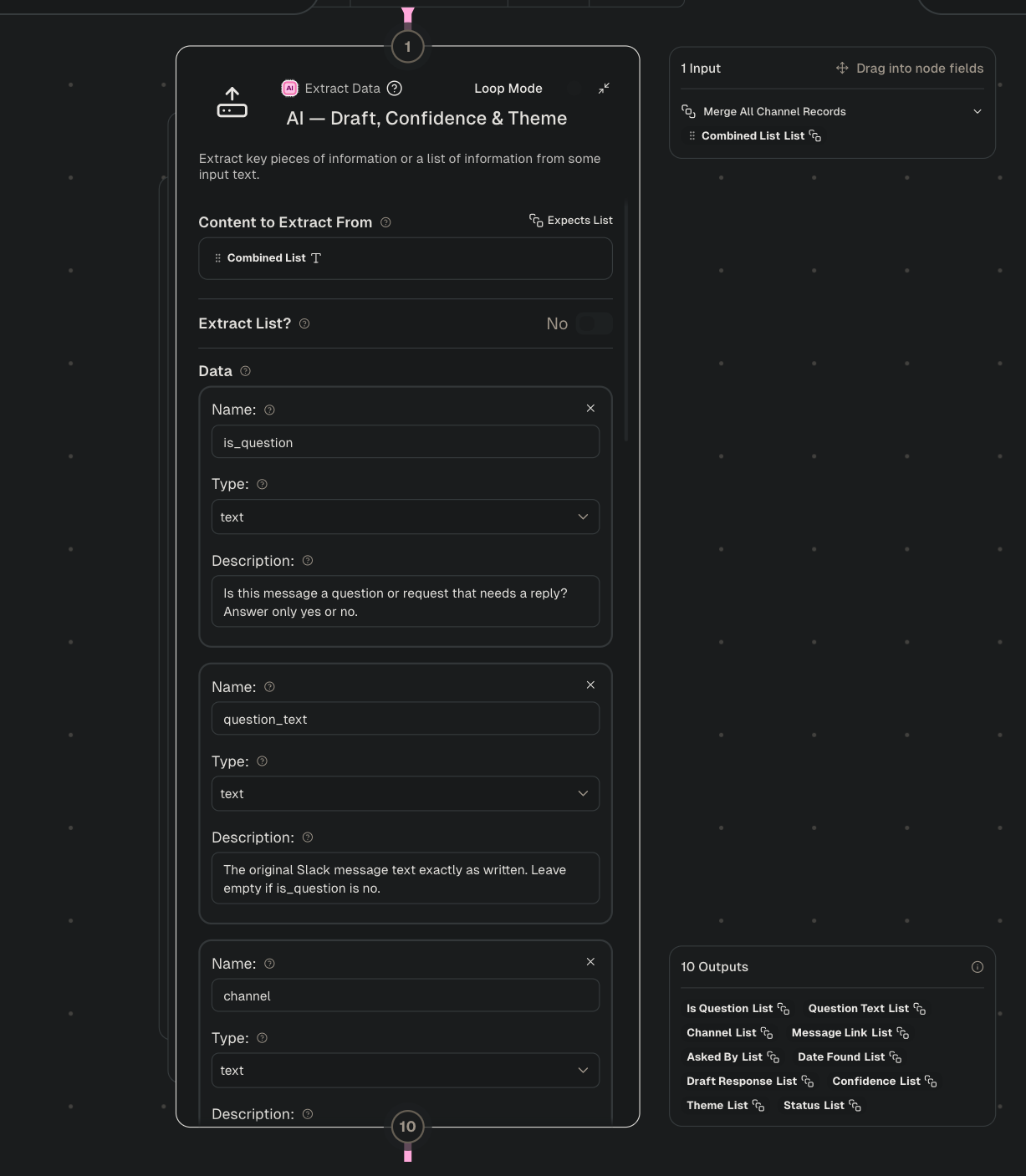
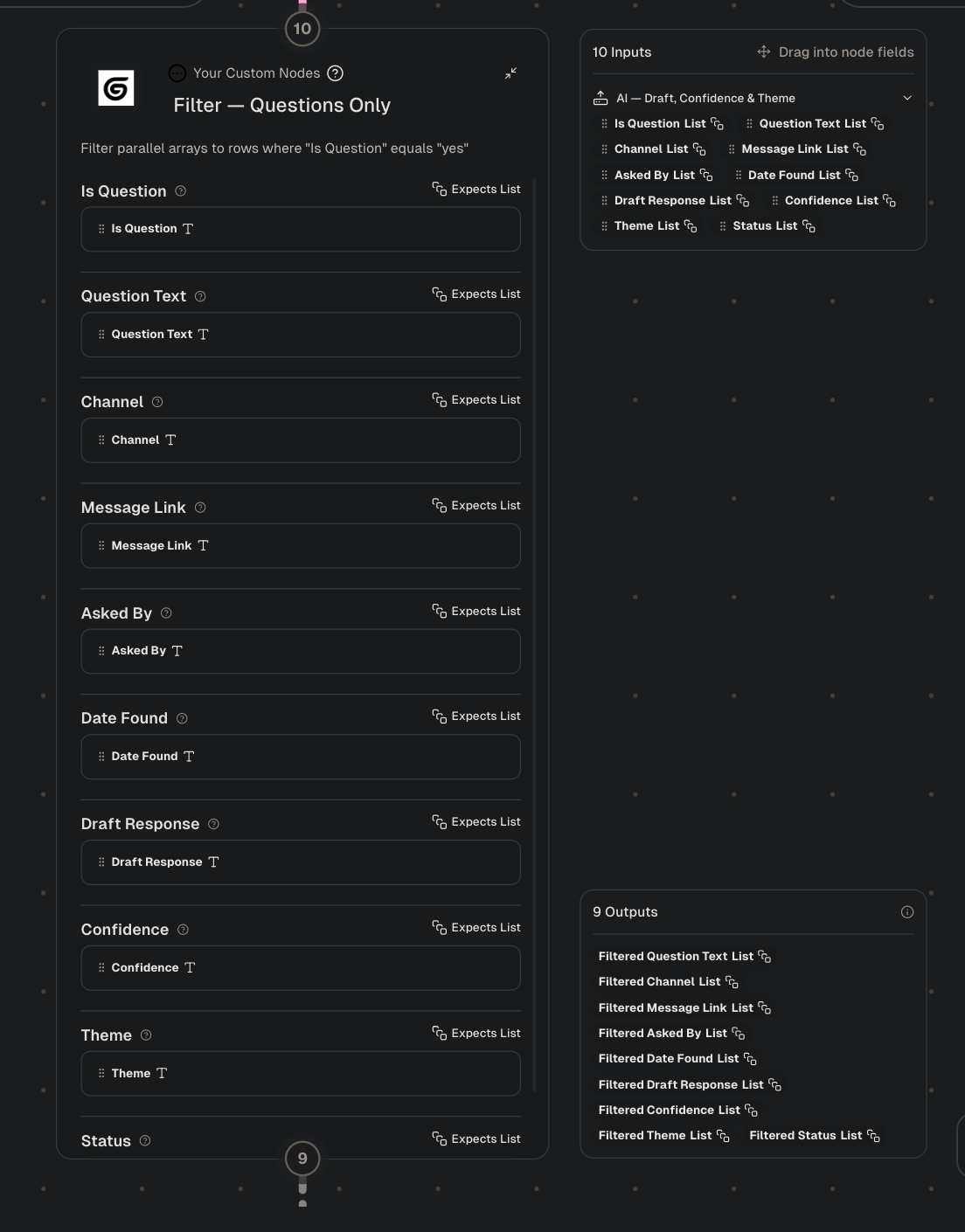
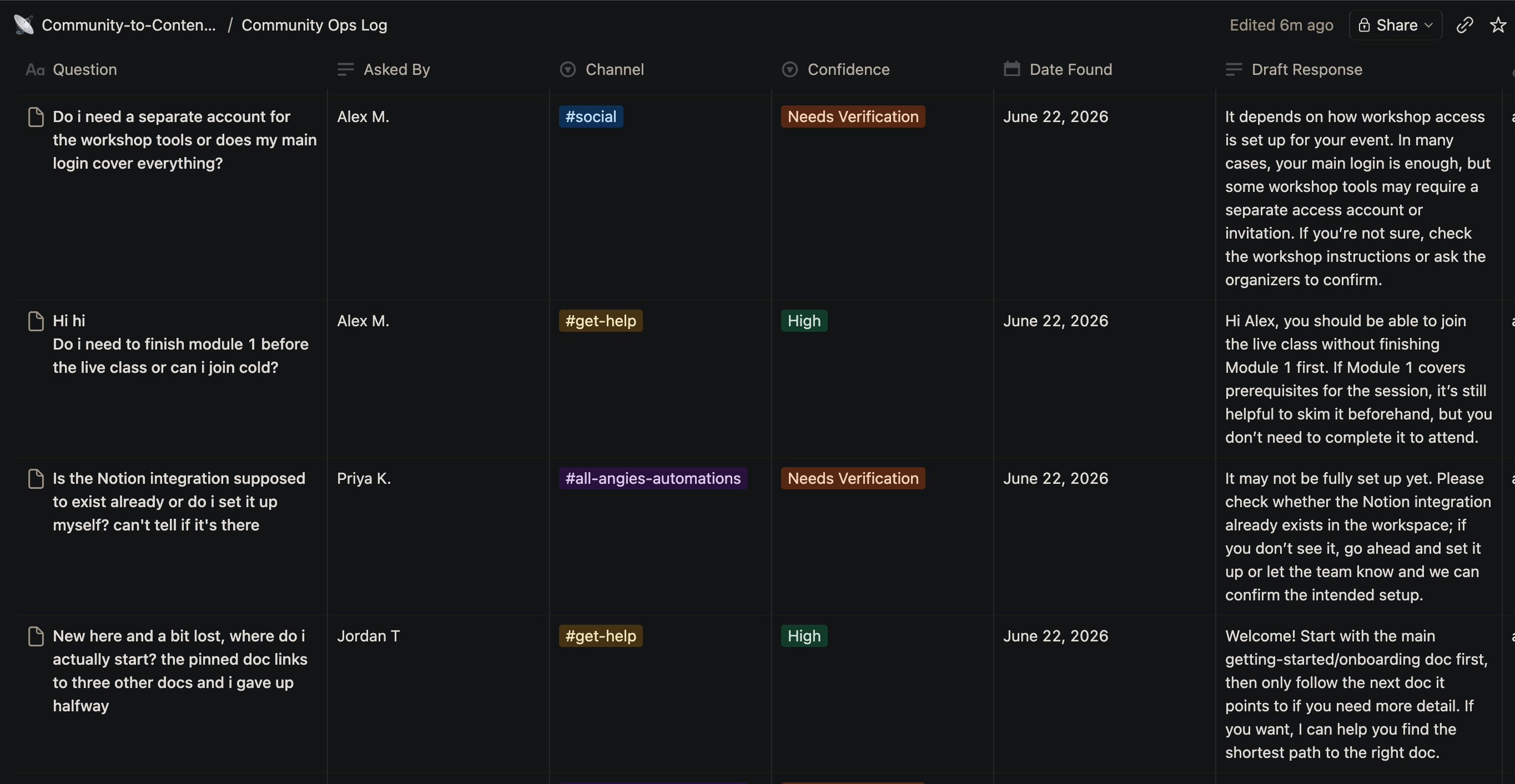
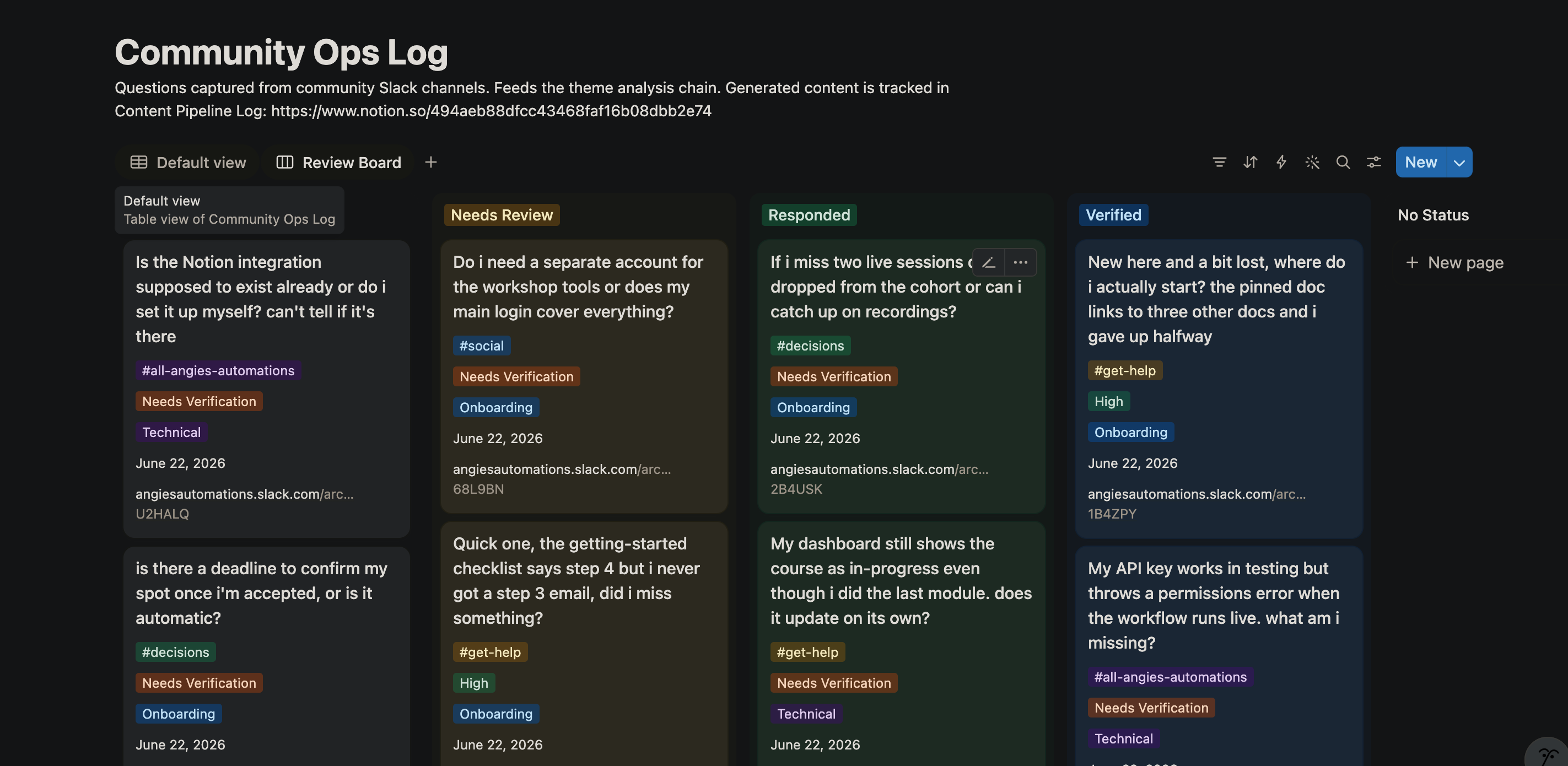
The full workflow in Gumloop. In order from L-R: 1/ The AI Extract Data node config in Gumloop. 2/ The filter step, keeping only the rows flagged as questions. 3/ The Community Ops Log, table view. 4/ The Review Board kanban, grouped by status.
How the pipeline decides which questions should be answered on our social channels
This step is probably the trickiest and the most important. Without it, every question becomes a post, and the queue fills with noise. So the pipeline defaults to not posting.
A Notion reader pulls everything in the Community Ops Log and hands it all to a Gumloop Ask AI node running Claude Opus. In a single pass, the prompt clusters the questions, grouping the ones that are asking about the same thing even when they're worded differently. Then it scores each cluster to decide whether it deserves a public post, removes near-duplicates, and for the themes that make the cut, writes a content idea and drafts the posts.
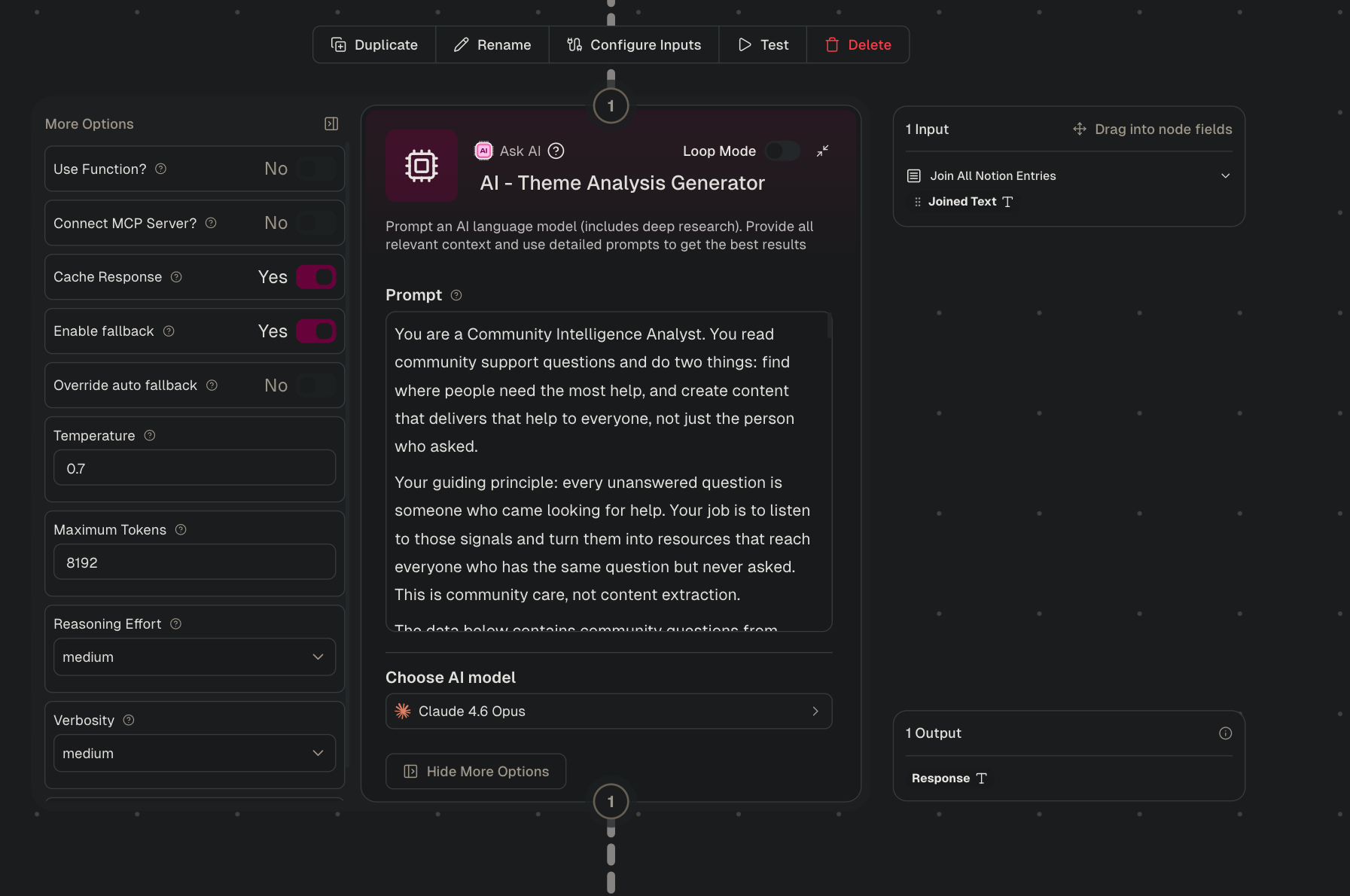
A second custom node then parses that output with plain rules and no AI, so the same clusters always produce the same structured rows.
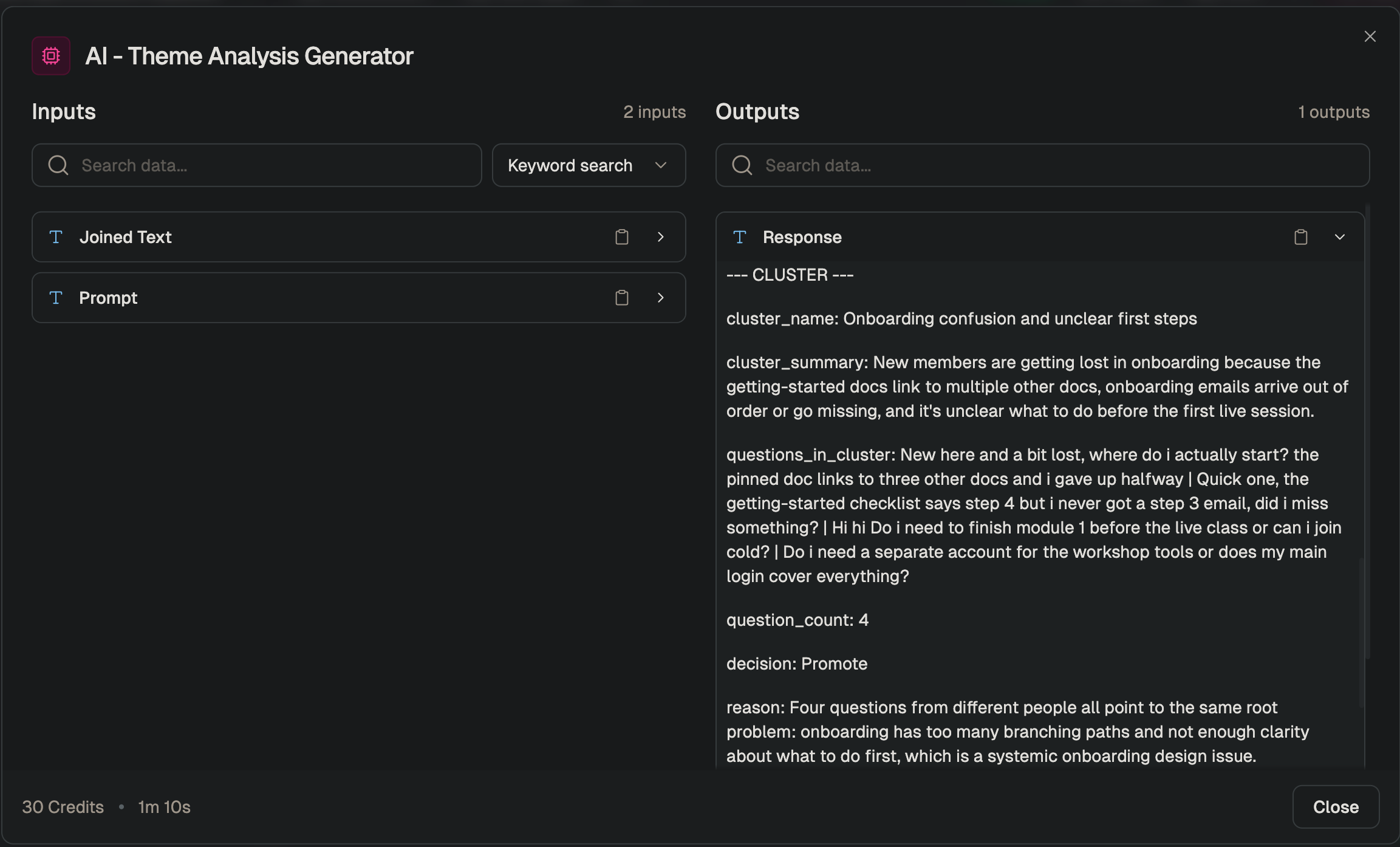
The goal is to surface the questions worth answering in public, including the valuable ones that only a few people, or even one person, thought to ask. Those are the easiest to miss, and they are often the ones the silent majority needs answers for.
To get there, each theme gets a quick gut-check against three criteria, and it has to clear at least two of them to be promoted:
- Can a member already solve this on their own? If the documentation we have would get them there in about 15 minutes, it doesn't earn a post**.**
- Does it affect a meaningful slice of the community? Roughly 10 to 20% of active members is the bar. But because the rule is two out of three, a rare question can still get through if it clears the others. That's the safety valve for the high-value question that only one or two people thought to ask.
- Is it a real gap, or just a doc fix? If the answer points to something structural, like a missing feature or a confusing pattern, it counts. If it's really just "we should update the doc," that belongs in the docs, not in a public post.
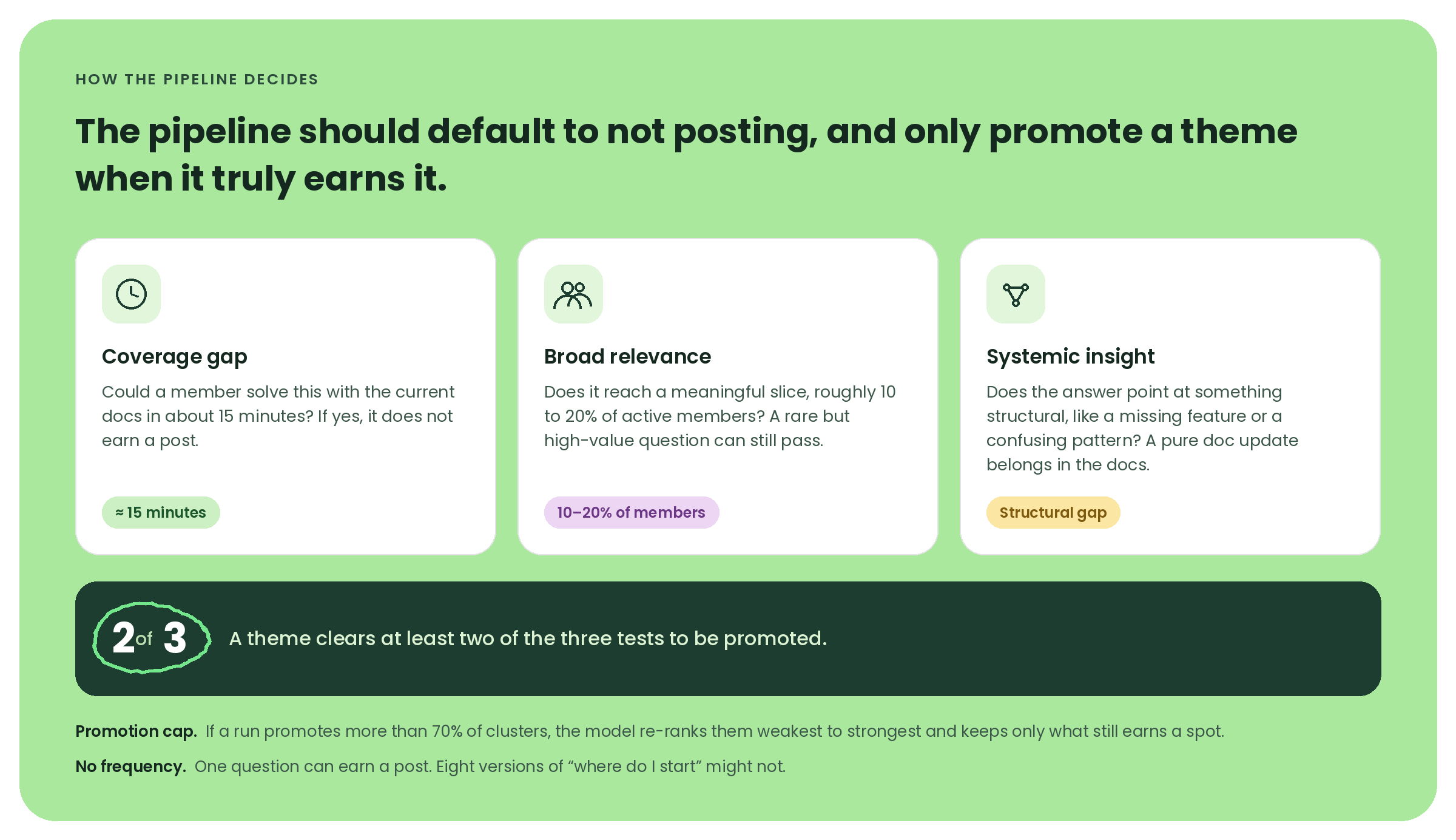
There's also a promotion cap. If the model promotes more than 70% of the clusters in a run, it has to stop, re-rank them from weakest to strongest, and keep only the ones that still clearly earn a spot. That exists because I've found that LLMs love to promote everything when you let them, and the whole point is to stay selective.
The one thing I deliberately left out is frequency. Most community tools sort by how often something comes up, which makes sense for triage because you answer the frequently asked questions first. But for content, that same sorting buries the questions I most wanted to find. So a single question can earn a post if it reveals a real gap, while eight versions of "where do I start" might not (especially because my answer there is usually "just read the docs.").
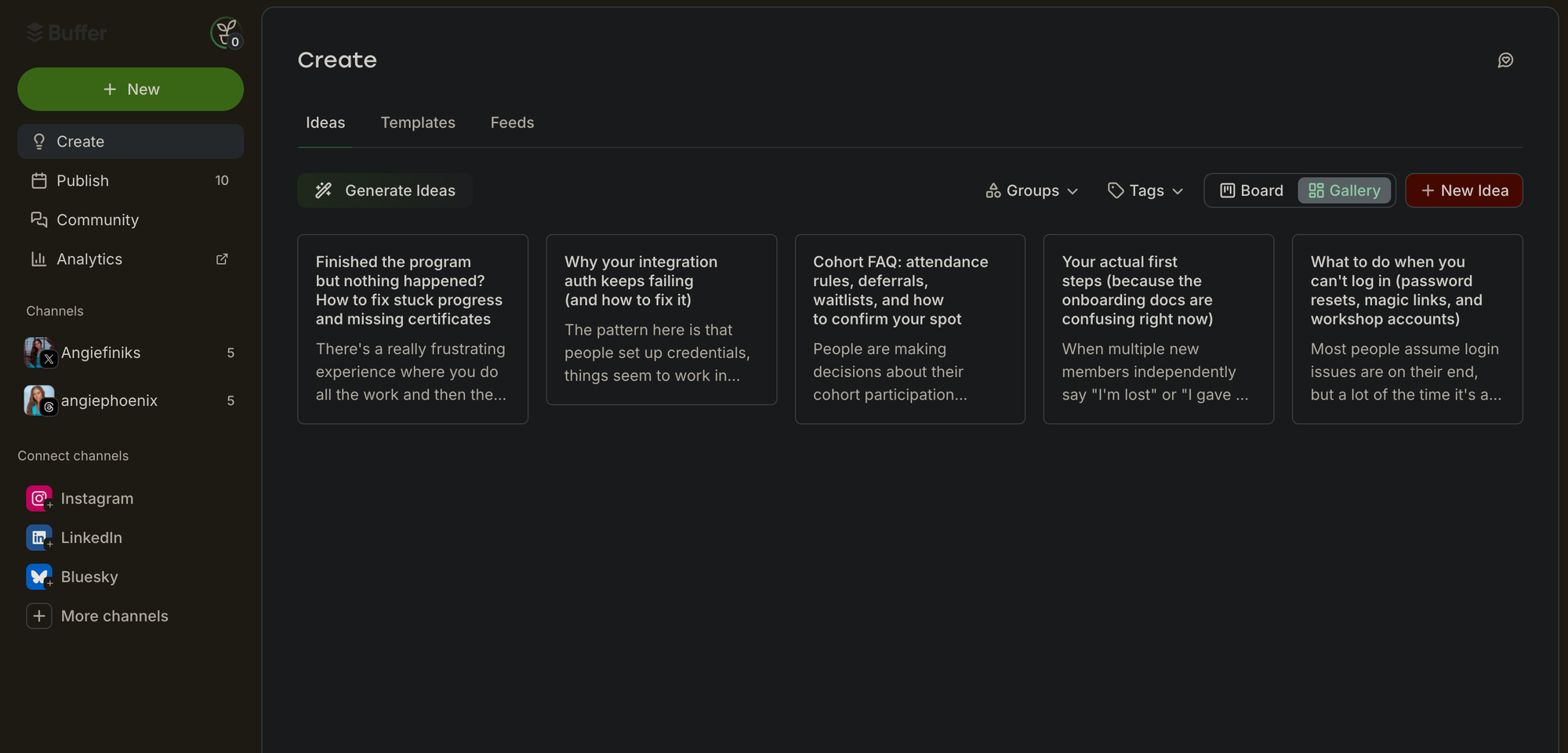
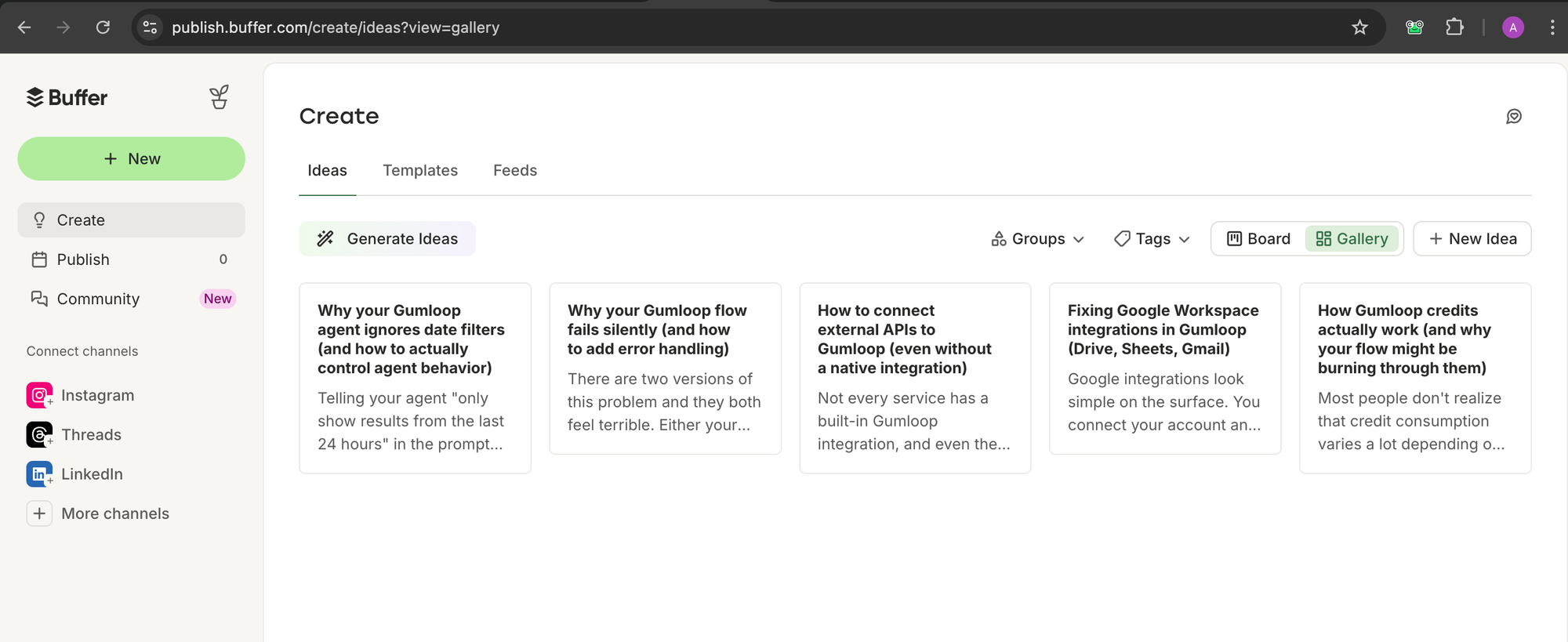
The pipeline scores, drafts, and pushes everything on its own. My review happens at the very end, inside Buffer. Ideas land in the Create space for me to develop, and posts wait in the queue for a final pass before anything goes live.
How Buffer fits into the system
Three custom nodes handle the handoff, each one responsible for a single Buffer API call. The first creates an idea in Buffer's Create space for every promoted theme. The other two queue the posts, one for X and one for Threads, and Buffer spaces them across the days so I never have to set times by hand.
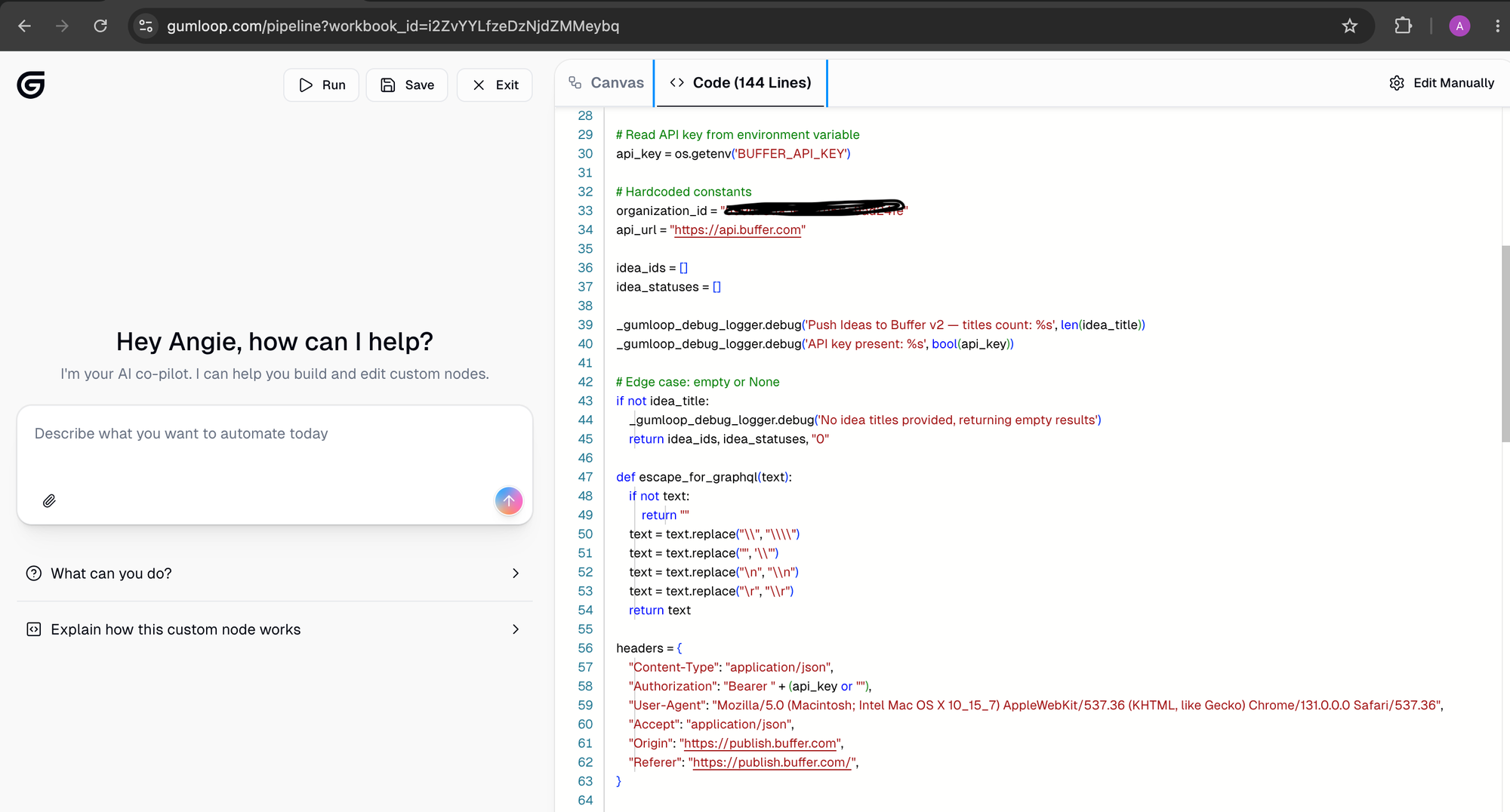
One practical note if you're ever calling Buffer's API from a low-code tool or a script: your requests need to look like they're coming from a browser. Buffer's API sits behind Cloudflare, a security service that filters out automated traffic, and a bare script is exactly what it's built to catch. The fix lives in the headers, the small labels attached to every request that tell the receiving server who's asking and what they want back.
Alongside the two standard ones (the content type and my access token), I added four more that a real browser would normally send:
- which browser it is
- what format it expects back,
- and which site the request is coming from.
With those in place, every call goes through cleanly. The screenshot below shows all six.
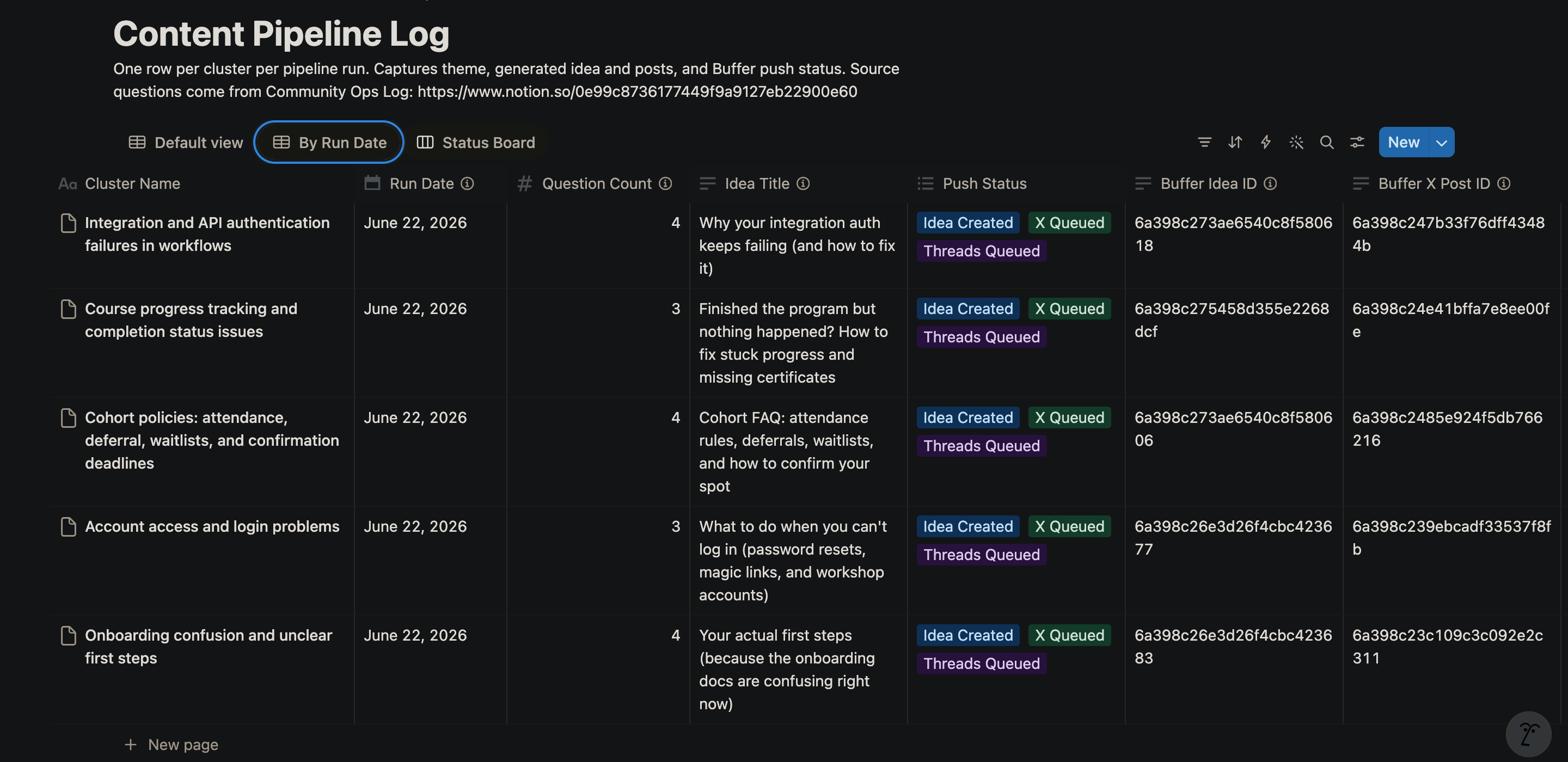
Once the push is complete, the results get sent into a second Notion database, the Content Pipeline Log.
Each theme gets a status like "Idea Created, X Queued, Threads Queued," stored next to the run date and links back to the original questions. So every post traces back to the question that started it. If a post does unusually well, I can find the question behind it and look for nearby ones worth a follow-up, and if anyone on the non-profit board asks how I'm choosing what to publish on our behalf, I can show them the exact question, channel, and date behind every post.
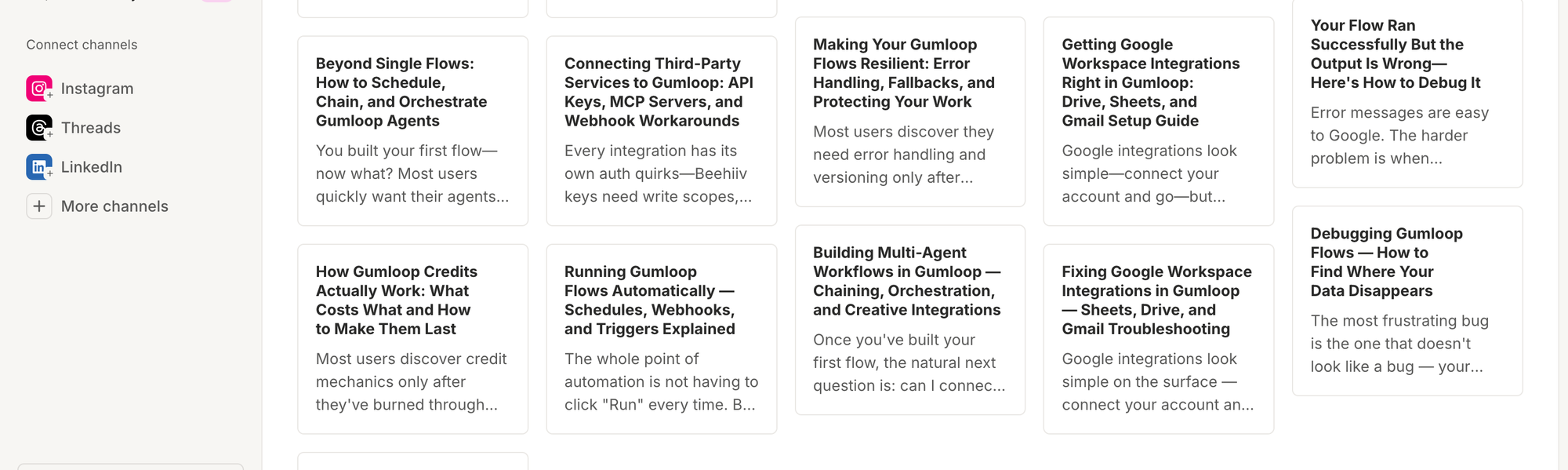
Buffer is also where I review. Ideas land in the Create space for me to develop, and posts wait in the queue for a final pass before anything goes live. The screenshots here are from my first full run, which pulled 18 questions out of the four channels and turned them into five content ideas and 10 scheduled posts, five each for X and Threads.
How I got the posts to sound like me
This was the part I was most worried about going in. I've seen what community content sounds like when generic AI takes the wheel, and I didn't want anything I publish to read like a content bot. So
before I asked the model to generate anything, I showed it samples of how I actually write, so it could pull out the patterns and match them as best it could..
I used four samples: two were peer replies I'd written in our Slack, one was a longer-form post from elsewhere, and one was a DM (where my voice is most authentic).
On top of the samples, I gave the prompt a few hard rules:
- Titles have to be short and specific, with no listicle stacking.
- Posts have to open with the situation, not a hook.
- The tone stays conversational and peer-to-peer.
- And there's a flat ban on em dashes and AI fluff.
That last rule was the one major tweak I had to make between my first and final runs. While the initial output already sounded like me, I noticed a slight over-reliance on em-dashes. I know em dashes are a perfectly good punctuation mark that writers have used for years, but the truth is, I wasn't reaching for them before AI started putting them everywhere. (I genuinely don't know where that key lives on my keyboard.)
The last piece is a self-check. Before the prompt finalizes anything, it scans its own output for the banned patterns and rewrites whatever slipped through. That's the step that catches the small AI-isms that the sample-matching alone misses.
It took a few rounds of testing before the tone really blended. But once it did, the posts started coming out the way I'd write them if I'd sat down and done it myself.
Before vs after showing generic AI-generated posts next to the same post after the voice samples were added.
What's changed so far
The pipeline is recent enough that I don't have hard engagement numbers to point to yet. A few runs have been live for a few weeks, which is enough to feel the difference but not enough to prove it with a chart. But I have noticed a few shifts, especially in the way I work.
First, those 15 to 20 hours a week I'd been pouring into community ops dropped to a fraction of that. The triage, the drafting, and the manual content calendar all happen inside the pipeline now, and what's left for me is the review and approval. That alone was the change I needed most.
Deadlines are much less stressful, too. The most common blockers from past training rounds are already answered in public by the time the next application-day rush hits, so the same questions pile up less. When the flood comes, the answer is often already sitting there waiting.
The change that took the longest to notice is actually the one I care about most. The questions coming in are different now. Instead of re-asking the original problem, people reference the public post and ask the next question on top of it. This is a strong signal that the content is achieving my main goal: reaching members who wouldn't have spoken up in the first place.
Why I built this
The volunteer role isn't a small commitment. Leading a growing community is a real job on top of a real job, and by the time I started looking at automation seriously, it had started creeping into my paid work. I knew I had to do something.
The practical reason is the one most people will relate to. The rest of my community team aren't engineers, so I needed something they could keep running without me. That's what made my specific stack the right fit. Anyone on the team can refine a prompt or adjust a step in Gumloop, and Buffer turns whatever comes out into a real content calendar they can see, schedule from, and trust. Now the work doesn't depend on any one person being awake. Someone can keep things moving whether I'm at my desk or asleep on a different continent.
There's also something about volunteering that keeps drawing me back. Sometimes I think God leads us to give without expectation, to plant seeds we may never personally harvest. Building this was one small way of doing that. Every question in those channels belongs to a real person trying to learn, build, or move forward. The more of those people I could help, the more worthwhile the effort felt.
Ready to build?
If you're taking Buffer's API for a spin, we've got resources to get you moving. Our developer docs cover the GraphQL schema, auth flow, and quick-start examples. The Buffer MCP server docs walk through plugging it into Claude or any MCP-compatible AI agent.
If you need hands-on help, our support team is around, or you can join our Discord server and chat to other people building with the API.
We'd love to hear about what you make. Find us in Discord, or @buffer on all major social channels.
Try Buffer for free
200,000+ creators, small businesses, and marketers use Buffer to grow their audiences every month.