Loomly has a lot going for it. If you’re a small team that needs structured hand-offs, it’s a great pick. Posts move through clear approval steps, each client or brand can live in its own calendar, and the Interactions inbox lets you hand conversations to the right teammate.
It gets harder once your team begins to grow — either in size or in the number of channels you manage.
Loomly's plans don't scale in small steps, and it's one of the things that might send you searching for alternatives:
- Budget: Starter is $65/month for 12 social channels and 3 users, and the next plan up is $332/month. A fourth teammate or a 13th account means a big jump with nothing in between.
- Free plan: There is one, but it's capped at 5 posts a month across 3 social channels.
- Ease of use: The interface can feel clunky, so everyday tasks might take you longer than they should.
- X/Twitter: Loomly doesn't support it, so teams posting on X need a separate tool.
- AI usage: AI is capped on every plan, with “minimal” usage on Free and “limited” on Starter. Loomly doesn’t publish the actual limits, so it's not super clear how close you are to the cap.
I've spent a lot of hands-on time testing Loomly and many of the tools on this list myself (seriously — here’s a look at all the tools I’ve tested over the last few months). Here are eight Loomly alternatives worth a look, what they cost, and where each one shines.
Key takeaways
- Best overall value: Buffer pairs a real free plan with paid plans from $6/channel per month, with X/Twitter included in every plan.
- Best for approval-first collaboration: Planable has strong approval workflows, with sign-off rules per workspace and unlimited users on the entry plan.
- Best for agencies that want to white-label their tools: SocialPilot lets you run the platform under your agency's own name, domain, and branding.
- Best for Instagram-first visual planning: Later's grid preview shows how your feed will look before posts go live.
- Best for proving the ROI of social media: Agorapulse connects to Google Analytics to show which posts bring in traffic, leads, and sales.
- Best for enterprise teams handling customer conversations: Hootsuite's unified social inbox lets large teams assign and answer comments, DMs, ad comments, and support requests.
- Best for social listening: Sprout Social lets you track conversations about your brand across social media, even when people don't tag you.
- Best for analytics and reporting: Metricool brings organic social, paid ads, and website data into reports you can customize and send automatically.
- Pricing reality: Loomly goes straight from $65/month to $332/month once you pass 12 accounts or 3 users. Before you switch, check how each alternative's price grows as you add people and channels.
Loomly alternatives at a glance
| Tool | Best for | Free option | Paid plans from |
|---|---|---|---|
| Buffer | Creators, small businesses, and growing agencies that want a flexible, affordable social media management tool | Free plan (3 channels, 10 scheduled posts per channel) | $6/channel/month |
| Planable | Teams that want approval-first collaboration | Free trial (first 50 posts, no time limit) | $39/workspace/month |
| SocialPilot | Agencies that want to white-label their social media tools | 14-day free trial | $30/month (white-labelling only available on higher tiers) |
| Later | Creators and brands that want Instagram-first visual planning | Free plan (12 posts per month per social channel) | $25/month |
| Agorapulse | Teams that need to show the return on their social media | 30-day free trial | $99/user/month (ROI analysis only available on the $199/month tier) |
| Hootsuite | Enterprise teams that handle a steady stream of customer conversations | 14-day free trial | $149/user/month |
| Sprout Social | Brands that want social listening | 30-day free trial | $99/seat/month (social listening is an add-on on the $249/seat tier) |
| Metricool | Creators and teams that want analytics and reporting | Free plan (1 brand, 20 posts per month) | $25/month |
Jump to a section:
1. Buffer
Best for creators, small businesses, and growing agencies that want a flexible, affordable social media management tool.
| Pricing information | Details |
|---|---|
| Free plan | ✅ 3 channels, 10 scheduled posts per channel |
| Paid plans | Starting at $6/channel per month (billed monthly) |
| Annual billing | 20% off on all paid plans |
| Free trial | ✅ 14 days |
I've been a Buffer user for more than a decade — sometimes alongside other tools my clients used — and after putting so many of the tools on this list through their paces, it's the one I keep coming back to.
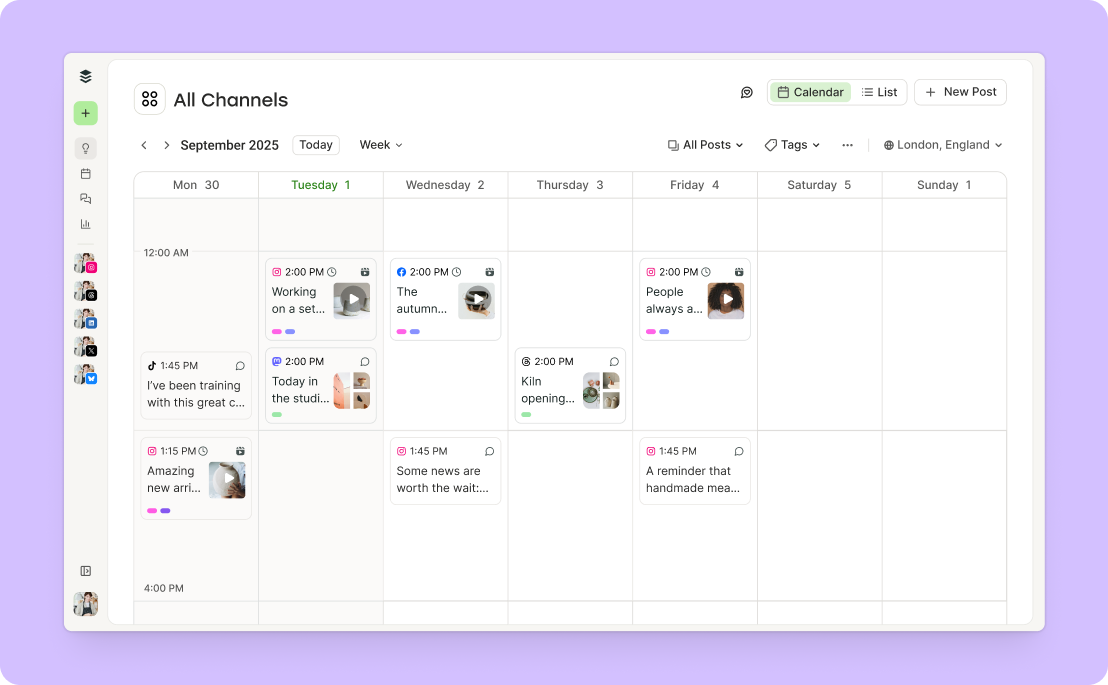
It covers what creators, small teams, and growing agencies need day-to-day. If you're coming from Loomly, a few things stand out right away:
- Pricing for paid plans is per channel, so you pay exactly for what you need
- The Team plan includes unlimited users
- There's a real free plan you can use to publish your posts, engage with your community, access analytics, and use Buffer in your AI platform of choice with the API and MCP
- X/Twitter is included in all plans, including Free
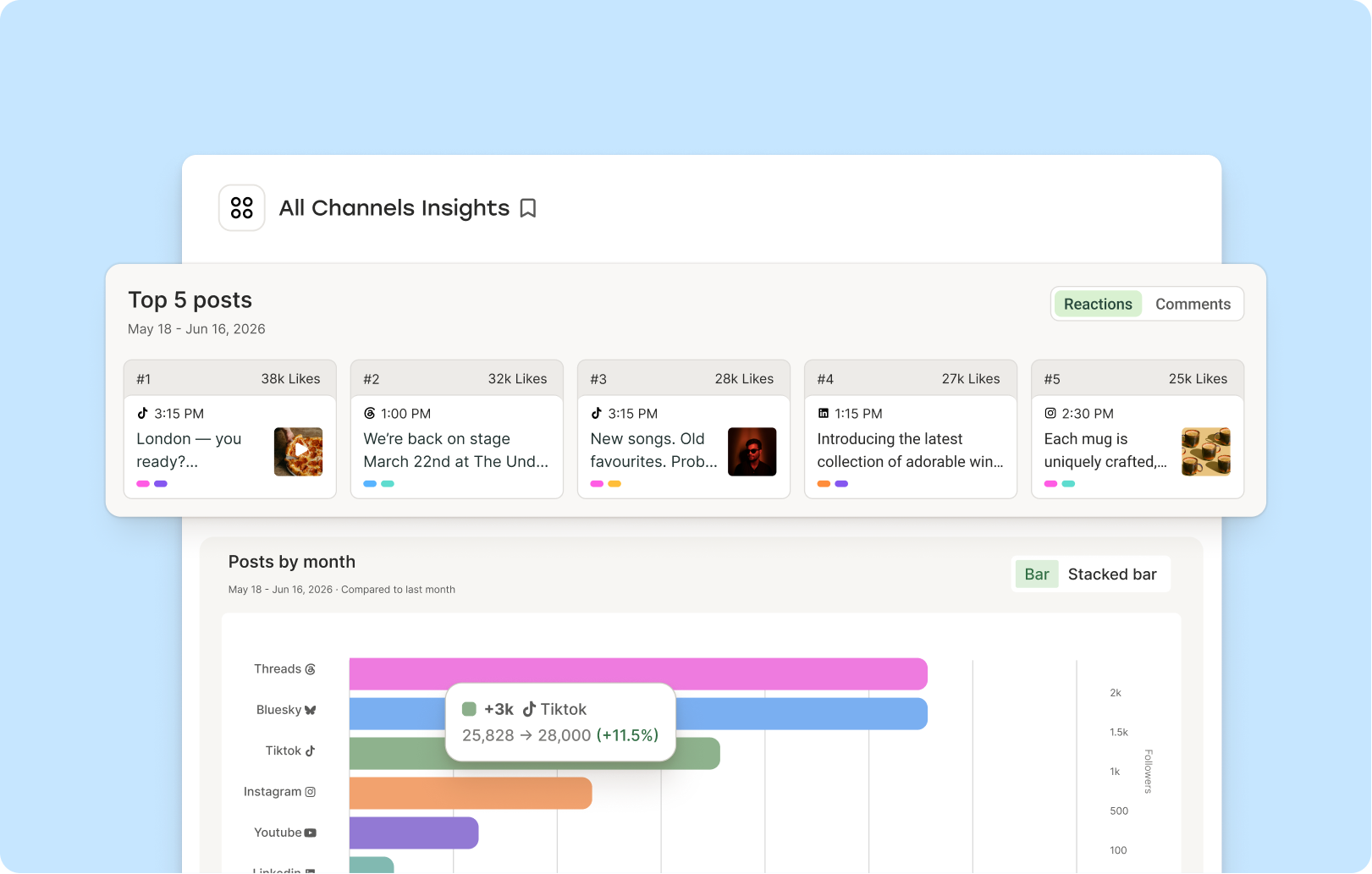
Here's everything you can do on the Free plan:
- Connect the platforms you actually use: Post to Instagram, Facebook, LinkedIn, Twitter/X, TikTok, YouTube, Pinterest, Threads, Bluesky, Google Business Profile, Mastodon, and Substack. (You can connect up to three on the Free plan.)
- Keep up to 30 scheduled posts across three channels: Line up to 10 posts per channel, and a slot frees up each time one publishes. When the same idea suits several platforms, crossposting lets you write it once and adjust the copy for each network in the composer.
- Save ideas until they're ready: The Create Space holds up to 100 ideas, and the template library gives you a head start when the page is blank.
- Build your own workflows: The Buffer API comes with every plan, along with an MCP connection for Claude, ChatGPT, Perplexity, Cursor, and Raycast.
- Answer comments in one place: The Community inbox pulls in comments and mentions from 10 networks, with AI reply suggestions when you want a starting point (five per week on free, unlimited on paid).
- Learn what to do next: Insights shows how your posts perform, and AI-powered takeaways give you practical suggestions for what to do next.
- Draft with AI as often as you like: Buffer's AI Assistant has no usage cap on any plan, so you can brainstorm, rewrite, or repurpose posts without counting credits.
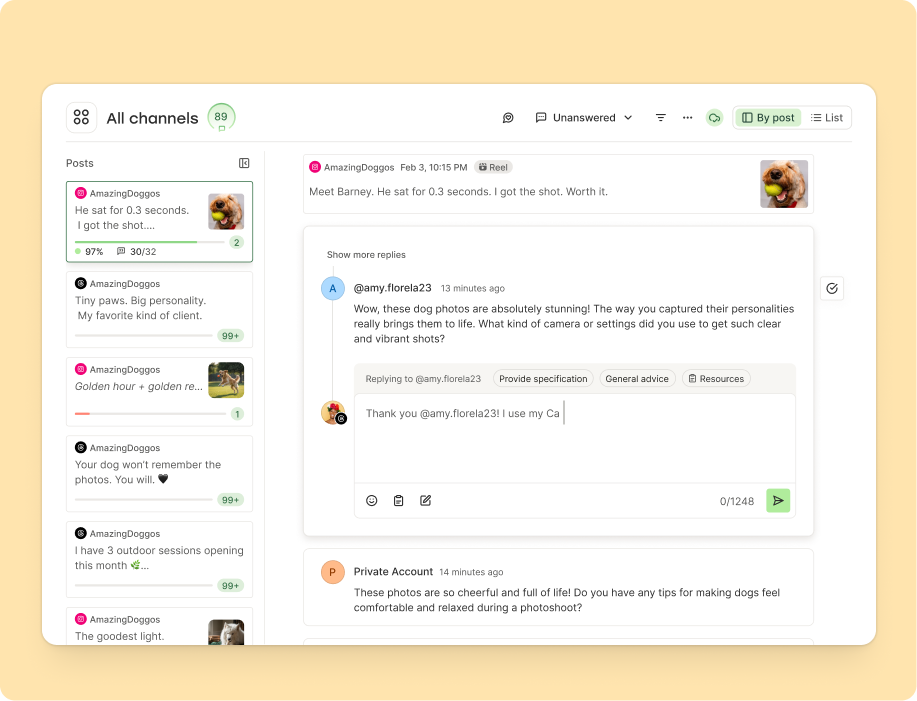
Once you need unlimited scheduled posts or more than three channels, the Essentials plan starts at $6/channel per month for one user.
Every paid plan comes with a 14-day free trial, so you can try the full feature set before you pay.
For teams, the Team plan starts at $12/channel per month and adds the collaboration pieces:
- Unlimited users: Bring on as many teammates or clients as you need without it affecting your bill.
- Permissions by channel: Decide who can publish, who needs approval, and who has no access, channel by channel.
- Approval workflows: Posts from teammates who need sign-off wait for review before they go out.
- Notes and tags on drafts: Leave feedback on posts and tag a teammate so the conversation stays with the content.
Buffer may not be for you if: You need an enterprise tool or features like social listening.
2. Planable
Best for teams that want approval-first collaboration.
| Pricing information | Details |
|---|---|
| Free plan | ❌ No |
| Paid plans | Starting at $39/workspace per month (billed monthly) for 4 social pages and 60 posts per month |
| Annual billing | Two months free |
| Free trial | ✅ First 50 posts free, with no time limit |
Planable is a strong choice for teams where content needs to go through approvals before it goes live. Review and sign-off workflows are built into the platform from the start.

You choose how strict each workspace is before a post can be published: no approval, optional approval, at least one person must approve, or multiple people must approve. Clients and stakeholders can review and approve posts from a link without a full dashboard login.
If sign-off is central to how your team works, Planable matches Loomly's structured approach without the price jump between plans.
You can even lock content so nobody can change anything — media, captions, links, scheduled date and time — once it's approved. If you absolutely need to change something, an approver can unapprove the post to unlock it.
Other standout features:
- Version history for each post lets you see and undo changes.
- The entry plan includes unlimited users, so adding teammates doesn't change your bill.
- Leave comments on a whole post, or select words or sentences and add specific comments or suggestions.
Planable may not be for you if: you need broad platform coverage for managing engagement on social media. Planable's inbox is available for Facebook, Instagram, LinkedIn, and TikTok only.
3. SocialPilot
Best for agencies that want to white-label their social media tools.
| Pricing information | Details |
|---|---|
| Free plan | ❌ No |
| Paid plans | Starting at $30/month (billed monthly) for 7 social accounts and 1 user |
| Annual billing | 15% off |
| Free trial | ✅ 14 days, no credit card required |
SocialPilot is a good choice for agencies that want to offer social media management under their own brand. Its white-label features let you customize the platform with your agency's name, domain, and design.
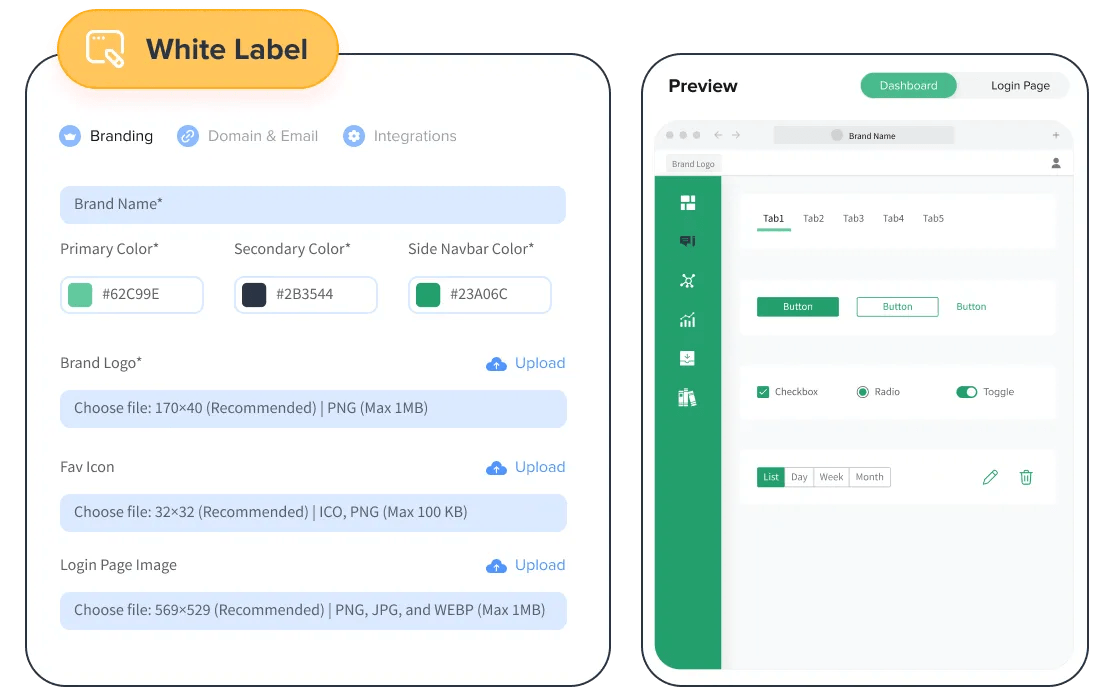
Each client gets their own dashboard in your colors and logo, and analytics reports go out to them automatically with the same branding. Even the automatic emails SocialPilot sends come from your domain. The whole client experience feels like part of your service.
Depending on your plan, you can choose whether to share a workspace with a client or share a link where they can give feedback and sign off on posts without creating an account.
Other standout features:
- Watermark images with your clients' logos to keep visuals on-brand.
- Granular permissions let you control what each teammate can see and do.
- X/Twitter is a supported platform.
SocialPilot may not be for you if: you're managing your own brand, since much of what makes SocialPilot stand out is its client-facing tools that are available at higher tiers.
4. Later
Best for creators and brands that want Instagram-first visual planning.
| Pricing information | Details |
|---|---|
| Free plan | ✅ 12 posts per month per social channel |
| Paid plans | Starting at $25/month (billed monthly) for 1 social set that includes up to 8 social channels |
| Annual billing | 25% off on all paid plans |
| Free trial | ✅ 14 days |
Later is a strong tool for creators and brands who plan their content around how their Instagram feed looks.
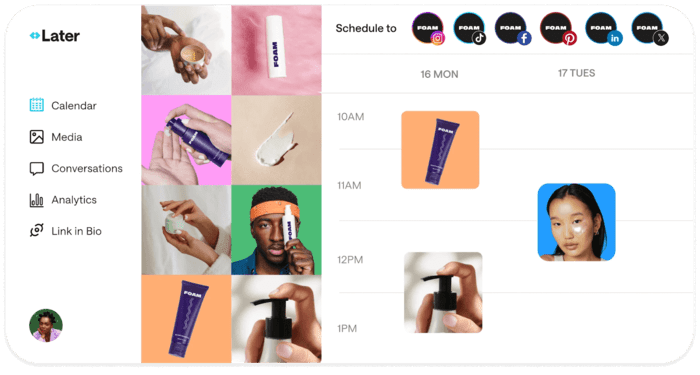
The Instagram grid preview lets you see a post in place before it's scheduled, and the drag-and-drop visual calendar makes it easy to shuffle things around until the feed looks right. If your planning starts with the visuals rather than the caption, you can arrange posts until the grid looks right, then fill in the details. Add music to your reels, invite collaborators, and tag other users from the composer.
On team plans, you can also manage your Instagram (and Facebook) comments and DMs from Later. In all, it's a well-rounded set of tools if Instagram is your main platform.
Like Loomly, Later doesn't support X/Twitter, so that won't change if you switch.
Other standout features:
- A link-in-bio page that connects with Shopify and Mavely, so followers can shop from your posts.
- An influencer marketing product for brands running campaigns with creators.
- Analytics for Instagram, Facebook, TikTok, Threads, and Pinterest, including audience demographics.
Later may not be for you if: You plan and post large campaigns at scale, since it doesn't support scheduling via a CSV file.
5. Agorapulse
Best for teams that need to prove the ROI of social media.
| Pricing information | Details |
|---|---|
| Free plan | ❌ No |
| Paid plans | Starting at $99/user per month (billed monthly) for up to 10 social profiles |
| Annual billing | 20% off on all paid plans |
| Free trial | ✅ 30 days |
Agorapulse is a good fit for teams that need to show how social media contributes to traffic, leads, and sales.
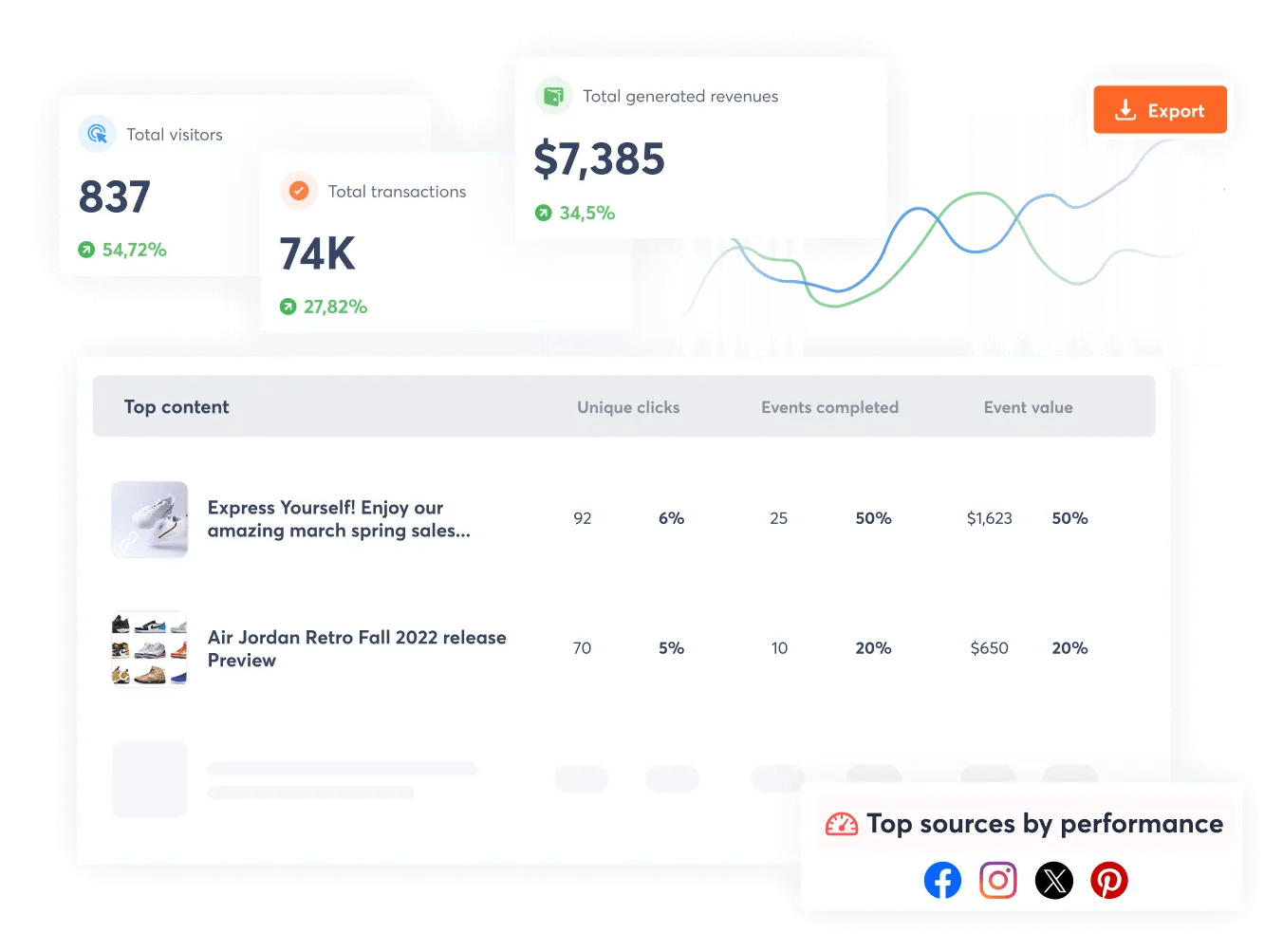
Connect Google Analytics, and Agorapulse shows how much traffic each post, profile, platform, and even team member sends to your website. On higher plans, you can see sign-ups, purchases, and revenue that followed, credited to the post that brought people in.
Replies count too. If you share a link when answering a comment or message, Agorapulse can track the visits it brings in, just like it does for posts. You can export your report to share numbers the next time leadership or clients ask what the ROI of social is.
Other standout features:
- Ad comments from Facebook, Instagram, LinkedIn, and TikTok show up in the same inbox as organic ones.
- Archie, an AI content studio, repurposes long-form content into social posts at scale.
- Sentiment analysis tags comments as positive, negative, or neutral.
Agorapulse may not be for you if: you want a quick read on your numbers, since its custom report builder takes some tweaking to get there.
6. Hootsuite
Best for enterprise teams that handle a large volume of customer conversations and support requests.
| Pricing information | Details |
|---|---|
| Free plan | ❌ No |
| Paid plans | Starting at $149/user per month (billed monthly) for up to 10 social accounts |
| Annual billing | Between 20% and 34% off depending on your plan |
| Free trial | ✅ 14 days |
Hootsuite's inbox is well suited to enterprise teams handling a large number of social media conversations. It brings comments, DMs, ad comments, and customer support requests together so teams can manage them in one place.
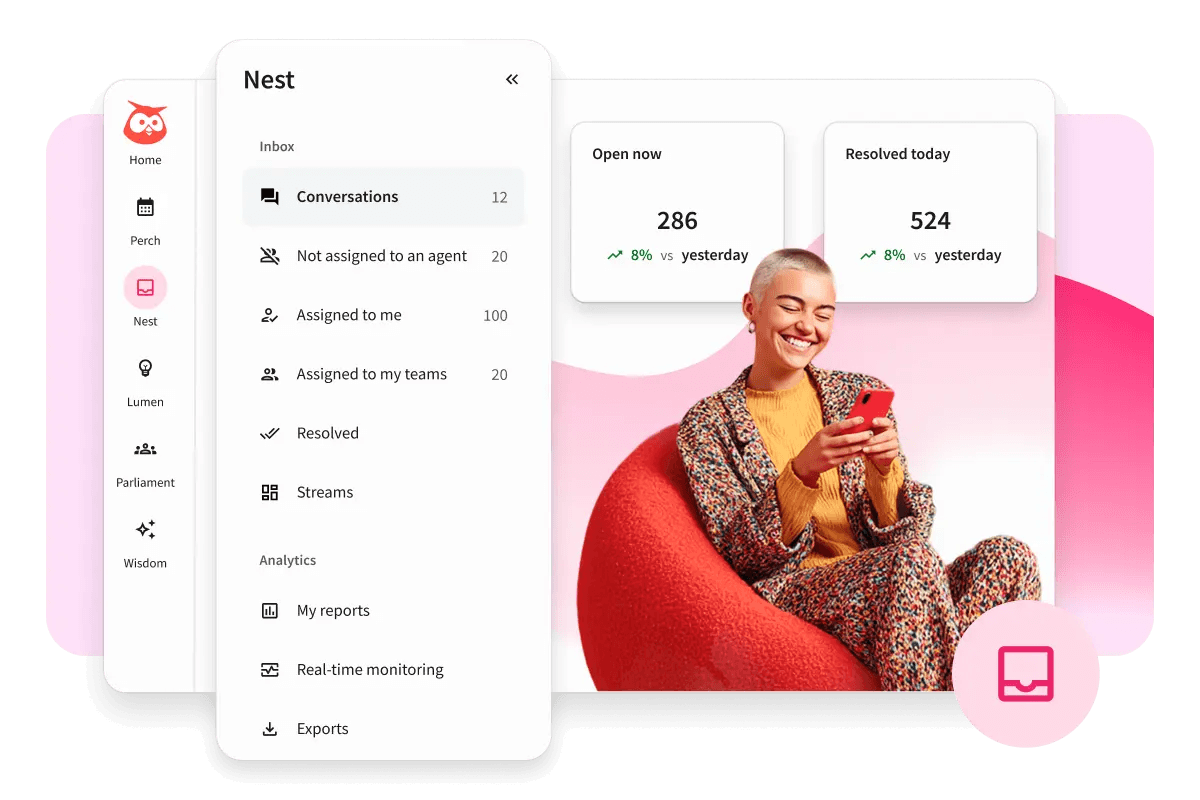
Facebook, Instagram, X, LinkedIn, TikTok, Threads, and WhatsApp all feed into the unified inbox, along with comments on your Meta and LinkedIn ads. Information masking — available on all plans — hides sensitive details in messages, which helps when customers share personal information for a support request.
On higher plans, you can assign any conversation to a teammate and leave notes so they get the full context before picking it up. You can also set up keyword-based automation to reply to comments and Instagram DMs, and check reports on reply times and customer satisfaction to see how your team is doing.
Other standout features:
- Social listening to follow conversations about your brand.
- Ad performance tracking across Facebook, Instagram, LinkedIn, and X/Twitter.
- A Content Library for shared templates and media.
Hootsuite may not be for you if: you're looking for a more affordable alternative to Loomly. With pricing starting at $149 per user per month, Hootsuite is one of the pricier tools on this list.
7. Sprout Social
Best for brands that want to track what people are saying about them on social media.
| Pricing information | Details |
|---|---|
| Free plan | ❌ No |
| Paid plans | Starting at $99/seat per month (billed monthly) for 5 social profiles |
| Annual billing | About 20% off |
| Free trial | ✅ 30 days |
If you use Loomly for social listening, Sprout Social is worth a look. It's a strong tool for brands that want to know what people are saying about them on social media, not just in their own comments and DMs.
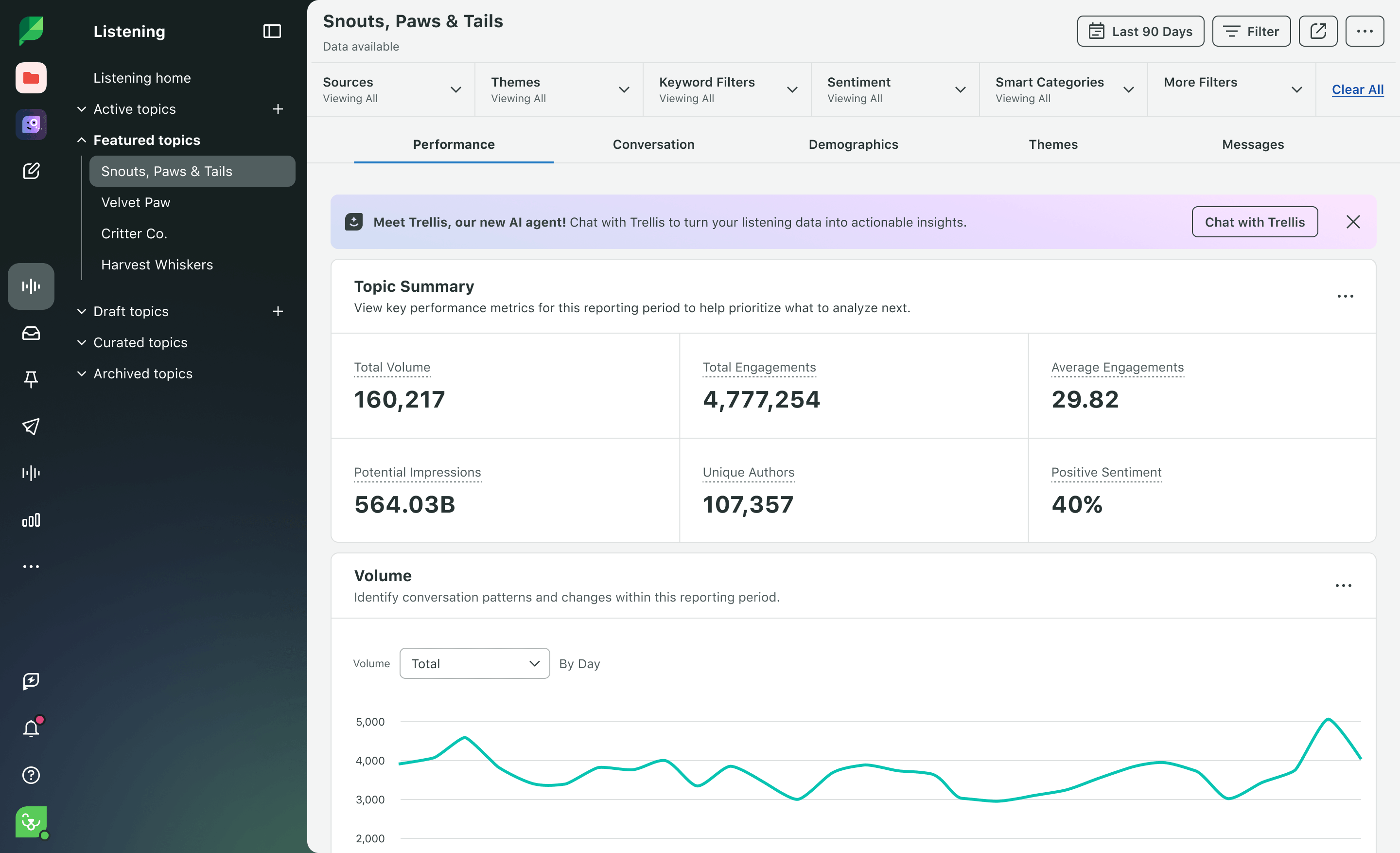
With social listening, you can build a search around your brand, products, or topics of interest and track the conversations about them on Facebook, Instagram, X/Twitter, LinkedIn, YouTube, Reddit, and Tumblr — even when people don't tag you. It's an opportunity to spot trends and get unfiltered feedback you may not get in your own comments.
You can also use listening to monitor mentions and conversations about your competitors, so you can see how people feel about them too.
It's worth noting that social listening isn't included in the base price. It's a paid add-on from the Standard plan ($199/seat per month) up..
Other standout features:
- One of the few tools on this list that supports Snapchat.
- Connects to review sites like Glassdoor and Yelp so you can also keep up with reviews.
- Offers an influencer marketing platform, which is also a paid add-on.
Sprout Social may not be for you if: you work with a large team, since it bills per user.
8. Metricool
Best for creators and teams that want in-depth analytics and reporting.
| Pricing information | Details |
|---|---|
| Free plan | ✅ 1 brand, 20 posts per month |
| Paid plans | Starting at $25/month (billed monthly) for up to 5 brands |
| Annual billing | 20% off on all paid plans |
| Free trial | ✅ 14 days |
Metricool is a good fit if you want to see how your social media posts, paid ads, and website traffic are performing without checking three different dashboards.
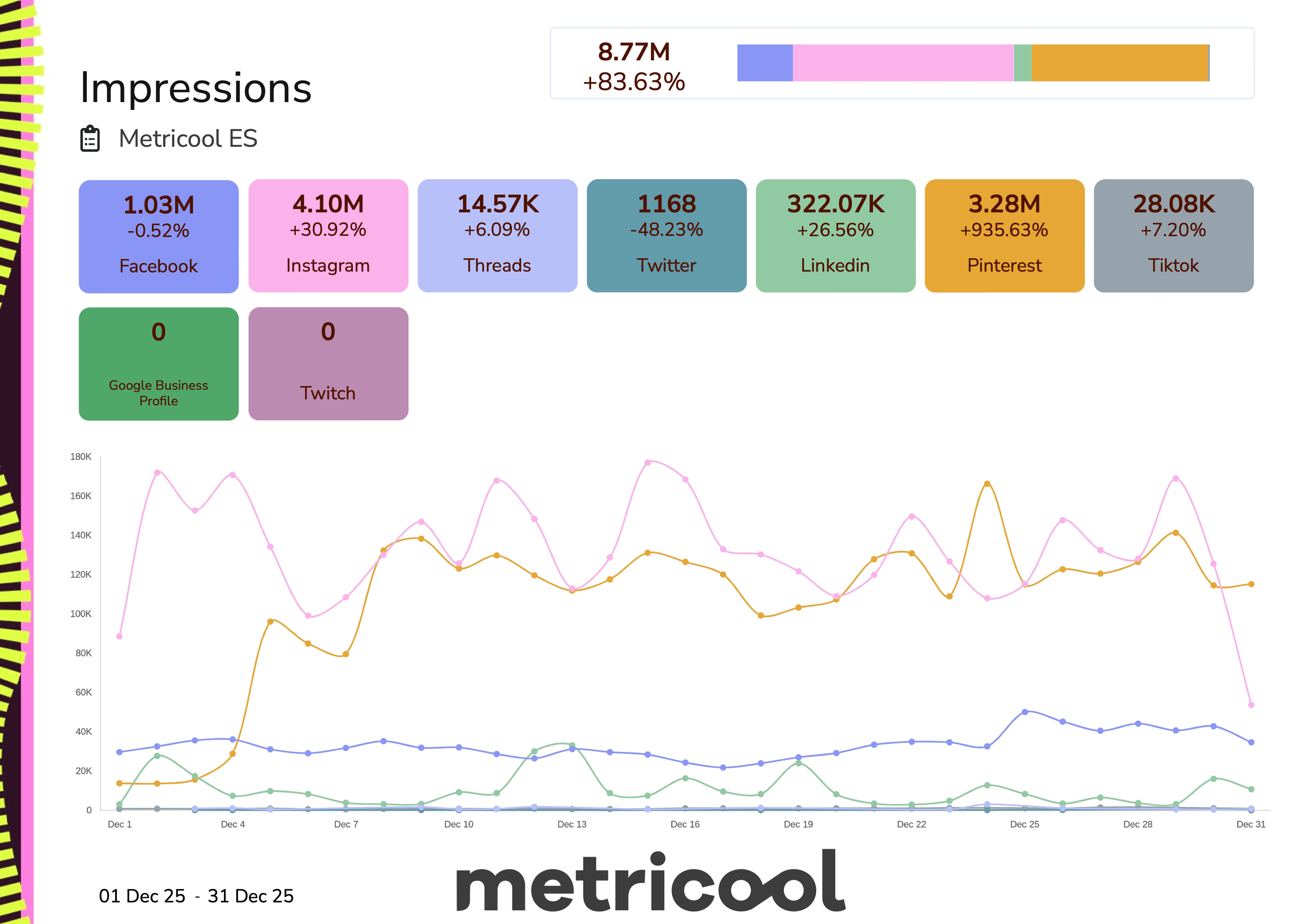
You can manage Meta, Google, and TikTok ads alongside your organic posts. That makes it easier to see how your paid and organic content compares during a campaign or launch, including which posts are getting attention and which ads are delivering results.
Metricool also tracks which social media posts send people to your website, so you can see what's driving traffic beyond likes and comments.
When it's time to share the results, you can build a report with the metrics you want, export it as a PDF or PowerPoint, or schedule it to land in someone's inbox every month. If you're already using Data Studio (formerly known as Looker Studio), you can connect Metricool to that, too.
Basic analytics come with the entry paid plan, while the full analytics suite, custom reports, and complete X analytics need a higher plan or a paid add-on.
Other standout features:
- Give Metricool context on your brand voice so AI-generated posts and captions sound more like you.
- Flows automate keyword-triggered replies and DMs on Instagram, plus comment replies on TikTok.
- MCP access on every plan lets you connect Metricool to compatible AI agents and assistants.
Metricool may not be for you if: you prefer scheduling your regular content through a queue. Metricool's queue-style scheduling is limited to autolists, which are designed for recycling evergreen posts.
How to find the right Loomly alternative for you
A roundup is a good place to start, but the right tool comes down to how your team works day to day. These questions can help you narrow the list.
- What's your budget, and how will it grow? Buffer's pricing is flexible, starting at $6/channel per month, with a free plan for up to 3 channels. Later and Metricool also have free plans. If you're adding teammates, per-user pricing at Agorapulse, Hootsuite, and Sprout Social adds up quickly, while both Buffer and Planable include unlimited users on team plans.
- How central are approvals to your process? Planable is a good fit if sign-off is the heart of your workflow, with optional or required approvals and outside reviewers who don't need a login. Buffer's Team plan adds approval workflows and per-channel permissions if you want approvals alongside publishing, engagement, and analytics.
- Are you an agency? SocialPilot is a good fit if you want branded dashboards and reports for clients, and Planable makes getting client approvals simple. Buffer works well if you want an affordable way to manage many client channels with unlimited teammates.
- Do you post on X/Twitter? Buffer, SocialPilot, Hootsuite, and Sprout Social support it. Metricool and Agorapulse do too, as a paid add-on.
- How busy is your inbox? If your team handles a steady stream of customer conversations, Hootsuite brings comments, DMs, and ad comments into one inbox, with assignment and notes for larger teams. If you run ads, Agorapulse also keeps ad comments next to organic ones. Buffer's Community inbox is a good fit if you want to quickly respond to comments and mentions, with saved replies and AI reply suggestions.
- How deep do you go on analytics? Metricool is a good fit for detailed reports that bring social, paid ads, and website traffic together, and Agorapulse is a good fit if you need to prove ROI, with traffic, leads, and sales tied to individual posts. Buffer's Insights is a good fit if you want clear numbers, with AI-powered takeaways that suggest your next move.
- Is Instagram your main channel? Later's grid preview and visual calendar are a good fit for feed-first planning. Buffer's Instagram features include adding music to reels, publishing a first comment, and adding a location to posts. Metricool and Hootsuite offer Instagram DM automation.
Each tool here has a free trial or a free plan, and some, including Buffer, offer both. Choose two or three that match your answers and use them alongside Loomly for a couple of weeks to see how they hold up in your real workflow.
If you give Buffer a try and it clicks, welcome aboard! And if another tool here suits your team better, that's a great outcome too.
FAQs about Loomly alternatives
Does Loomly have a free plan?
Yes, though it isn't listed on the pricing page. The Free plan includes one user, three social accounts, and up to five posts per month across those accounts. It's enough to try the basics, but regular posting on Loomly needs a paid plan.
Is there a free alternative to Loomly?
Yes, there are several. Buffer's Free plan includes three channels with up to 10 scheduled posts each at a time (refilled as they publish), the AI Assistant, the Community inbox, analytics, and API access, with X/Twitter included. Later's free plan suits Instagram-first planning with up to 12 posts a month per social channel, and Metricool's covers one brand and 20 posts per month.
What's the best Loomly alternative for agencies?
SocialPilot offers white-label client dashboards and branded client reports on its higher plans, plus client seats for sharing workspaces. Planable lets clients approve posts from a link without a full login, and its entry plan includes unlimited users. Buffer's Team plan includes unlimited users, per-channel permissions, and approval workflows from $12/channel per month.
Which Loomly alternatives support X/Twitter?
Buffer supports X/Twitter on every plan, Free included. SocialPilot, Hootsuite, and Sprout Social support it too, and Metricool and Agorapulse offer it as a paid add-on. Loomly doesn't support X/Twitter.
Is Loomly more expensive than its alternatives?
It depends on your team size. Loomly's Starter plan is $65/month for 12 social accounts and three users, and the next plan is $332/month. Buffer starts at $6/channel per month, SocialPilot at $30/month, and Later and Metricool at $25/month, while Agorapulse, Sprout Social, and Hootsuite charge per user or seat, starting between $99 and $149 each month.
How do I choose the right Loomly alternative?
Start with the reason you're looking: price, X/Twitter support, analytics, approvals, automation, or something else entirely. Shortlist two or three tools that cover it, then use their free trials or free plans alongside Loomly for a couple of weeks before you switch.
Can I switch from Loomly without losing my content?
Your published posts stay on the social platforms themselves, so switching tools won't remove them. Connect your accounts to the new tool before you cancel Loomly, then move over any posts that are still scheduled. Some tools, including Buffer, also pull in past posts and data when you connect, depending on what each platform allows.
Try Buffer for free
200,000+ creators, small businesses, and marketers use Buffer to grow their audiences every month.