With more than 40 million registered users, Bluesky is one of the fastest-growing social networks out there.
Among the new wave of fediverse platforms and decentralized networks, Bluesky is possibly the easiest to get to grips with, thanks to its clean interface and ever-increasing community of all sorts of creators. From science to K-pop, there’s a space for everyone on the network.
If you’re new to Bluesky and the world of decentralized social media, here’s a quick summary: Bluesky was created by former Twitter CEO Jack Dorsey, and is a decentralized social network built on an open-source protocol called AT Protocol.
With the protocol, Bluesky’s mission is to create “an open foundation for the social internet so that we can all shape its future” because “social media is too important to be controlled by a few corporations.”
Here’s a great graphic by artist Davis Bickford that explains the company’s vision:
To mark the occasion, we teamed up with @davis.social to create a comic illustrating what Bluesky is all about. See if you can spot the easter eggs! 👀 [1/3]
— Bluesky (@bsky.app) Feb 6, 2024 at 16:10
[image or embed]
Key takeaways
- App passwords: To connect Bluesky to third-party tools like Buffer, you must generate a specific app password in your Bluesky settings rather than using your main login password.
- No native scheduling: Bluesky does not currently offer a built-in scheduling feature, making external tools necessary for planning content.
- Crossposting: You can use Buffer to post simultaneously to Bluesky, Mastodon, and other platforms to save time.
- Thread support: Buffer allows creating and scheduling full Bluesky threads.
- Self-hosting: Buffer supports users who choose to self-host their own Bluesky instances on private servers.
Initially an invite-only network, Bluesky opened its proverbial doors in February 2024, welcoming more than one million new users in just one day.
That said, adding another platform to your social media mix is a big decision. We hope to make that a little easier with Buffer's planning, publishing, and crossposting features.
Why bother scheduling your Bluesky posts? A few good reasons:
- Stay consistent without being online 24/7. Bluesky moves fast, and a steady posting rhythm helps you stay visible.
- Free up time for conversations. When your publishing is handled, you can focus on replying, connecting, and actually being part of the community.
- Plan across platforms. If you're posting to Bluesky, X, Threads, and Mastodon, scheduling lets you coordinate your messaging in one go.
- Post when your audience is scrolling. Schedule your content to go live at times that work for your followers, even if that's 3 a.m. your time.
Another helpful feature: Buffer lets you crosspost your Bluesky content to platforms like X, Threads, Mastodon, LinkedIn, and more, all from a single composer.
One thing worth knowing for those familiar with decentralized networks: while Bluesky is decentralized, it’s not technically part of the fediverse. That’s because Bluesky’s AT Protocol is different from ActivityPub, the open protocol that fediverse platforms like Mastodon and Threads use. But with Buffer, you can bridge that gap by crossposting to both.
Sound good? Whether you're just getting started on Bluesky or ready to dive in, here's how to connect your account to Buffer and start posting.
Jump to a section:
Connect your Bluesky account to Buffer
First things first: before you can schedule or crosspost, you'll need to add Bluesky as a channel in Buffer. It only takes a few minutes.
- Sign in to Buffer (if you’ve not yet signed up, no sweat — you can do that for free here).
- In a new tab, sign in to Bluesky.
- In Buffer, navigate to publish.buffer.com. On the left-hand side of the screen, click the + button next to Channels.
- Choose Bluesky in the dialog box.
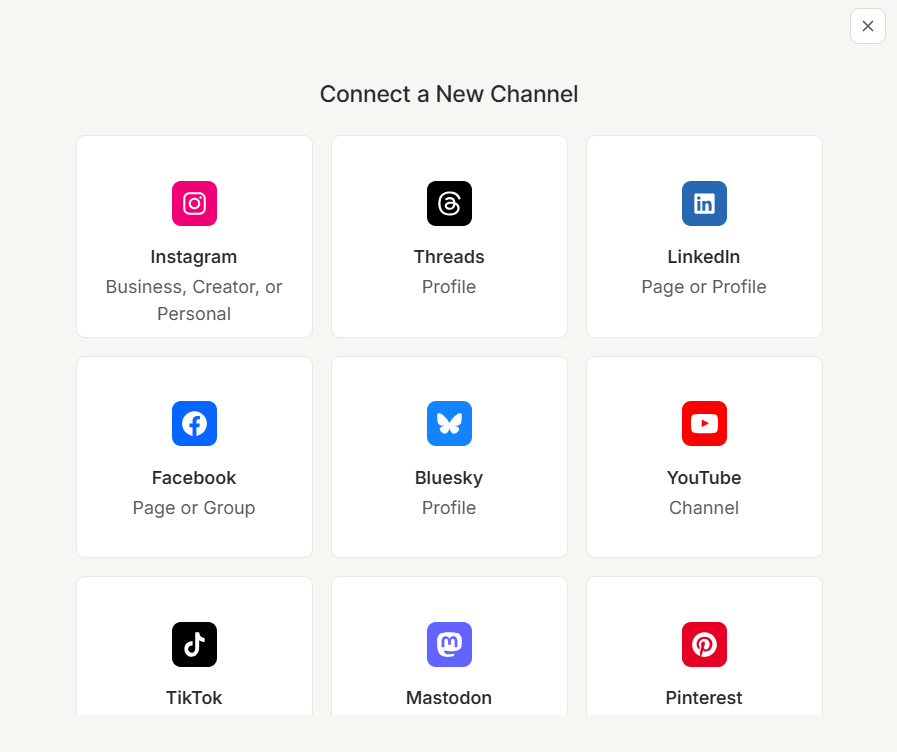
- This will open the dialog box below:
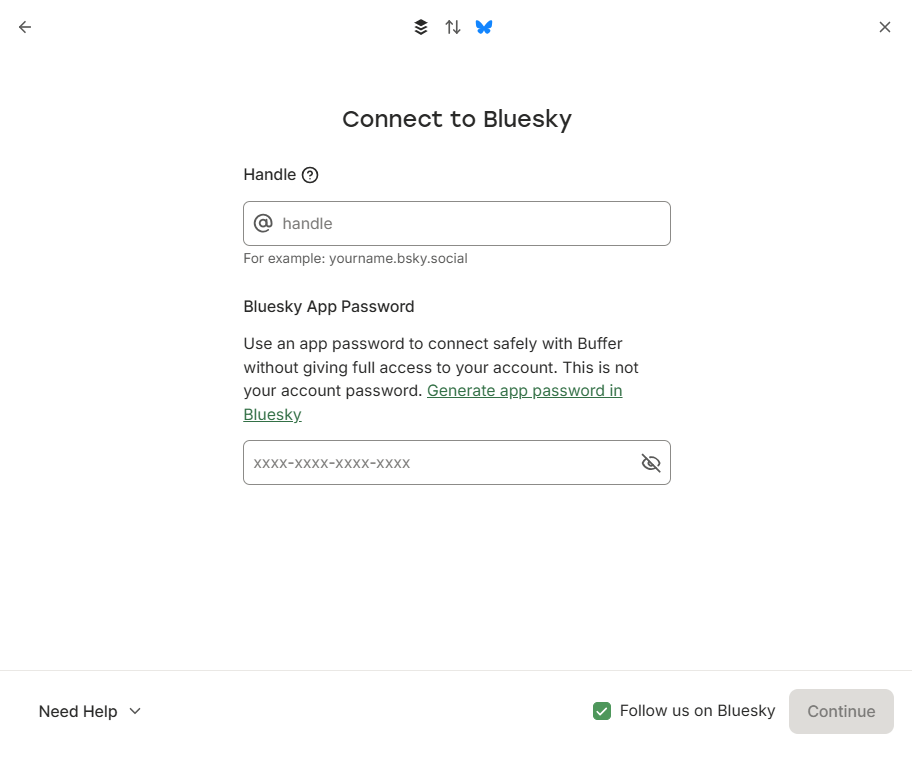
- Leave your Buffer tab open, and navigate to your Bluesky tab. Click the profile icon on the left-hand side to go to your profile page.
- At the top of the page under your name, you’ll find your Bluesky handle. Unless you’ve customized your domain, it should look something like this: @yourname.bksy.social.
- Copy that over to the dialog box you left open in Buffer.
- Now head back to Bluesky. Click on the settings cog on the left to navigate to the Settings menu. Choose Privacy and Security to find the App passwords option.
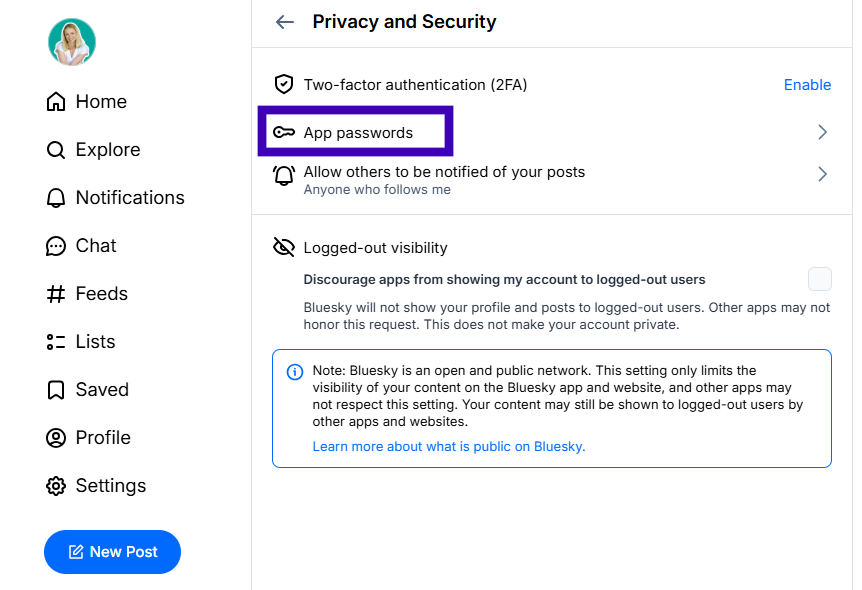
- Click Add App Password
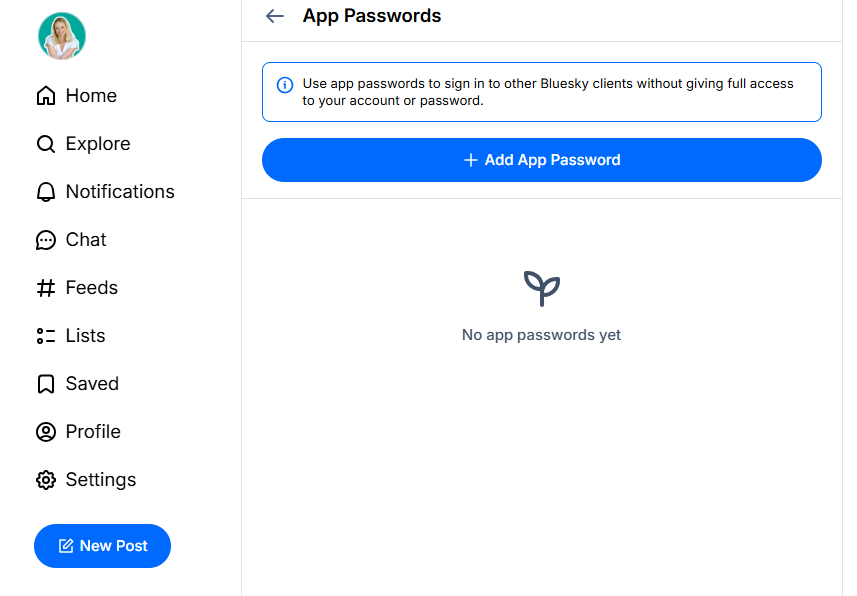
- This will open a dialog box that allows you to create a new app password. You can stick with the default password name or create your own. (Note that this is not your login password. It’s more like a key that will unlock Bluesky for your Buffer account.)
- Your password will appear in the next window. Copy that and head back to Buffer, where you can paste it into the Bluesky App Password box.
- Click Continue, and you’re all done. And you're all set. Your Bluesky account is now connected to Buffer.
Schedule and crosspost your Bluesky content
Here’s the 30-second version:
- Open Buffer and click + New.
- Select Bluesky (and any other channels)
- Draft your text, images, or video.
- Choose when you'd like to post.
- Review it any time from your Buffer calendar.
There are many routes to creating a new post in Buffer. We'll start with the + New button on the top right of publish.buffer.com.(You can also create posts by clicking the + icon next to any channel, or by clicking on calendar or queue slots.)
The process will be similar for whichever option you choose.
- Log in to Buffer, then click on the Publish tab at the top.
- Click the + New button on the top right.
- In the composer window, be sure to choose Bluesky from your channels list at the top. To crosspost, choose the other channels you want to publish to as well.
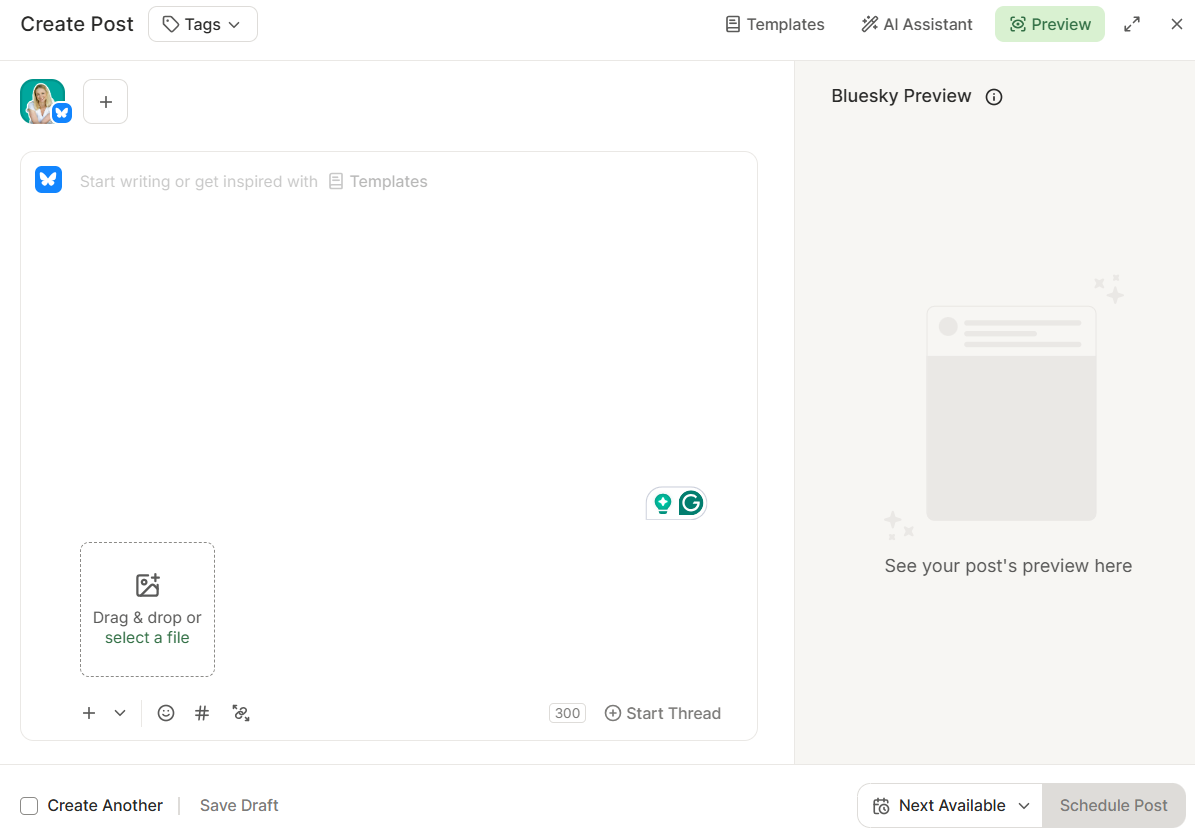
- Add your text or media to the main composer window. Bluesky posts can be up to 300 characters and support up to four images or one video (up to three minutes long). You can also add alt text to your images directly in the Buffer composer to make your content more accessible — something Bluesky actively encourages.
- If you’re crossposting, you can customize for each platform by clicking within the boxes that correspond to each of the channels you’ve selected.
- When you’re ready to post, pick your preferred option:
- Next Available: Publish in the next available slot in each platform’s custom queue
- Prioritize: Bump your post to the top of the queue
- Now: Publish right away
- Set Date and Time: Publish at a specific time
- To move your posts around, head to your calendar in Buffer and drag the post to a new slot, or hover over the post and click Edit.
And that's it. Your post is scheduled and ready to go live on your chosen platforms at your chosen times. One less thing to worry about.
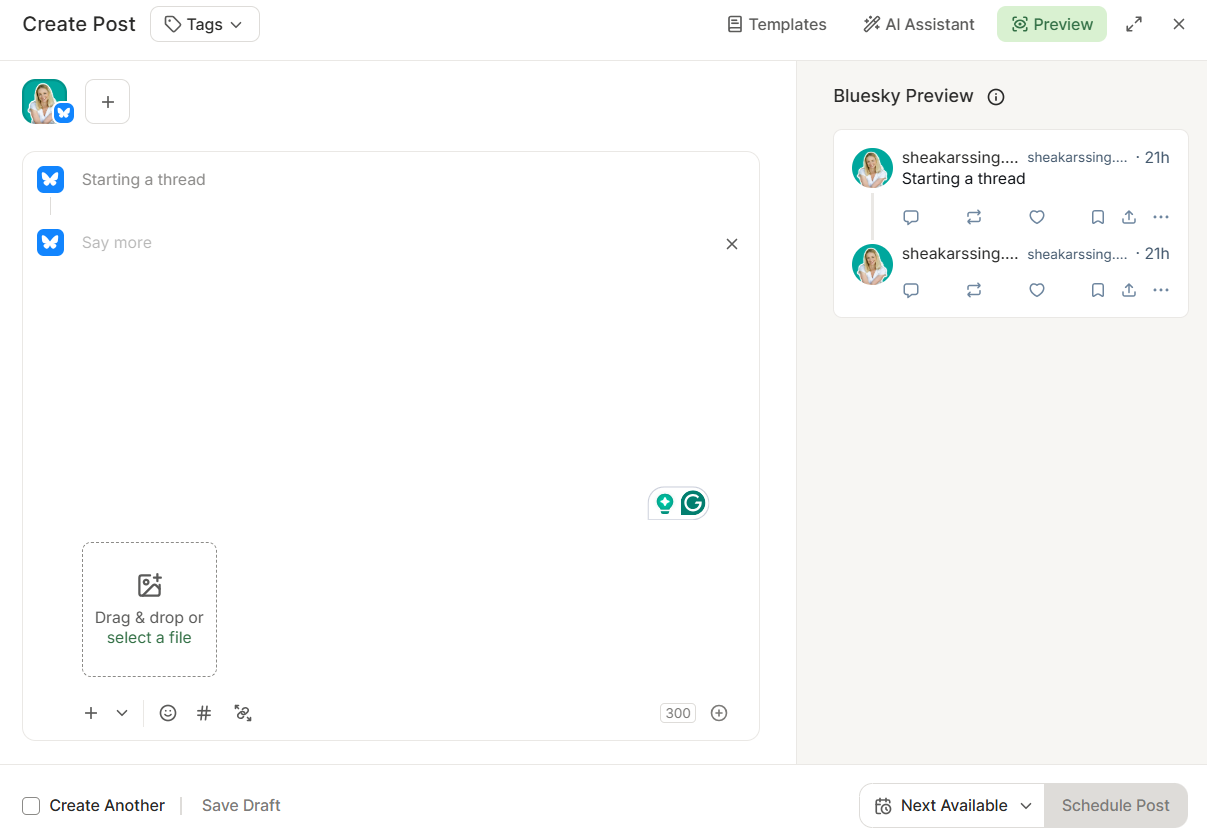
Want to create a Bluesky thread? In the Buffer composer, click Start thread at the bottom of the editor. Add each post in the thread using the + button, then schedule or publish as usual. Buffer will post the entire thread in order, right on time.
Once your posts are live, Buffer can help you stay on top of the conversation, too. With Buffer's Community tool, you can view and reply to your Bluesky comments directly from Buffer — no tab-switching needed. And if you want to see what's working, Buffer's analytics let you track engagement and follower growth right from your dashboard.
Let’s connect on Bluesky
Bluesky is a platform worth being on right now, and I'd love to connect with you there. You can find me here and Buffer here.
I hope this guide made things easier. If you run into any questions as you're getting set up, our support team is always here to help.
FAQs about Bluesky
What if I'm self-hosting my Bluesky account — can I still use Buffer?
You can; we support custom servers in Buffer, so go ahead and connect your account.
What is self-hosting?
Self-hosting means running your Bluesky account on a server you control, rather than on Bluesky's default servers. Most people use the standard Bluesky-hosted instance when they sign up. If you'd prefer more control over your data, you can host your own instance instead. It's similar to the difference between using a hosted website builder and running your own server.
Does Bluesky have built-in scheduling?
Not yet; Bluesky doesn't offer any built-in scheduling tools right now, so if you want to schedule, you'll need a third-party tool. You can connect your Bluesky account to Buffer, pick a time (or add it to your queue), and Buffer will publish it for you, even while you're offline.
Can I schedule Bluesky threads in Buffer?
While Bluesky supports threads natively, it doesn't currently let you schedule them. Buffer lets you create and schedule complete threads ahead of time. However, you can schedule threads with Buffer. In the Buffer composer, click Start thread, add each post, and then choose when you want it to go live. We'll publish the entire thread in order, right on time.
Can I crosspost my Bluesky content to other platforms with Buffer?
Yes, you can. In the Buffer composer, select Bluesky along with any other channels you'd like. Customize each version if needed, pick your times, and we'll take care of publishing to every platform.
Can I schedule Bluesky posts from my phone?
Yes. Download the Buffer app for iOS or Android, connect your Bluesky account, and you can draft, schedule, and manage your posts right from your phone.
What types of media can I include in a scheduled Bluesky post?
When composing a Bluesky post in Buffer, you can include text, images, and video. You can also add alt text to any image directly in the Buffer composer. Just click the image after uploading. It's a small step that makes your content more accessible to everyone.
Is Buffer free to use for scheduling Bluesky posts?
Yes. Buffer has a free plan that lets you connect a Bluesky account and schedule posts right away, with no credit card required. Paid plans add more channels, a higher scheduling limit, and other features. You can get started and upgrade whenever it makes sense for you.
More Bluesky resources
If you’re new to the platform (or want to level up), we have a bunch of resources to help make things a little easier. Here’s my recommended reading:
- What is Bluesky? Here's What You Should Know
- What You Need to Know About How to Use Bluesky
- 7 Bluesky Content Ideas and Tips for Your Next Post
- All of Bluesky’s Features (So Far) and How to Use Them
- Bluesky Verification is Here: How the Blue Check Works
- Subscriptions and Monetization are Coming to Bluesky — Here's How
Try Buffer for free
200,000+ creators, small businesses, and marketers use Buffer to grow their audiences every month.