Top navigation

Buffer

Buffer's features

  • CreateBuild your own library of content ideas
  • PublishPlan and schedule your content across social media platforms
  • InsightsNewUnderstand your performance and what to post next
  • CommunityEasily engage with your community
  • CollaborateWork together seamlessly, from planning to publishing
  • Start PageBuild a custom link-in-bio page in minutes
  • AI AssistantGet help creating, refining, and repurposing content
  • APIConnect Buffer to your agents, automation tools, or build something entirely new

Channels

  • InstagramFacebookTikTok
  • LinkedInX (Twitter)YouTube
  • ThreadsPinterestGoogle Business Profile
  • BlueskyMastodon

Tools

  • CanvaGoogle Drive
  • ZapierUnsplash
  • DropboxClaude
See all app integrations

Made for

  • CreatorsGrow your community with confidence, not complexity
  • Small BusinessA simpler way to manage your small business’ social media
  • AgenciesRun every client’s social with clarity
  • NonprofitsMade for small teams doing big things
  • Higher EducationSocial media management built for schools and universities
  • DevelopersAdd a social layer for whatever you're building

Buffer's resources

  • BlogReal-life stories and resources on growing an engaged audience
  • TemplatesPlug-and-play content templates to jump-start your planning
  • Free ToolsEasy-to-use tools to grow your presence across social media
  • Our CommunityLearn, connect, and grow with creators around the world
  • SupportHelp articles and tutorials to get the most out of Buffer
  • Developer DocsConnect Buffer to your agents, automation tools, or build something entirely new
  • Case StudiesHow power users get more from Buffer.
Pricing
Log inGet started for free

Breadcrumbs

  • Social Media Terms
  • LinkedIn Company Page

LinkedIn Company Page

A LinkedIn Company Page is your brand’s public profile on LinkedIn, designed to help your business establish and grow its presence on the platform.

What is a LinkedIn Company Page?

A LinkedIn Company Page, also known as a LinkedIn Page, is your brand’s public profile on LinkedIn, designed to help your business establish and grow its presence on the platform.

LinkedIn Company Pages are a great platform for brands to give details about their businesses and the people that work there, post industry updates, announce new product launches, share new job opportunities, and much more.

For example, at Buffer, we use our LinkedIn Company Page to share details about what our business is all about, showcase our teammates, share transparently what we’re working on, and announce new features and tools.
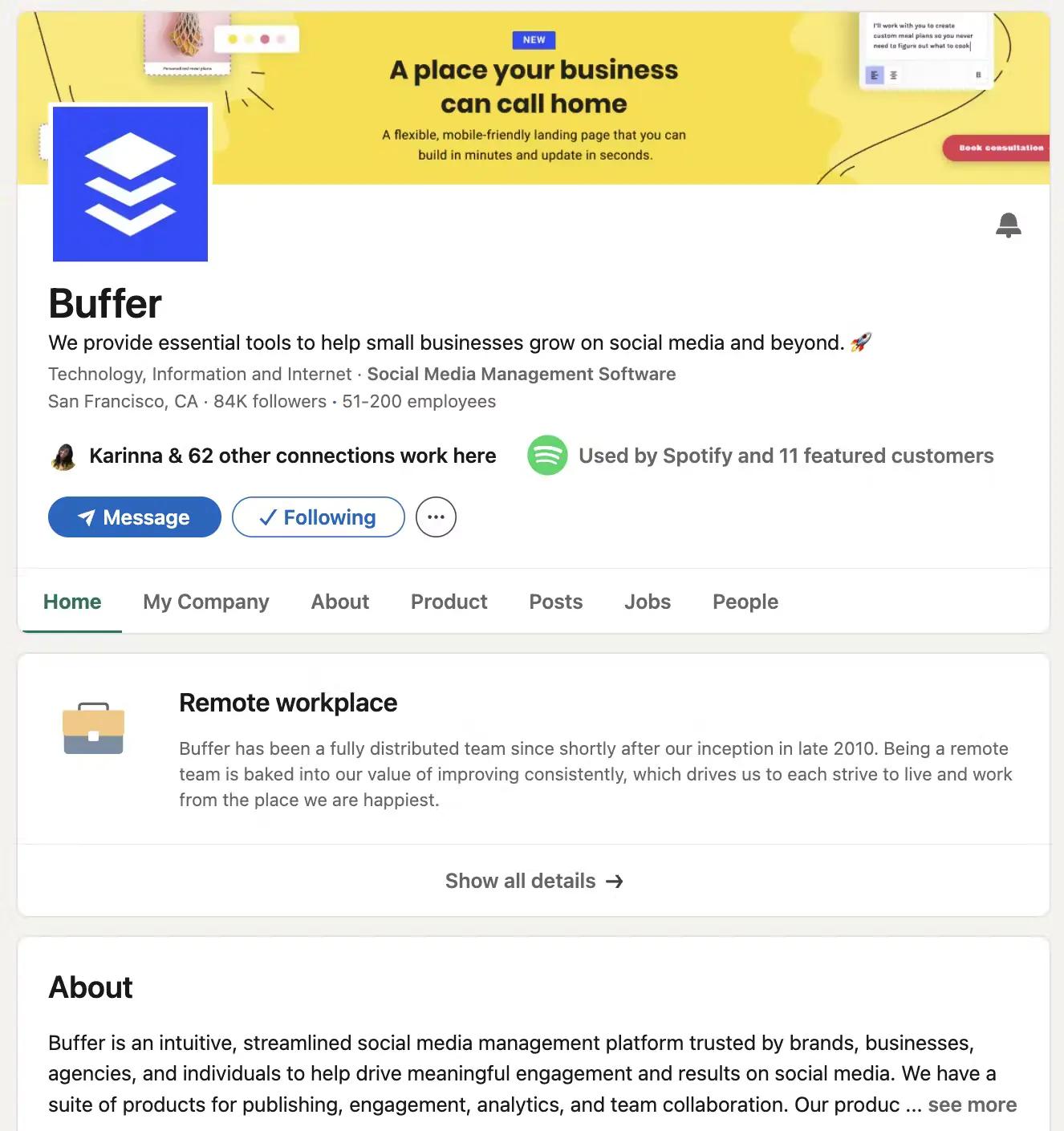
Buffer’s LinkedIn Company Page

How do I create a LinkedIn Company Page?

Creating a LinkedIn Company Page is an easy process. Here’s how you can set up a LinkedIn Company Page:

  1. Log into your personal LinkedIn account.
  2. Navigate to the “Work” icon in the top right corner of your LinkedIn homepage and select “Create a Company Page +”, and then choose the appropriate category for your business.
  3. Enter your company details, such as company name, website, industry, company size, and company type.
  4. Upload your company’s logo and cover image.
  5. Add a company description (250-2,000 characters) that describes what your company does, its mission, and its values.
  6. Once your page is ready to go, click the ‘Create page’ button. If your page meets LinkedIn’s requirements, it will be published immediately.

Is a LinkedIn Company Page free?

LinkedIn Company Pages are completely free for everyone. Learn how to get started with your own LinkedIn Company Page.

Why should I create a LinkedIn Company Page?

There are many reasons why you should create a LinkedIn Company Page, but one of the top ones is that it can help generate leads and create trust with your customers and communities.

In fact, LinkedIn is 277 percent more effective at generating leads than Facebook and Twitter. Plus, 82 percent of consumers are more likely to trust a company whose leadership team engages on LinkedIn — and 77 percent are more likely to buy from them.

Schedule your LinkedIn Page posts in advance with Buffer

LinkedIn has found that 20 posts per month can help you reach 60 percent of your unique audience. Schedule your posts in advance, reach your followers, and find new fans with Buffer’s free LinkedIn scheduler.

Get started with our free plan, or try out our advanced features with our 14-day free trial!

Need a hand growing followers?

Kickstart your social media growth with Buffer!

Try Buffer for free

Brought to you by Buffer

Your full stack of brand building tools

Resources

LinkedIn Marketing in 2026: The Complete Guide for Businesses and Creators

A complete look at the best types of updates on LinkedIn, the best timing and frequency, and how to create a powerful LinkedIn marketing strategy.

How to Create and Schedule LinkedIn Carousel Posts to Maximize Engagement + Reach

LinkedIn document carousels are among the best ways to capture your audience's attention. Follow this guide to create scroll-stopping carousels.

How to Use LinkedIn for Business in 2026: The Ultimate Guide to LinkedIn Company Pages

Your company’s LinkedIn page is the place where your target audience gets to know your brand digitally. In this guide, I’ll share everything you need to know about creating and using them effectively.

Join 75,000+ growing businesses that use Buffer to drive engagement on social

Sign up for free

Buffer

Features

  • Buffer API
  • Collaborate
  • Community
  • Create
  • InsightsNew
  • Publish

Tools

  • AI Assistant
  • Android App
  • Browser Extension
  • Integrations
  • iOS App
  • Social Media MCP
  • Start Page
  • Template Library

Channels

  • Bluesky
  • Facebook
  • Google Business Profile
  • Instagram
  • LinkedIn
  • Mastodon
  • Pinterest
  • Threads
  • TikTok
  • X
  • YouTube

Made for

  • Agencies
  • Creators
  • Developers
  • Higher Education
  • Nonprofits
  • Small Business
  • Startups

Resources

  • Blog
  • Our Community
  • Resource Library
  • Social Media Terms Glossary

Support

  • Changelog
  • Developer Docs
  • Help Center
  • Request a Feature
  • Status

Transparency

  • Open Hub
  • Product Roadmap
  • Transparent Metrics
  • Transparent Pricing
  • Transparent Salaries

Company

  • About
  • Careers
  • Legal
  • Partner Program
  • Press
  • Sitemap

Free tools and social media data

Benchmarks, best times to post, and tools you can use right now.

Free Tools

  • AI Hashtag Generator
  • AI Social Media Post Generator
  • Blog to Social Media Post Generator
  • Facebook Image Resizer
  • Free Link in Bio
  • Hook Generator
  • Instagram Bio Generator
  • Instagram Hashtag Generator
  • Instagram Image Resizer
  • Instagram Name Generator
  • LinkedIn Headline Generator
  • LinkedIn Image Resizer
  • Social Media Image Resizer
  • Social Media Scheduler
  • TikTok Hashtag Generator
  • TikTok Image Resizer
  • TikTok Username Generator
  • Username Generator
  • UTM Generator
  • YouTube Hashtag Generator
  • YouTube Name Generator
  • YouTube Thumbnail Resizer
  • All Free Tools

Social Media Insights

  • Facebook Benchmarks
  • Instagram Benchmarks
  • Best Time to Post on Instagram
  • Best Time to Post on LinkedIn
  • Best Time to Post on TikTok
  • Best Time to Post on Facebook
  • Best Time to Post on Threads
  • Best Time to Post on X
  • All Social Media Benchmarks

Compare Buffer

  • Agorapulse vs Buffer
  • eClincher vs Buffer
  • Hootsuite vs Buffer
  • Later vs Buffer
  • Loomly vs Buffer
  • Meta Business Suite vs Buffer
  • Metricool vs Buffer
  • Sked Social vs Buffer
  • Sprout Social vs Buffer
  • Tailwind vs Buffer
Buffer

Social media

  • Instagram
  • Facebook
  • Bluesky
  • X
  • LinkedIn
  • Threads

Policies

Copyright ©2026 Buffer

|

Privacy

|

Terms

|

Security