
Behind the scenes of a fully remote team week — what actually goes on a calendar.
Where your ideas turn into posts
Capture ideas, organize them by theme, and turn them into scheduled posts — all from one place.
Engagement myths
We looked at 1M posts to find out when engagement actually peaks.
Creator spotlight
Interview series with small teams publishing every weekday.
Launch teaser
Short clip showing the new board view in action.Buffer's content planner is a space for capturing, organizing, and scheduling social media content across your channels before it goes live. Save ideas with images and links attached, group them by theme with tags, then turn any idea into a post and drop it into the queue.
Save posts, links, images, and half-formed thoughts to your Create space before you pick a channel.
Sort ideas into groups and tag them by category, so next month's mix is already decided.
Pick an idea, choose your channels, and it becomes a draft or a scheduled post.
Everyone in your team sees the same ideas, whatever channels they can post to.
Never lose an idea
Store ideas with images, links, and notes attached, up to 5,000 on paid plans, so a blank composer never stalls your week.
Get started nowFind your best themes
Tag ideas and posts by category, then check how each category performs so next month leans on what worked.
Get started nowFill the week automatically
Set your posting times once and the queue slots each planned post into the next opening, so nothing sits waiting.
Get started nowPlan your month
Templates and guides for filling a content calendar without starting from scratch.
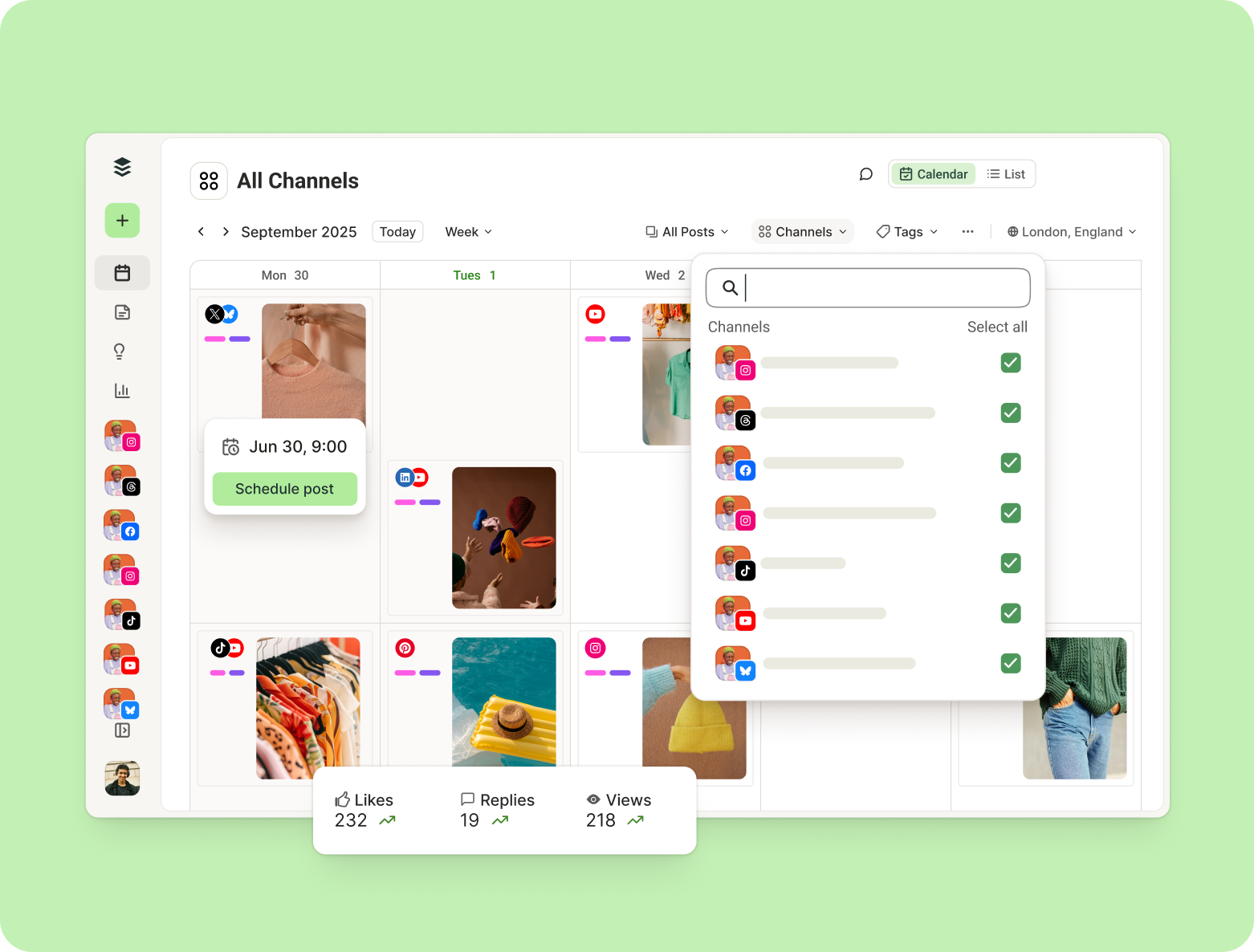
Free social media calendar templates for 2026 — Buffer, Google Sheets, Canva, Notion, and PDF — plus a step-by-step guide to building your own content calendar.

Build a social media marketing strategy that actually works in 2026. This 7-step guide covers goals, audience research, content pillars, and the platforms worth your time, with expert tips from top creators.
The 11 best social media management tools for 2026, tried and tested by a social media marketer + creator — from free creator picks to enterprise platforms, with pricing and who each is for.
Start free today, and connect a channel whenever you're ready to publish.
Start by collecting ideas in one place, then group them by theme before you decide when anything goes out. In Buffer, you save ideas to your Create space without picking a channel first, tag them by category, and turn any idea into a post when you're ready. Planning the mix before the schedule is what stops you filling a month with whatever comes to mind that morning.
Save every idea to your Create space, group and tag them by theme, then turn each one into a scheduled post. Ideas are channel agnostic, so you don't have to decide where something goes when you capture it. You can attach images, links, videos, or PDFs to an idea, and the AI Assistant can help develop a rough note into a finished post.
Buffer supports Facebook Pages, Instagram business and creator accounts, X, LinkedIn Pages, Pinterest business accounts, Google Business Profiles, Start Pages, YouTube Shorts, Threads, TikTok, Mastodon, and Bluesky. Facebook groups, Instagram personal accounts, and LinkedIn profiles publish by notification rather than posting directly. Facebook personal profiles, LinkedIn groups, and Pinterest personal accounts can't be connected, and some channels are available on newer plans only. See the full list and account requirements.
The Free plan holds up to 100 ideas, and paid plans hold up to 5,000 per organization. You can sort them into groups: three groups on Free, up to 500 on paid plans. Each idea takes up to 10 media attachments, with a 10MB limit per image and 1GB per video. Only owners and users with Admin access can create or rename groups, and the limits for each plan are on our pricing page.
Yes. Ideas are visible to everyone in your Buffer organization, whatever channels they have permission to post to. That means a writer without publishing access can still add ideas and see what's queued up. Tags and groups are shared too, so the way you organize content stays consistent across the team rather than living in one person's head. If you run multiple clients, Buffer for agencies covers how access works across workspaces.
Tags let you sort ideas and posts into your own categories, then see how each category performs once posts publish. You can apply up to 10 tags per post on paid plans, from a library of 250. Filter by tag to spot where a month is thin on one theme, and check tag performance in analytics to see which categories are worth repeating.
An idea has no channel and no time attached; a scheduled post has both. Ideas live in your Create space as raw material: a link, an image, a half-written thought. When you're ready, you open the idea, pick your channels, customize the content, and save it as a draft or schedule it. Until then it stays out of your queue.
Yes. Each channel needs at least one posting time before you can use Next Available or Add to Queue, because those options fill the next open slot in that channel's schedule. Every posting time you add creates a slot that repeats weekly. You can set a posting goal of 1x, 3x, or 5x a week, add times manually, or copy a schedule from one channel to another.
Partly. The Buffer mobile app lets you view and adjust your schedule of posts on the go, and you can create and manage tags there, but the Ideas board is desktop only, so capturing and organizing ideas happens on a computer.
Yes. Buffer's Free plan includes up to 100 ideas, three idea groups, three tags, and 10 scheduled posts in your queue at a time. Paid plans raise those to 5,000 ideas, 500 groups, 250 tags, and 5,000 queued posts. You don't need a credit card to start on the Free plan.
Sign up for a free Buffer account, connect a channel, and open the Create space to save your first idea. From there you can group and tag ideas as your list grows, then turn them into scheduled posts whenever you're ready. The Free plan is free forever and doesn't need a credit card.