If you're on the hunt for a social media management tool, Buffer and Hootsuite are probably two of the first names you'll come across — and for good reason. Both offer solid scheduling, analytics, and engagement features to help you stay consistent on social.
So which one is best? There's no single answer — the better question is: which social media management tool is right for you?
Buffer is the better fit for creators, solopreneurs, and small businesses that want an affordable, easy-to-use tool, while Hootsuite is built for large marketing teams that need social listening, ad management, and competitive benchmarking. Buffer starts free and costs $5 per channel/month on paid plans; Hootsuite has no free plan and starts at $99 per user/month.
While both Buffer and Hootsuite offer similar core features (social media management, scheduling, and analytics), they were built with pretty different users in mind.
Buffer serves small to medium businesses, solopreneurs, and creators. Hootsuite is built primarily for enterprise social media marketing teams.
You'll see these target users reflected in different ways across the tools, from how features work to the pricing structure.
Key takeaways
- Buffer is built for creators and small-to-mid-sized businesses; Hootsuite is built for large enterprise marketing teams.
- Buffer has a forever-free plan for up to 3 channels; Hootsuite offers no free plan, only a 14-day trial.
- Buffer charges per social channel ($0–$12/mo); Hootsuite charges per user, starting at $99/mo billed annually.
- Both include AI assistants, but Buffer's AI Assistant is unlimited on every plan while Hootsuite's OwlyWriter has token limits.
- Buffer supports channels like Substack, Mastodon, and Google Business Profiles that Hootsuite does not.
Let's take a closer look at the two tools.
Jump to a section:
Buffer vs. Hootsuite feature comparison (at a glance)
Here's how the two tools stack up side by side before we get into the detail.
| Feature | Buffer | Hootsuite |
|---|---|---|
| Best for | Creators & small-to-mid-sized businesses | Enterprise marketing teams |
| Free plan | Yes — up to 3 channels | No |
| Paid plans | From $5/channel/mo | From $99/user/mo |
| Channels | Instagram, Facebook, X/Twitter, LinkedIn, TikTok, Pinterest, Substack, Google Business, Mastodon, YouTube Shorts, Threads, Bluesky | Instagram, Facebook, X, LinkedIn, TikTok, Pinterest (image-only), YouTube, Threads, Bluesky, WhatsApp |
| Mobile app | iOS and Android | iOS and Android |
| Content planning | Create Space (all plans, including free) | OwlyGPT (paid only) |
| Engagement | Paid only | Paid only |
| Analytics | Free basics + paid advanced | Paid only |
| Team members | Paid only | Paid only |
| AI generation | AI Assistant (all plans, unlimited) | OwlyWriterAI (all plans, limited tokens) |
| Social listening | Not available | Paid only |
| Link-in-bio | Start Page (all plans, including free) | Paid only |
| Public API | All plans, including free | Enterprise plans |
Buffer vs. Hootsuite pricing compared (2026)
The clearest difference between the two tools is how they charge: Buffer bills per social channel, while Hootsuite bills per user. Cost matters (a lot), and this is particularly important when some of your essential features might only be available on specific plans or cost extra.
Buffer pricing
- Free: $0 — up to 3 channels, 10 queued posts per channel
- Essentials: $5/channel/mo (billed annually; $6/mo monthly)
- Team: $10/channel/mo (billed annually; $12/mo monthly) — unlimited team members
You can see the full breakdown on Buffer's pricing page.
Hootsuite pricing
- Standard: $99/user/mo (billed annually; $149/mo monthly)
- Advanced: $249/user/mo (billed annually; $399/mo monthly)
- Enterprise: Custom pricing (contact sales)
Free plan: Buffer vs. Hootsuite compared
Buffer has a forever-free plan; Hootsuite does not. Buffer's free plan covers up to 3 channels with 10 queued posts per channel, analytics, a universal comment inbox, and a Start Page link-in-bio.. Hootsuite offers no free plan, only a 14-day trial of its paid tiers, after which you pay from $99 per user/month.
What this means for you
Here's how the two pricing models play out in common real-world setups:
| Scenario | Buffer | Hootsuite |
|---|---|---|
| Solo creator, 3 channels (free) | $0 (Free plan) | No free plan |
| Solo creator, 3 channels (paid) | ~$18/mo ($6/channel) | $99/mo (Standard, up to 5 accounts) |
| Small team, 2 users + 2 channels | $24/mo (Team — unlimited users) | $298/mo ($149/user × 2) |
Buffer bills per channel with unlimited team members; Hootsuite bills per user. Figures use monthly billing rates as of August 2026.
If you're a creator or a small team, Buffer's per-channel model keeps costs low — you can add teammates without paying more. If you're a large team where lots of people need access, Hootsuite's per-user pricing is built for that scale, but it adds up fast for a small group.
Free trials
Buffer offers a 14-day trial for its Essentials and Team plans, on top of the forever-free plan for up to 3 channels. Hootsuite offers a 30-day trial of its Standard and Advanced plans, after which pricing starts at $99/user/mo (Standard) or $249/user/mo (Advanced).
Pricing accurate as of August 2026 — check each provider for the latest plans.
Ease of use
How simple a tool is plays a massive role in whether you can get started quickly or spend time wrestling with the interface. The faster you feel comfortable, the faster you can focus on your content strategy.
Buffer
Getting started on Buffer is quick. You can connect your social media accounts, set up a posting queue, and start publishing within minutes of signing up. The onboarding flow walks you through how to draft and publish content, so you're ready to go within minutes of signing up.
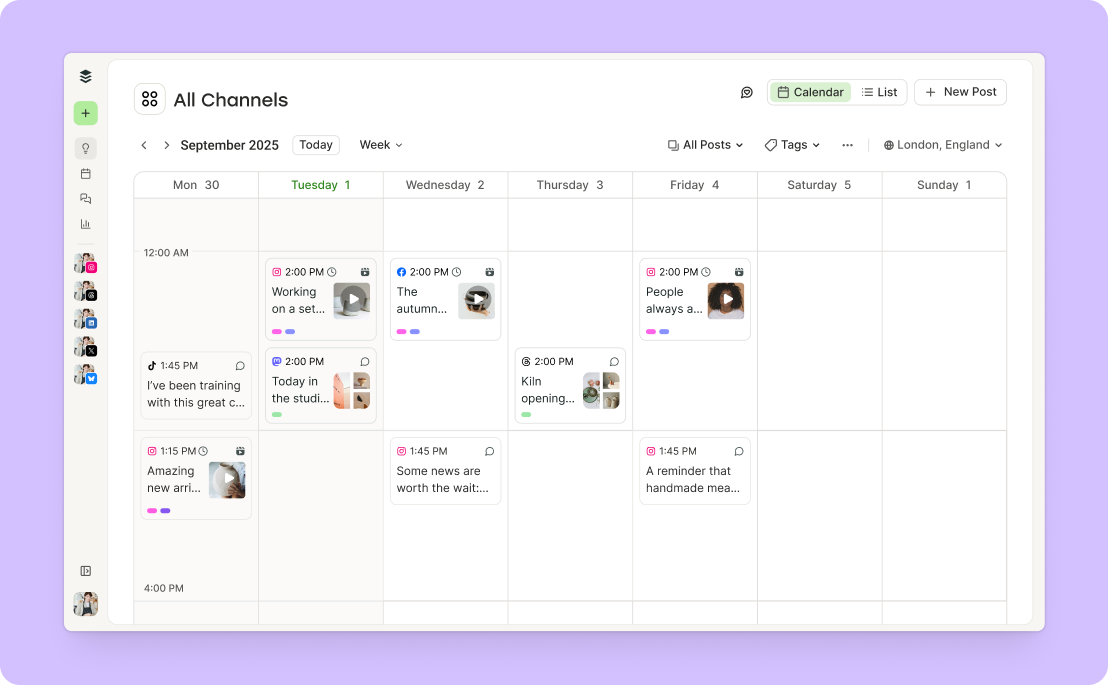
Publishing content is far from the only thing Buffer offers. There's the powerful new Insights tab for measuring the performance of all your channels in a single, easy-to-understand hub. There's even a 'Takeaways' feature that interprets the data for you (a huge win if you're not a natural number cruncher).
The Community tab, a single 'inbox' for all your comments, is similarly easy to use and get going with. A lot of work went into making the space calm and comfortable (as opposed to the chaos that comes with responding to messages on multiple platforms!).
Buffer also integrates with tools like Canva, Unsplash, Dropbox, and Google Drive, so you can pull in images and designs without leaving the platform. It keeps the creative process smooth and all in one place.
Hootsuite
Hootsuite includes some useful extras (like paid post management), and it's built to handle a wide range of social media needs under one roof. That also means it takes a bit longer to find your footing and get real value out of it.
You can expect to spend some time figuring out where to find different features and how to use them. Navigating between streams, inbox settings, and analytics dashboards takes some getting used to. I definitely had to make a few trips to their knowledge base to find my way around.
Social media planning and scheduling
Both tools cover the fundamentals of social media scheduling, but they differ in the details.
Available channels
Both tools connect to the major networks. Beyond those, Buffer supports channels like Substack, Mastodon, and Google Business Profiles; Hootsuite supports WhatsApp and paid ads on Facebook, LinkedIn, and X. Which matters more depends on the social media platforms you actually publish to.
Creating and scheduling posts
Posting across platforms
Both tools let you draft a post once and customize it per channel before it goes out.
Bulk scheduling posts
Buffer lets you bulk-upload up to 100 posts via CSV on paid plans, with no queue limit. Hootsuite supports bulk scheduling of up to 350 posts on its Advanced and Enterprise plans.
AI assistance
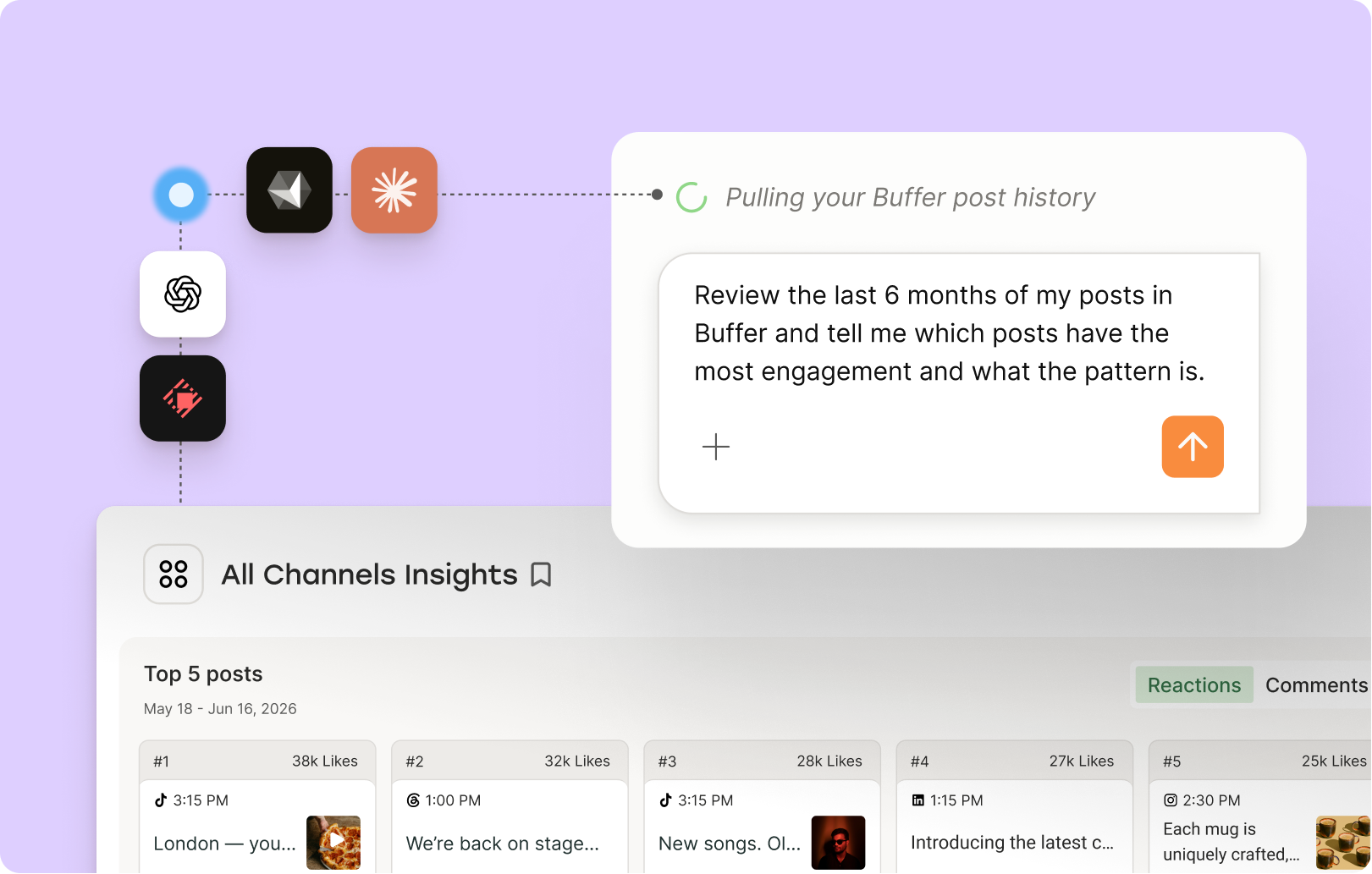
Buffer's AI Assistant is available on all plans, including free, with no usage limits, and Buffer's new API lets you build ChatGPT and Claude workflows on top of it.
Hootsuite's OwlyWriterAI is included on paid plans and offers a wider range of AI-powered tools, including campaign idea generation and content repurposing based on trending topics. That said, it comes with token limits, so you'll need to be more selective about when you use it.
Hootsuite's API is available for custom integrations and enterprise workflows, though access and implementation are generally geared toward larger organizations.
Cover images for short-form video
Hootsuite can't select covers or thumbnails for Instagram Reels (on the Creator plan) or TikTok. Buffer lets you set them.
Crossposting to Pinterest
Hootsuite can't crosspost to Pinterest. Buffer can.
Calendar views
Buffer offers channel-specific week and month views. Hootsuite's week view shows detail, but its month view shows post status rather than the platform, which makes it harder to build a clear social media content calendar at a glance.
Hashtag support
Buffer has a free Instagram hashtag generator plus an in-app hashtag manager. Hootsuite offers hashtag recommendations inside its composer.
Capturing ideas and content planning
Planning ahead looks different depending on the tool you use. Buffer provides a dedicated space to gather and organize social media content ideas, while Hootsuite leans on AI to help spark and shape them.
Buffer
On the planning front, Buffer offers Create Space, an ideas hub where you can store any post content ideas, text, and media to access when you're ready to publish them.
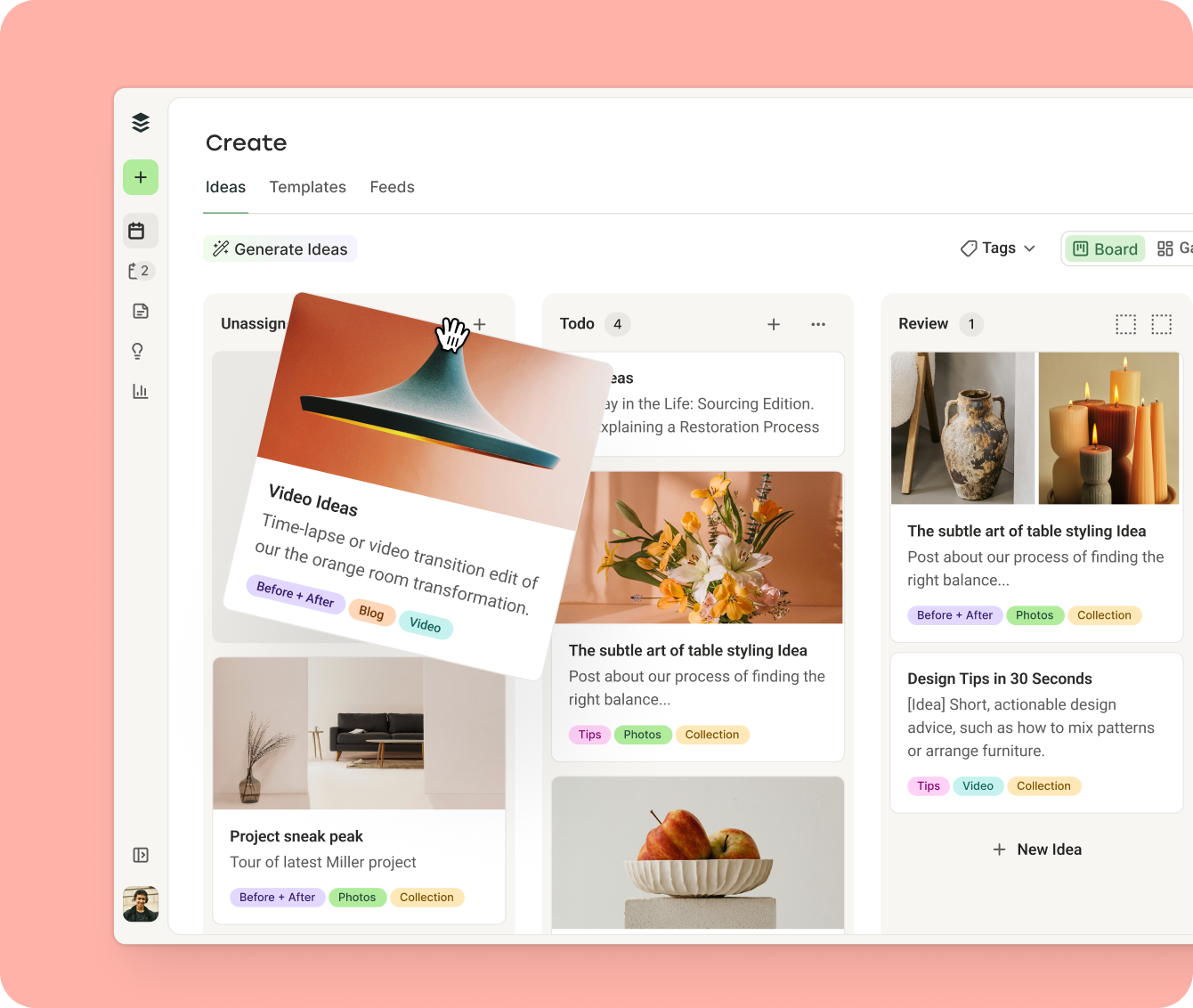
Tags and a Kanban board view help you keep this library structured, and built-in templates plus the AI Assistant help you quickly turn a saved idea into a polished draft.
Hootsuite
Hootsuite takes a different approach. Its planning features instead center on AI, with OwlyGPT acting as a chatbot that gives personalized suggestions based on your connected brands and accounts. You can use it to generate campaign ideas, write posts or video scripts, or even build a drafting schedule for one channel or for your social presence as a whole.
There’s no dedicated space for storing unfinished post ideas as you work on them, and you could save your post as a draft as a workaround.
Social media engagement
Both Hootsuite and Buffer offer social media engagement features that will help you stay on top of messages and comments across multiple social media platforms.
Buffer’s engagement features
Buffer's Community feature is designed to help you build genuine connections with your audience. You can jump into conversations right from the Community tab in Buffer, and when you're stuck on what to say, the AI Assistant offers suggestions to get the conversation flowing.
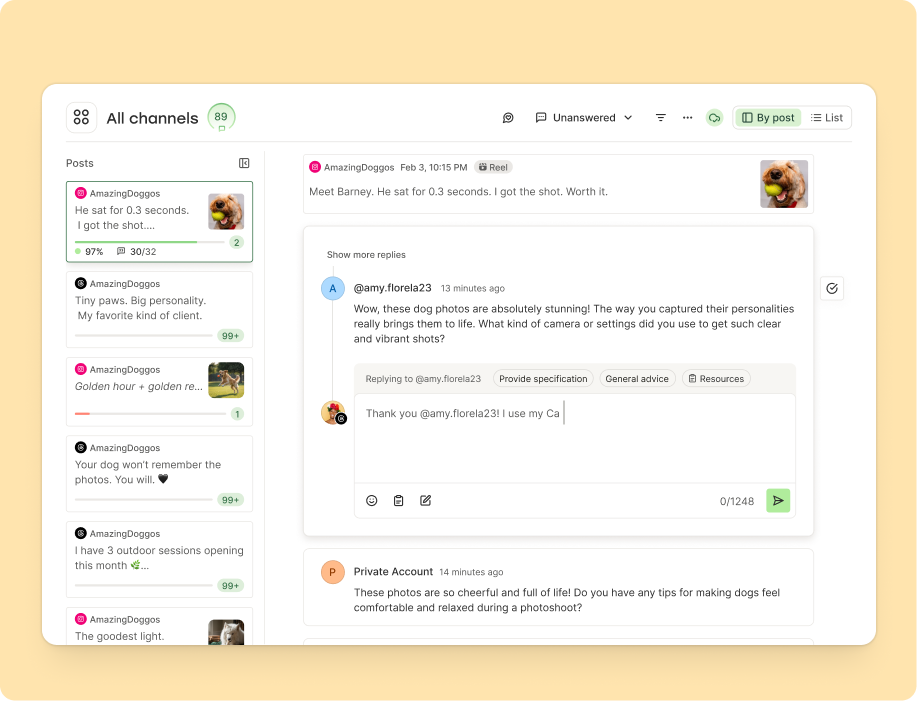
If you find yourself answering the same questions over and over, you can save those responses and pull them up whenever you need them instead of typing the same thing repeatedly.
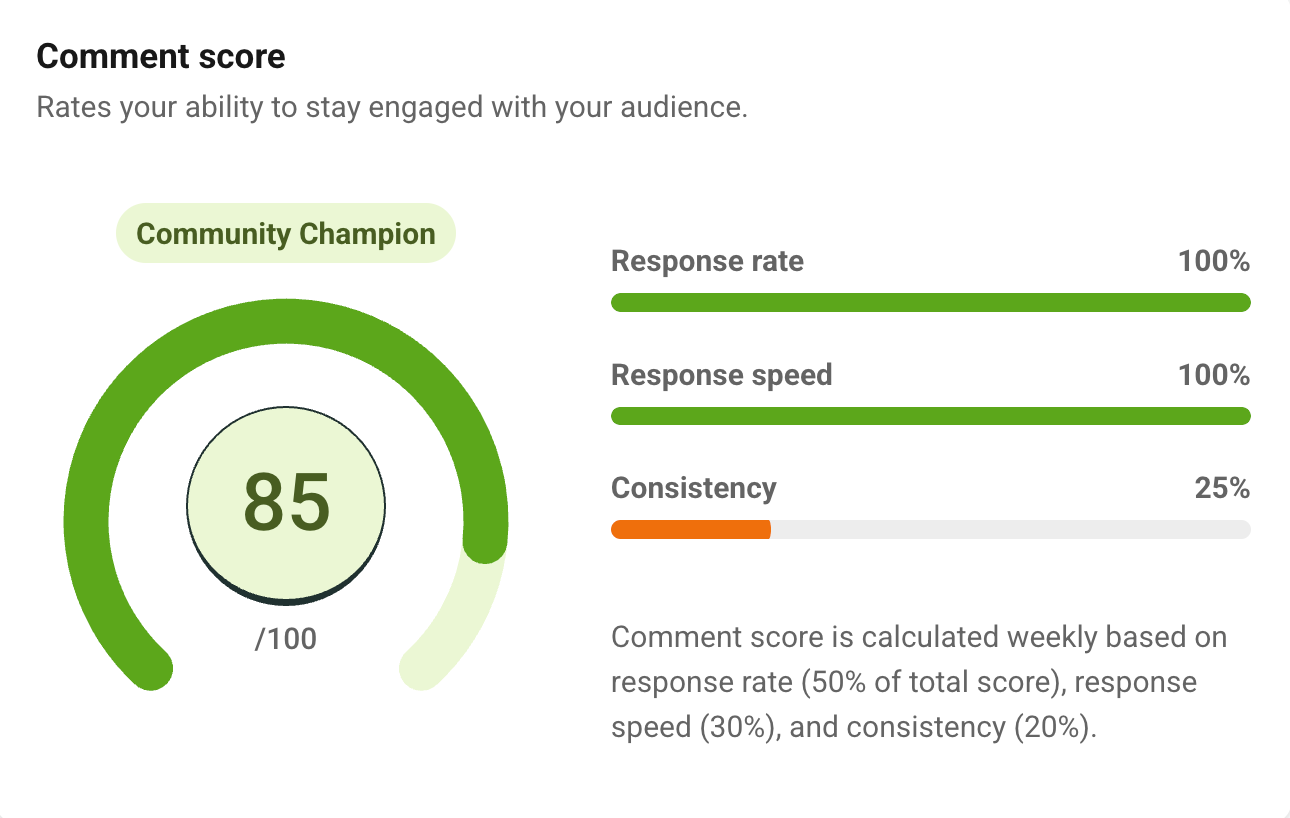
You'll also see a comment score for each channel based on how quickly and consistently you respond, so you can understand where engagement feels strong and where it might need attention.
The Community tool also gives you a window into how your audience is responding, whether that's comments on individual posts or replies and mentions across an entire social media account.
Just type in a question about what you'd like to understand, and the AI will offer guidance on how your audience is reacting. It can also suggest new post ideas and offer ways to keep audience engagement going.
Hootsuite’s engagement features
Hootsuite's Inbox 2.0 is a conversation management feature that works like a customer support tool. It pulls in both comments and direct messages from your connected platforms into one view, so your team can respond without switching between apps. You can assign messages to team members, route them to the right place, and even set up automatic responses.
It also works like a mini customer relationship management (CRM) tool. You can update a conversation with the user’s email addresses, phone numbers, and URLs so your team has all the important information at their fingertips when replying to messages.
Worth noting: some of the more advanced inbox features — like automated routing rules and detailed conversation tagging — are only available on Hootsuite's Enterprise plan, which requires custom pricing.
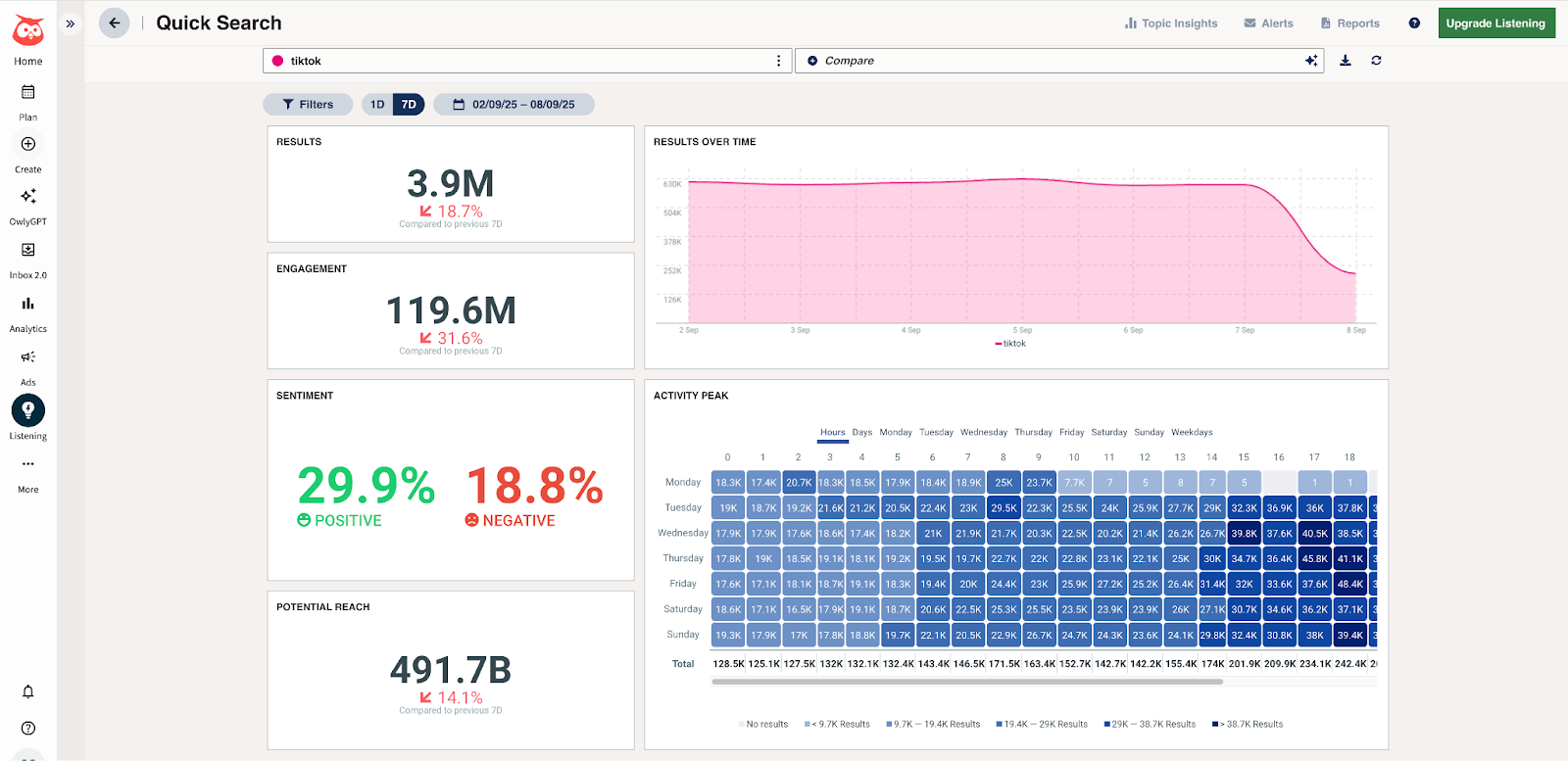
Hootsuite also offers a social listening tool. If you're interested in tracking mentions of and sentiment towards your company or brand, Hootsuite has some powerful options. You'll have access to ‘basic' social listening features like those within the example below, but full access to the tool is only available on their price-on-request Enterprise plan.
Social media analytics
Social media analytics tools can make a real difference when you're trying to grow. They help you understand what's actually working, so you're not just posting into the void.
Again, both Buffer and Hootsuite have you covered, though the different user focuses are definitely evident in the complexity of the social media analytics options.
Buffer’s analytics features
Buffer's analytics live in Insights, a brand-new system launched in 2026. The first thing you'll notice is how easy it is to understand (a very underrated social media analytics feature, if you ask me).
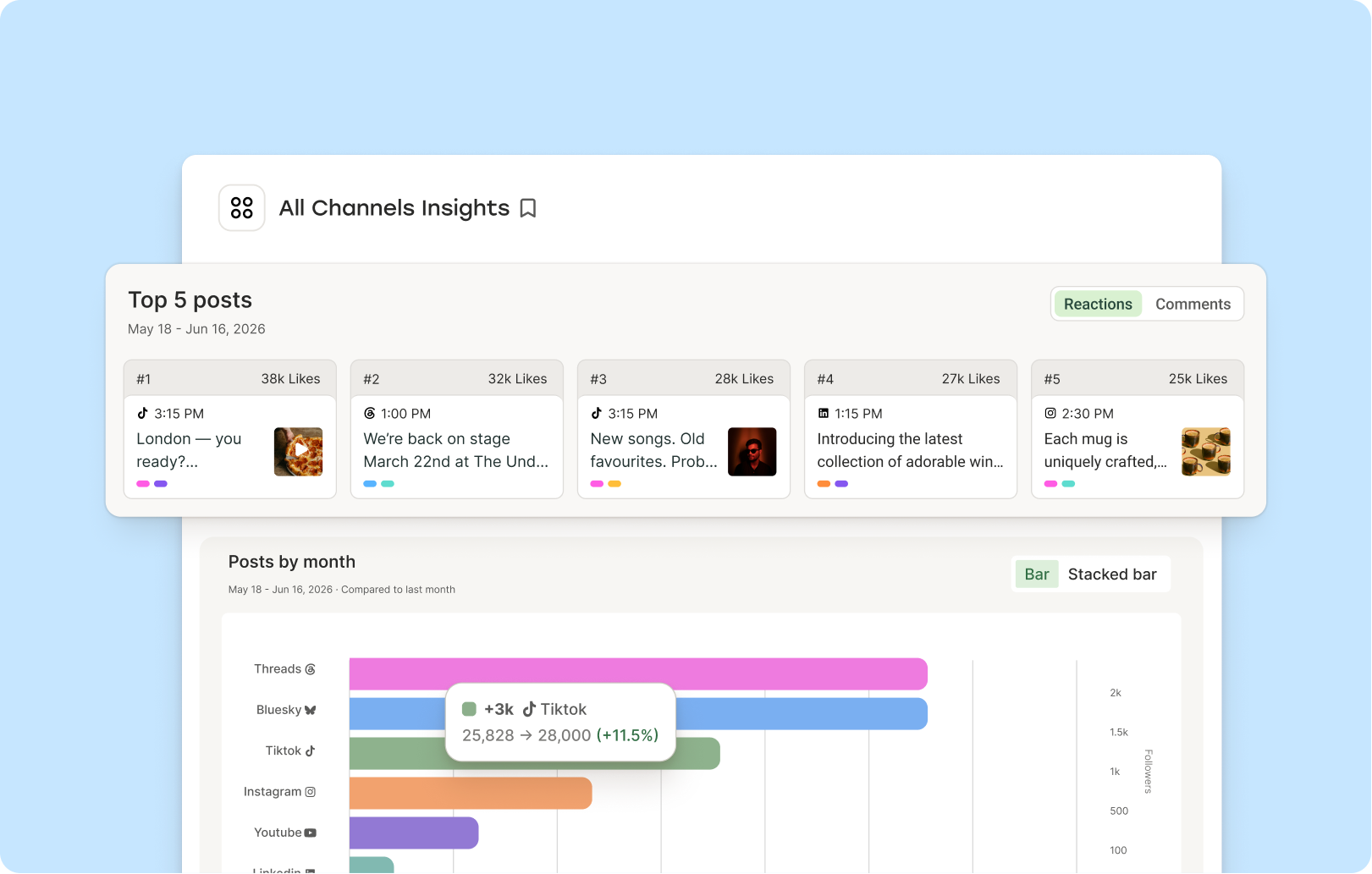
You get post-level analytics for every channel you've connected, and you can see how everything's performing in a single dashboard: Instagram, TikTok, LinkedIn, Facebook, YouTube, Threads, X, Pinterest, Bluesky, and Mastodon (that's 10+ networks, in one view).
Insights is also available on Buffer's free plans, so you get meaningful data from the get-go. Paid plans unlock historical data and custom date ranges, plus social media metrics broken down channel by channel, from reach to your best-performing content types.
Every metric comes with a clear definition and how often it updates, so you're never guessing how a number was worked out.
My absolute favorite thing about Insights, though, is that it doesn't just hand you charts and leave you to work out what they mean. It helps you figure out your next move.
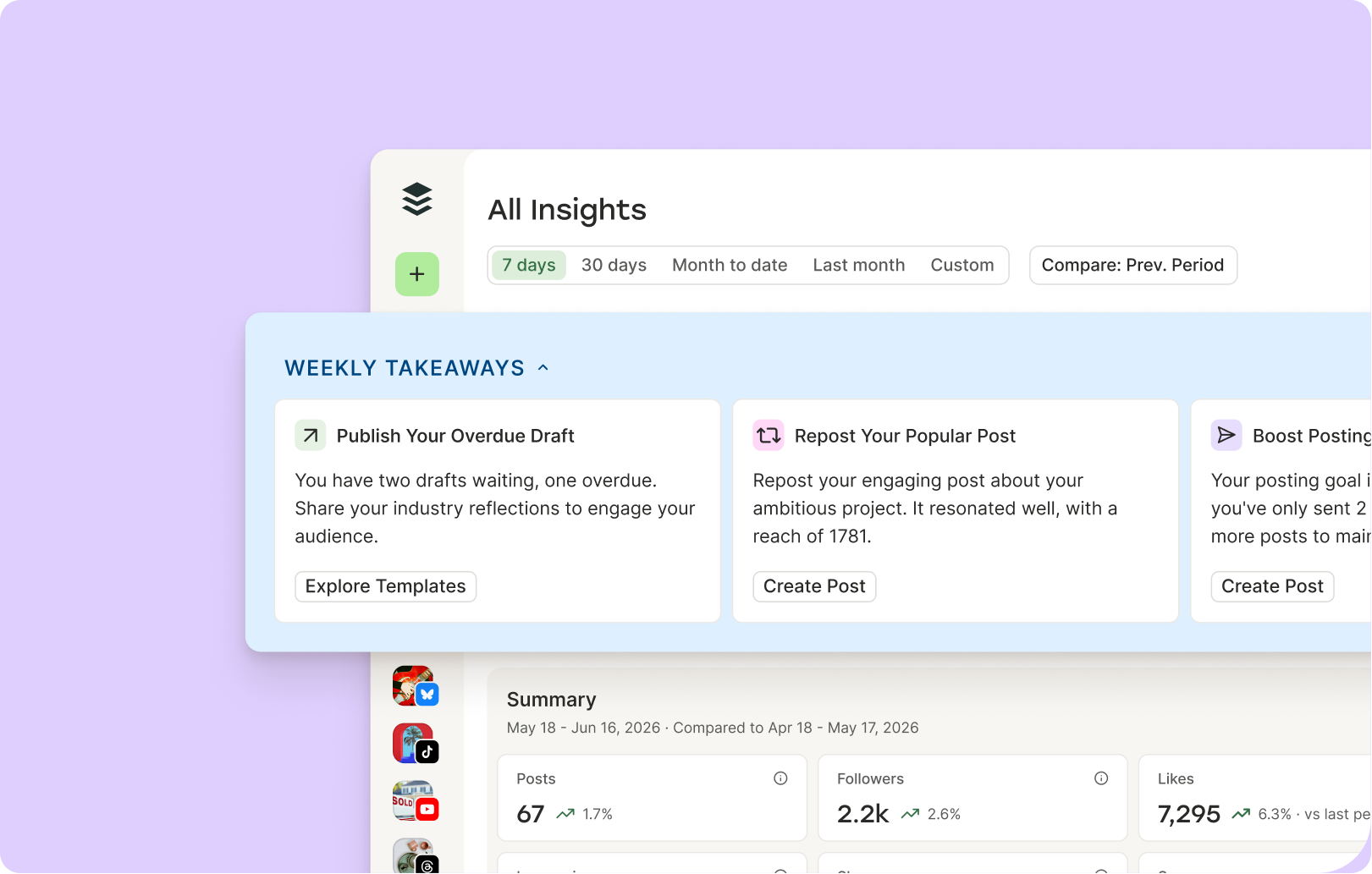
A feature called Takeaways reads your performance for you and flags the patterns worth paying attention to. It makes recommendations to help you boost your growth and engagement, based on how your current content is performing.
So instead of squinting at a graph (which, historically, I have spent way more time doing than I'd care to admit), you have a plan.
And when you need to share your results with a client, a manager, or just your own records, folks on a paid plan can export polished PDF or CSV reports, or copy your data as markdown to drop straight into an AI tool (another of my personal favorites).
If you work with an AI agent/LLM like Claude or ChatGPT to analyze and create your social media content like I do, that last one gives Buffer a bit of an edge on Hootsuite.
Hootsuite’s analytics features
Where Buffer shines for creators, agencies, and growing businesses, Hootsuite can provide data for enterprise teams.
Hootsuite includes the same core analytics you’ll find in Buffer, such as tracking the performance of your social media posts and audience.
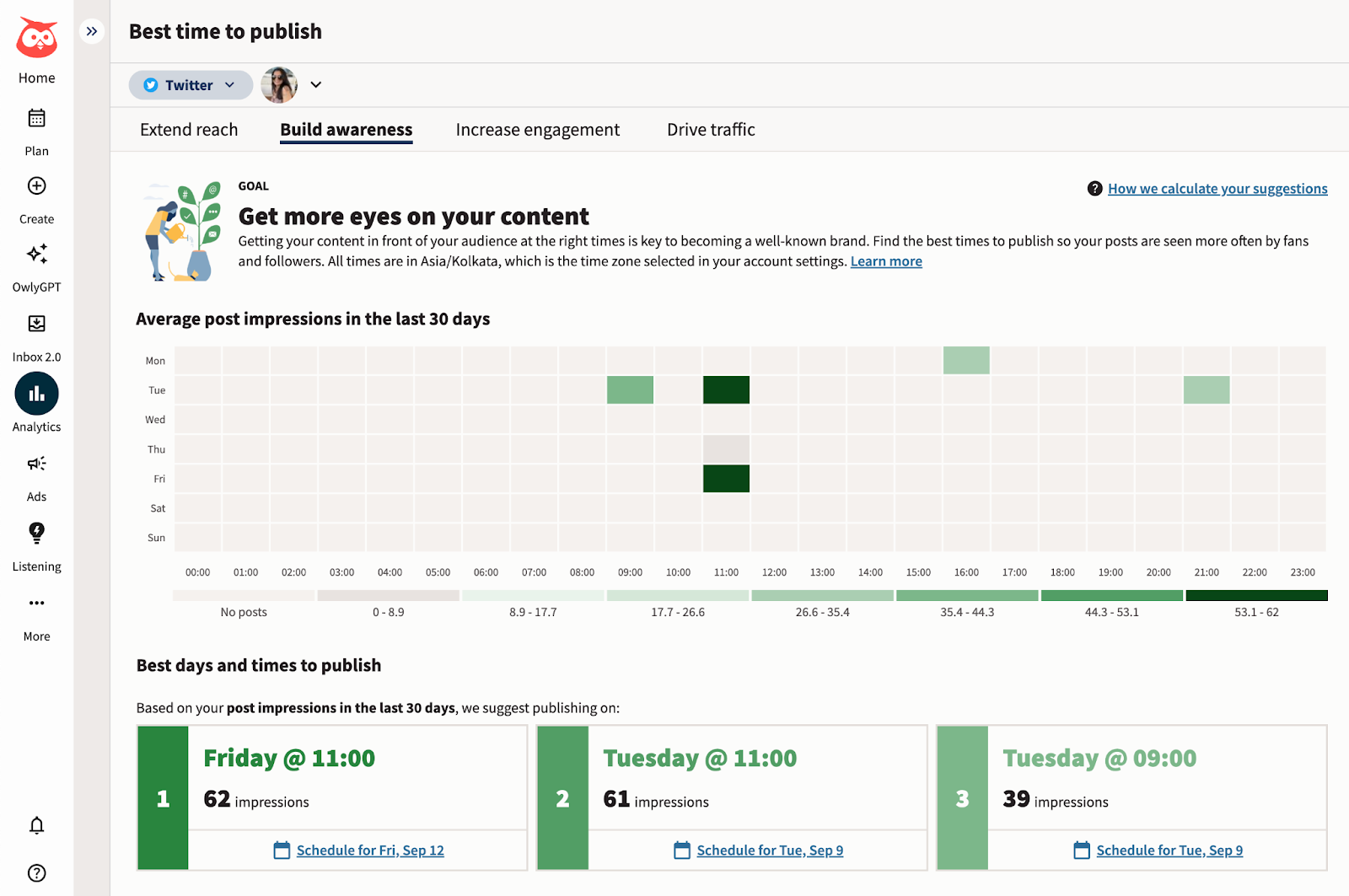
Hootsuite brings some handy extras if you want to dig deeper into your analytics. You can track how your ads are performing across Facebook, Instagram, LinkedIn, and X/Twitter — something Buffer doesn't currently offer.
There's also industry benchmarking, which lets you compare your performance against averages in your sector, and competitive benchmarking: up to five competitors on the Standard plan and as many as 20 on the Advanced plan. This means you can see how your content stacks up side by side against others in your space.
These features are particularly useful for larger teams that need to report on market positioning or justify social media spend.
Team collaboration features
Teamwork in social media management brings plenty of moving parts, like managing who has account access, what permission settings to use, and creating approval workflows that make working together feel easy.
Both Buffer and Hootsuite have solid tools for managing teams, though they go about it in pretty different ways.
Working with teams in Buffer
Team management in Buffer is straightforward. You can add unlimited users to the platform on the Team plans.
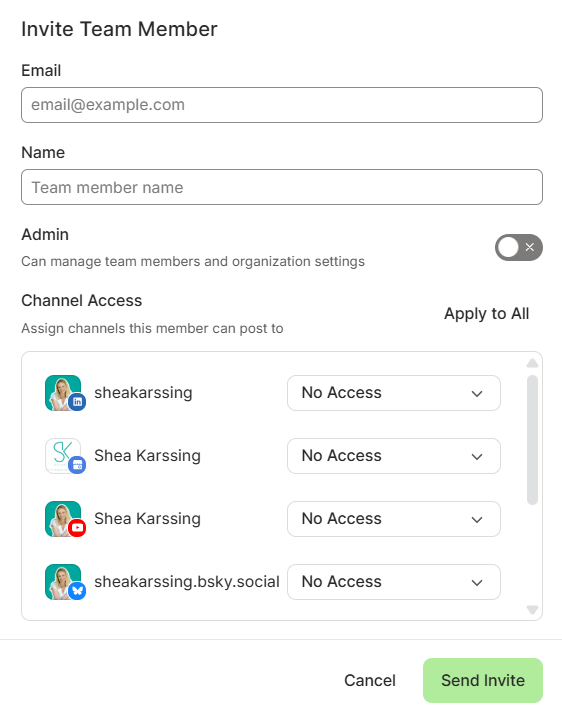
For each channel, you can choose from three levels of access to give each person on the team:
- Full posting access: Their posts and ideas will be published when scheduled.
- Approval required: Everything they create will need to be approved by someone with full posting access before it is published.
- No access: They won't see the social media channel in their Buffer workspace at all.
As you'll see from the screenshot below, the collaboration system is flexible enough to allow you to give users admin access, whether they have full posting access or not.
Working with teams in Hootsuite
Hootsuite was built with large teams in mind, and it shows. You can control exactly who sees and manages what, across multiple teams and accounts.
With different ‘organizations,' teams, and channels, you can create an intricate system for a big social media marketing team (or several). Organizations are the highest tier in the system.
Within an organization, you can manage collaboration through a layered system:
- Multiple teams: Group members based on department or project.
- Task assignment: Delegate specific posts or messages to individuals or teams.
- Message routing: Automatically send incoming queries to the relevant department.
You can also set default permission levels for new members (whether their posts need approval or not, or if their access is limited to the inbox) and get as detailed as your team needs.
In addition to teams and access levels, Hootsuite also offers the Content Library which is focused explicitly on saving templates and media files for everyone on a team to use. You can create as many content libraries as you need, and assign them to teams depending on what media assets they need access to.
That said, Hootsuite's pricing is based on the number of users, so large teams will have to pay extra to have anything more than five users per account, even on Hootsuite's premium Enterprise plan.
Which is better for you: Buffer or Hootsuite?
Choose Buffer if you're a creator, solopreneur, or small team that wants an affordable, easy-to-use tool — a clean interface, per-channel pricing, unlimited team members on the Team plan, and a free plan to start with.
Choose Hootsuite if you're a larger team that needs social listening, competitive benchmarking, ad management, and granular permissions.
How Buffer and Hootsuite compare to other tools
Buffer and Hootsuite aren't the only options, and plenty of people weigh them against a few others:
| Tool | Best for | Pricing model | Standout strength |
|---|---|---|---|
| Buffer | Creators and small-to-mid-sized businesses | Per channel, with a free plan | Affordable and quick to set up, with unlimited team members on paid plans |
| Hootsuite | Large enterprise marketing teams | Per user, no free plan | Social listening, ad management, and competitive benchmarking |
| Sprout Social | Enterprise teams that want deep analytics | Per user, premium pricing | Advanced analytics paired with a built-in social CRM |
| Later | Creators focused on Instagram and short-form video | Tiered plans | Visual content calendar and link-in-bio |
| Loomly | Small teams that need post approvals | Flat tiered plans | Structured post-approval workflows |
| Metricool | Creators who want scheduling plus analytics | Tiered, with a free plan | Scheduling and analytics together in one budget-friendly tool |
| Sendible | Agencies managing many client accounts | Per seat, agency tiers | Multi-client management with white-label reporting |
| Agorapulse | Teams that prioritise a shared inbox | Per user, tiered plans | Unified social inbox and reporting |
If you want to weigh the full field, see our round-up of Hootsuite alternatives and our guide to the best social media management tools.
Still weighing it up? We'd love to help you! You can reach the team at hello@buffer.com.
FAQ about Buffer vs. Hootsuite
What is the main difference between Buffer and Hootsuite?
The main difference is who they're built for and how they charge. Buffer is designed for creators and small to mid-sized businesses, charges per social channel ($0–$12/month), and has a forever free plan. Hootsuite is designed for large, enterprise marketing teams, charges per user (from $99/month), has no free plan, and adds enterprise features like social listening, ad management, and competitive benchmarking.
Is Buffer or Hootsuite free?
Buffer is free; Hootsuite is not. Buffer offers a forever-free plan for up to 3 channels, with scheduling, the AI Assistant, and basic analytics, and no expiry date — paid plans start at $6/channel/month. Hootsuite has no free plan, only a 30-day trial of its paid tiers, which start at $99/user/month.
Is Buffer cheaper than Hootsuite?
Yes. Buffer starts at $5/channel/month (billed annually) and has a forever-free plan, while Hootsuite starts at $99/user/month. For most creators and small teams, Buffer is significantly cheaper.
Why do people use Buffer instead of Hootsuite?
People choose Buffer because it's easy to use, affordable, and quick to set up. It covers the core features most creators and small- to mid-sized businesses need — scheduling, engagement, and analytics — without the complexity and cost of enterprise software.
Is Buffer a good social media management tool?
Buffer is a strong choice for creators and small- to mid-sized businesses. If your needs are enterprise-scale — social listening, multi-team workflows, or paid ad management — weigh those against what Buffer offers before deciding.
Do Buffer and Hootsuite integrate with other tools?
Both do. Hootsuite connects with 100+ apps, including Canva, Salesforce, and Zendesk. Buffer integrates with 24+ tools, including Canva, ChatGPT, Claude, Dropbox, and Google Drive. The easy-to-use API and MCP make it really simple to connect Buffer to tools beyond that list.
Is there anything better than Hootsuite?
It depends on what you need. For creators and small businesses, Buffer is often a better fit — it's more affordable and easier to use. Larger teams sometimes prefer Sprout Social or Agorapulse. Our round-up of Hootsuite alternatives walks through the main options.
What app is better than Buffer?
For most creators and small and mid-sized businesses, Buffer covers scheduling, engagement, and analytics affordably, so most folks will be covered. If you need enterprise features like social listening or competitive benchmarking, Hootsuite or Sprout Social may suit you better — see our list of the best social media management tools to compare.
Which is better for small businesses and agencies?
For small businesses and agencies, Buffer is usually the better fit — it's affordable, quick to set up, and covers the essentials. For larger agencies and teams that manage many accounts and need social listening, competitive benchmarking, and ad management, Hootsuite (or an agency-focused tool like Sendible) is worth considering.
More resources on social media tools
- The 11 Best Social Media Management Tools — Tried + Tested
- 9 Tools for Social Media Automation (+ Automation Pro Tips)
- The Best Social Media APIs for Developers + Vibe Coders
- The Top 10 AI Writing Tools I Recommend as a Professional Writer
- The 21 Best Social Media Marketing Tools to Try
- 24 Free Instagram Tools to Help Grow Your Account
- The 9 Best AI Image Generators of 2026 (+ Examples)
Try Buffer for free
200,000+ creators, small businesses, and marketers use Buffer to grow their audiences every month.