Top navigation

Buffer

Buffer's features

  • CreateBuild your own library of content ideas
  • PublishPlan and schedule your content across social media platforms
  • InsightsNewUnderstand your performance and what to post next
  • CommunityEasily engage with your community
  • CollaborateWork together seamlessly, from planning to publishing
  • Start PageBuild a custom link-in-bio page in minutes
  • AI AssistantGet help creating, refining, and repurposing content
  • APIConnect Buffer to your agents, automation tools, or build something entirely new

Channels

  • InstagramFacebookTikTok
  • LinkedInX (Twitter)YouTube
  • ThreadsPinterestGoogle Business Profile
  • BlueskyMastodon

Tools

  • CanvaGoogle Drive
  • ZapierUnsplash
  • DropboxClaude
See all app integrations

Made for

  • CreatorsGrow your community with confidence, not complexity
  • Small BusinessA simpler way to manage your small business’ social media
  • AgenciesRun every client’s social with clarity
  • NonprofitsMade for small teams doing big things
  • Higher EducationSocial media management built for schools and universities
  • DevelopersAdd a social layer for whatever you're building

Buffer's resources

  • BlogReal-life stories and resources on growing an engaged audience
  • TemplatesPlug-and-play content templates to jump-start your planning
  • Free ToolsEasy-to-use tools to grow your presence across social media
  • Our CommunityLearn, connect, and grow with creators around the world
  • SupportHelp articles and tutorials to get the most out of Buffer
  • Developer DocsConnect Buffer to your agents, automation tools, or build something entirely new
  • Case StudiesHow power users get more from Buffer.
Pricing
Log inGet started for free
Log outOpen Buffer

Breadcrumbs

  • Social Media Terms
  • Google Business Profile

Google Business Profile

Google Business Profile is a free tool used to help manage and optimize the online presence for your business.

What is a Google Business Profile (GBP)?

Google Business Profile (GBP for short) is a free tool that allows you to create a listing for your business on Google Search and Google Maps and better manage and optimize your online presence. It typically includes essential company information, such as business location, contact details, website, opening hours, and more.

Below are some examples of Google Business Profiles of popular businesses based in London.
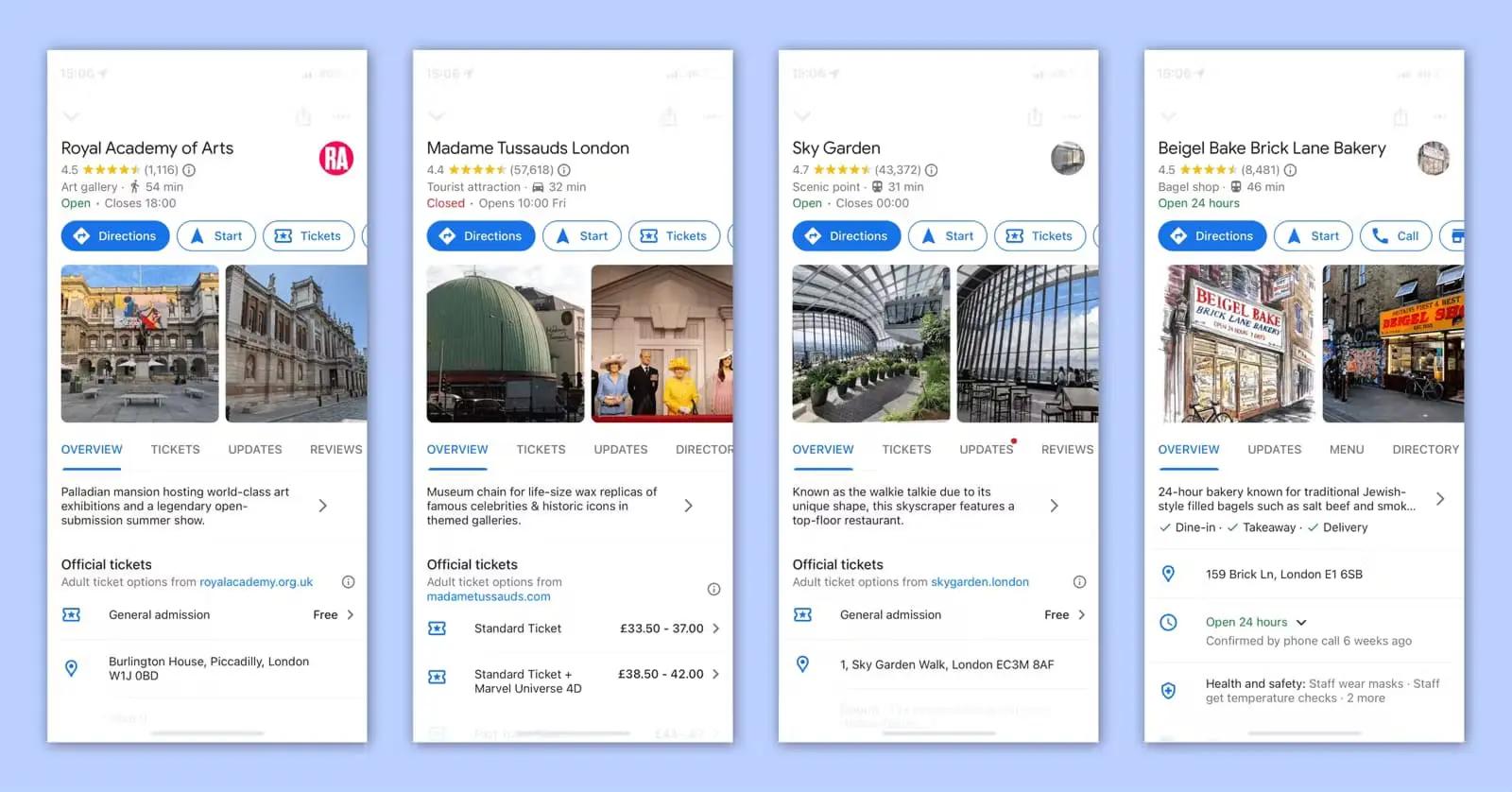
Examples of Google Business Profiles in London

What does GMB stand for?

GMB stands for Google My Business, which is what Google Business Profile used to be called, and it’s an online tool used by business owners to create an online profile for their business and manage their online presence.

Why do I need a Google Business Profile?

Creating a Google Business Profile is an essential part of how you can boost your business’ online presence. Here are a few reasons why you should create a Google Business Profile for your business:

  1. It’s the easiest way to maintain and manage your online presence
  2. It’s the easiest way to keep people updated, either by keeping your information always up to date or posting updates to your profile (pro tip: you can use Buffer to manage, schedule, and publish posts to your Google Business Profile)
  3. It can increase your visibility in local search results and help people find your business via Google Maps and Google Search results
  4. It adds credibility to your business and creates trust with potential customers since you can add reviews, location, and a website to your profile
  5. It provides a way for people to interact with your business through reviews, questions, and answers.
  6. It provides valuable insights into how people find and interact with your business online.

Is Google Business Profile free?

Yes, creating and managing a Google Business Profile is completely free. It’s one of the main benefits of this tool, making it accessible for all types of users.

What should I put on my Google Business Profile?

You should put your business’ most essential information on your Google Business Profile, such as:

  • Your business’ name
  • A brief description of your business
  • Email address
  • Physical address
  • Phone number
  • Website
  • Opening hours
  • Photos and videos

How to create a Google Business Profile?

Google makes creating a Google Business Profile really easy. Here’s how:

  1. Sign in to your Google Account. If you don’t have one, sign up for free.
  2. Go to create a profile.
  3. Enter your business name, service area address, phone number, and website URL.
  4. Verify that you are the rightful owner of the business.

Head to Google Business Profile’s help center for more step-by-step details on how to set up an account.

Grow Traffic with Google Business Profile Post Scheduling

Consistent posting on Google Business Profiles can grow traffic and boost conversions—putting you ahead of 79% of most brands. Use Buffer’s free scheduler to manage, schedule, and publish all your posts to your Google Business Profile (and all the other social media channels, too!)

Get started with our free plan or try out our advanced features with our 14-day free trial!

Need a hand growing followers?

Kickstart your social media growth with Buffer!

Try Buffer for free

Brought to you by Buffer

Your full stack of brand building tools

Resources

The Ultimate Guide to Google Business Profile

Wondering how to get started on Google Business Profile? Then here's your ultimate guide. We've spent over 100+ hours learning what works, and what doesn't, so you don't have to.

How This Car Rental Business Used Its Google Business Profile to Grow Online

Learn how this small car rental business optimizes its Google Business Profile so you can do the same for your operation.

How to Craft a Click-Worthy Google Business Profile Post, According to Joy Hawkins, a GBP Expert

Just as search engine optimization can fuel your growth in the Google rankings, Google Business Profiles are another way to direct eyes from organic searches to your business. For this article, we interviewed Joy Hawkins, a GBP expert, on how to make your posts perform better.

Join 75,000+ growing businesses that use Buffer to drive engagement on social

Sign up for free

Buffer

Features

  • Buffer API
  • Collaborate
  • Community
  • Create
  • InsightsNew
  • Publish

Tools

  • AI Assistant
  • Android App
  • Browser Extension
  • Integrations
  • iOS App
  • Social Media MCP
  • Start Page
  • Template Library

Channels

  • Bluesky
  • Facebook
  • Google Business Profile
  • Instagram
  • LinkedIn
  • Mastodon
  • Pinterest
  • Threads
  • TikTok
  • X
  • YouTube

Made for

  • Agencies
  • Creators
  • Developers
  • Higher Education
  • Nonprofits
  • Small Business
  • Startups

Resources

  • Blog
  • Our Community
  • Resource Library
  • Social Media Terms Glossary

Support

  • Changelog
  • Developer Docs
  • Help Center
  • Request a Feature
  • Status

Transparency

  • Open Hub
  • Product Roadmap
  • Transparent Metrics
  • Transparent Pricing
  • Transparent Salaries

Company

  • About
  • Careers
  • Legal
  • Partner Program
  • Press
  • Sitemap

Free tools and social media data

Benchmarks, best times to post, and tools you can use right now.

Free Tools

  • AI Hashtag Generator
  • AI Social Media Post Generator
  • Blog to Social Media Post Generator
  • Facebook Image Resizer
  • Free Link in Bio
  • Hook Generator
  • Instagram Bio Generator
  • Instagram Hashtag Generator
  • Instagram Image Resizer
  • Instagram Name Generator
  • LinkedIn Headline Generator
  • LinkedIn Image Resizer
  • Social Media Image Resizer
  • Social Media Scheduler
  • TikTok Hashtag Generator
  • TikTok Image Resizer
  • TikTok Username Generator
  • Substack to Social Media Post Repurposer
  • Username Generator
  • UTM Generator
  • YouTube Hashtag Generator
  • YouTube Name Generator
  • YouTube Thumbnail Resizer
  • All Free Tools

Social Media Insights

  • Facebook Benchmarks
  • Instagram Benchmarks
  • Best Time to Post on Instagram
  • Best Time to Post on LinkedIn
  • Best Time to Post on TikTok
  • Best Time to Post on Facebook
  • Best Time to Post on Threads
  • Best Time to Post on X
  • All Social Media Benchmarks

Compare Buffer

  • Agorapulse vs Buffer
  • eClincher vs Buffer
  • Hootsuite vs Buffer
  • Later vs Buffer
  • Loomly vs Buffer
  • Meta Business Suite vs Buffer
  • Metricool vs Buffer
  • Sked Social vs Buffer
  • Sprout Social vs Buffer
  • Tailwind vs Buffer
Buffer

Social media

  • Instagram
  • Facebook
  • Bluesky
  • X
  • LinkedIn
  • Threads

Policies

Copyright ©2026 Buffer

|

Privacy

|

Terms

|

Security